



Blog Listing

Technology in Practice
Practical guidance on ERP, CRM, HR, finance, and the technology powering modern organizations.



ERP
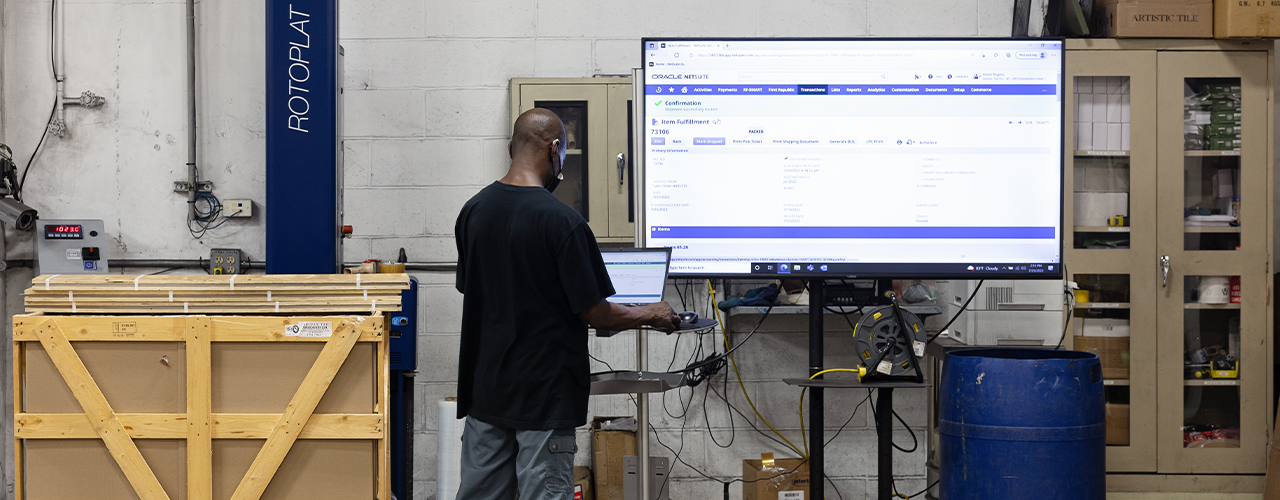
Artistic Tile Lays Foundation for Growth with Migration from Legacy Accounting Software to Next Generation Distribution ERP
When it comes to high-end tile and stone, Artistic Tile has carved out a place in the market where they are known for their truly unique and elegant designs inspired by both modern patterns and antiquities from around the globe. The family-owned and operated business has been designing their products in-house and distributing them to discerning customers since 1987. Today Artistic Tile maintains nine showrooms, an online storefront and a network of authorized retailers and dealers.
While the company continues to deepen its stance as a distributor of premium building materials among consumers, architects, engineers and contractors, its legacy accounting software wasn’t matching its high-growth trajectory. The overall performance of the 30-year-old business system was slow and it required programming resources to re-write customizations for each new release, which lacked functional advancements. Executives became even more concerned that a complete loss of data could be imminent as daily server resets became the norm.
“It was no longer worth the upgrade just to maintain data stability,” said Joshua Levinson, Artistic Tile’s Chief Executive Officer (CEO). “We knew we needed to make a bold, strategic move, so we brought in Net at Work.”
Finding the Right Fit
A technology consultancy for small-to-mid-sized (SMB) organizations throughout North America, Net at Work serves as a digital transformation strategist, guiding leaders through 360-degree business assessments, IT governance and operations management through software selection, implementation, vendor management and ongoing support. The partnership between Artistic Tile and Net at Work started with a Business Health Assessment (BHA), in which the functional areas, systems and processes of the distributor were graded in relation to its strategic plans and industry competitiveness. The result was a recommendation to migrate its end-of-life accounting system to a Next Generation Enterprise Resource Planning (ERP) solution. Next Generation ERP represents a dramatic shift from previous iterations of ERP, and embodies three distinct characteristics:
Adaptive for fast-changing business needs
Artificial Intelligence (AI)-based for efficiency and innovation
Accessible for interactions beyond the browser
Once the team had landed on the right technology, they knew that they would need the right partner to guide them through the implementation process. Artistic Tile identified the need to collaborate with a team experienced with both their existing systems and processes as well as the new distribution ERP solution, and the experts at Net at Work were enlisted to carry out the project. “Our teams were committed to making this work, and Net at Work did a fabulous job executing the implementation,” says Levinson. “They learned our business and designed a solution that supports every aspect of our operation.”
Reaping the Rewards
With Net at Work at the helm of its digital transformation, Artistic Tile has moved beyond the legacy accounting software challenges that were previously holding the organization back. Now the company can focus on process automation, workflow efficiency and making timely decisions based on real-time insights. Artistic Tile is on pace to beat last year’s record-breaking revenues and is better positioned by its technology to effectively do so. “Honestly, the changes have been transformational for Artistic Tile,” says CMO Michael Epstein. “We’re seeing tremendous growth and success and our systems are powering that success.”
Learn more about Artistic Tile’s triumphs in the warehouse and the back office by accessing their complete Client Success Story. For more information about how Net at Work can help accelerate your own digital transformation, contact us today.
Read more

CRM
Microsoft Dynamics CRM Tip: How to Quickly Edit Multiple Records at Once
In this video our Microsoft Dynamics CRM expert will walk you through how to edit multiple records at once by selecting them and clicking the edit button. This only allows you to edit a maximum of 250 records at a time.
Contact Us if you have any questions or would like more information about Microsoft CRM features and enhancements.
.embed-container { position: relative; padding-bottom: 56.25%; height: 0; overflow: hidden; max-width: 100%; } .embed-container iframe, .embed-container object, .embed-container embed { position: absolute; top: 0; left: 0; width: 100%; height: 100%; }
Read more

Company
Establish A Vision. Plan For the Unexpected.
Look at Your Industry Broadly and What the Future Will Likely Bring.
Most of my career in technology has been focused on serving the needs of entrepreneurial business owners who have chosen to compete in the SMB ERP marketplace serving their individual clients. Over the course of time representing major software publishers, I have taken pride in helping these business owners fulfill their dreams, ambitions, and goals. In the process I have developed long term relationships of trust with them and have accumulated “best practices” knowledge and understanding that I have shared numerous times.
Today’s Major Business Disruptions
One of the common threads that has appeared over the course of time, that has presented obstacles to those businesses, has been dealing with major disruptions. These have been both technology driven, and market driven. Technology changes have been things such as: introduction of GUI, introduction of Windows, emergence of SAAS (software as a service), introduction of Hosting, and Cloud Computing to name a few. Market disruptions have been marked by things such as: changes in publisher programs resulting in shrinking commissions and/or margins, introduction of subscription pricing, increased competition in SMB by enterprise publishers both through direct sales and channel partners, and clients moving to consolidate technology providers to name a few.
Many business partners who have longevity in this business are considering whether now is the time to consider an exit plan. Technological disruptions are continuing with the maturing of Artificial Intelligence and the growth of the Internet of Things and there will be more. Will these disruptions make it difficult to compete or require significant reinvestment or a complete restructuring of the business.
When is the Right Time to Consider a Business Exit Plan?
As a business owner, ask yourself early on “How, when, and why do I want to transition or sell my business, and to whom?” / “Do I want to remain involved in the business after the transition, or step away completely?” / “Does the potential buyer share my business and personal values?” / “Is the potential buyer financially sound?” / “If you want to keep the business in the family, does the next generation want to be involved, and are they ready and capable to take over?”
These are questions that should ideally be asked years in advance of any transition.
Entrepreneurs start businesses for many reasons; to pursue aspirations and dreams, create a lifestyle, and/or build wealth. But the sale or transition of a business can take a myriad of different forms. It is critical to carefully think through your objectives and have clarity around what you want to happen and when. Only then can you realize the payoff for all your hard work.
Stay tuned as we explore many of these topics in future posts. If you have any immediate needs or want to schedule a meeting to discuss your specific business, please don’t hesitate to email me today.
Read more

ERP
Acumatica Summit 2023: A Recap
Acumatica Summit Celebrates, Discovers and Imagines Where Digital Transformation Can Take Wholesale Distributors and Retailers
As the community came together this year for the Acumatica Summit in Las Vegas, each day’s events and activities were laced with three themes:
Celebrate the community, reconnect with friends and recognize the achievements of innovative businesses that have overcome challenges and transformed their operations.
Discover the latest capabilities and best practices that are empowering users to reach new heights of efficiency, productivity and growth.
Imagine where technology is taking us, where we can take technology and how this progress can apply to your business and enable you to maximize your impact and control your future.
The ever-present drive toward digital transformation, that is, the digitizing of manual tasks and continuously improving business models and processes to keep pace with the modern digital world, gave attendees much to celebrate, discover and imagine – particularly within the wholesale distribution and retail industries. New functionality previewed at Acumatica Summit now allows the purchase and return of counter sales with transactions involving negative and positive balances to be completed within one screen.
An additional enhancement shown accommodates optional variants within products for easier eCommerce. Acumatica user Jeffree Star Cosmetics reported that the cosmetic company went from two employees generating SKUs to one employee, steering employee priorities towards value-generating activities. Other Acumatica development efforts will encourage experimental retail by bringing the “brick and mortar” experience to the digital environment. “Experimental retail essentially allows companies to display products for a short duration, like two weeks, and look at conversions and time on page to determine the ultimate mix of matrixed products,” says Chris Cleary, Acumatica Practice Director at technology advisor Net at Work, a 2023 Acumatica President’s Club member.
Net at Work Acumatica Practice Director Chris Cleary joined BigCommerce to discuss the latest technology to transform digital sales at the 2023 Acumatica Summit
THREE PILLARS OF DIGITAL TRANSFORMATION: PEOPLE, PROCESS, TECHNOLOGY
One session at Acumatica Summit, entitled “Manufacturing Operations: Improving Efficiency and Data Collection,” cited the three major areas of digital transformation related to accounting and finance, according to McKinsey & Company. Digital transformation no longer comprises one major initiative but is an ongoing process to optimize the entire business with financial operations playing an integral part.
This first area centers on the improvement of processes in finance through automation, such as scheduled bank feed imports. McKinsey & Company indicated that 40% of finance activities (e.g., cash disbursement, revenue management and general accounting and operations) can be fully automated, and 17% can be mostly automated.
The second area of digital transformation involves the ability to give end users access to real-time financial data to improve organizational performance through data visualization. An example of this level of visualization includes the creation of multi-currency, multi-company financial reports with the ability to drill-down to transactional details from consolidated report levels.
Through advanced analytics available through Acumatica, companies can fulfill the third major area of digital transformation to accelerate decision support and uncover hidden growth opportunities.
Lastly, the third area focuses on advanced analytics for finance operations to accelerate decision support and uncover hidden growth opportunities. Success varies, cautions McKinsey & Company, as “organizations with fewer than 100 employees are 2.7 times more likely to report a successful digital transformation than are those from organizations with more than 50,000 employees.”
Discover how to achieve success with your own digital transformation by contacting the Acumatica experts at Net at Work
Read more
CRM
Microsoft Dynamics CRM Tip: How to Quickly Access Areas in CRM
In this video our CRM expert will walk you through how to pin areas you frequently use (i.e. key views or records) to the Pinned area in the site map to allow you to quickly access them in Microsoft Dynamics CRM.
.embed-container { position: relative; padding-bottom: 56.25%; height: 0; overflow: hidden; max-width: 100%; } .embed-container iframe, .embed-container object, .embed-container embed { position: absolute; top: 0; left: 0; width: 100%; height: 100%; }
Contact Us if you have any questions or would like more information about Microsoft CRM features and enhancements.
Read more

ERP
Simplifying and Securing Attachments in Sage X3
Files can be attached to any standard Sage X3 object-based function such as Sales Orders, Customers, Invoices, etc. through the Attachments button.
With Sage X3 2022 R4 (12.0.32), Sage introduced some changes to the attachments option which can be enabled optionally. Specifically, the user interface has been simplified to upload files in a single action without having to perform manual tasks. In addition, the storage of attachments has been secured in an administrative storage area rather than an open volume. And lastly, filenames are now controlled in a more consistent manner before uploading attachments.
Although those changes are optional, we strongly recommend you read the following how-to guide and activate these changes to enable secure attachments and improve the overall security of your information system.
ACTIVATING THE CHANGES
These changes can be activated in the General Parameters menu:
Go to Setup > General Parameters > Parameter Values
Select the SUP chapter
Select details for the ATC (Attachments) section
Select Yes for parameter value ATTSECUR (Attachment protection)
This will enable the changes outlined above starting the next login. This will apply to any new attachments. Existing attachments will not be changed by the system.
SIMPLER FILE UPLOAD
Reminder: This is enabled only of the ATTSECUR (Attachment protection) parameter value is active.
The attachments window has been simplified as follows:
The attachments list is now simpler, and the user has two options to upload a new attachment to the record:
Upload file: This uploads an attachment directly from the user’s local device and lists it immediately in the attachments table with no additional user entry required. The user can either select a file through the browser’s selection window, or drag a file onto the upload section of the screen. When uploaded, the file appears in the attachments list with its filename (Document name), Type (from the extension if present), and a default Category set to Confidential (This can be changed by the user and is informative only).
Select file: This opens an additional window where the user can select a file from an existing volume on the server (or to upload a file from the local device onto a volume on the server), as with previous Sage X3 releases.
SECURE ATTACHMENTS
Reminder: This is enabled only of the ATTSECUR (Attachment protection) parameter value is active.
Secure attachments, when uploaded, are stored in an administrative volume that is accessible only to administrative users and cannot be seen by normal users through the Sage X3 volumes interface. Their filenames are obfuscated and replaced with a generic sequence number.
With this option, the attachment can be retrieved only from the Attachments window on the relevant record, which means access to the attachment is subject to the same functional access rights as the actual record it is attached to.
Users who do not have access to a record will not be able to browse through its attachments in any other way.
LIMITATIONS
With secure attachments, the Keyword interface has been disabled and cannot be accessed manually. The keyword fields, however, are still present in the attachments table and can be used programmatically.
It is important to note that the actual filenames on disk will be changed by the system. The filenames can only be referred to from the attachments table, through the Document name property.
FILENAME CONTROL
When uploading files, the system will now perform controls to remove unwanted characters and will issue clear error messages when the file’s name cannot be used.
The following characters are not allowed in attachment filenames:
You cannot use @, %, and $ in Sage X3 file names (Sage X3 reserved characters)
You cannot use /, , <, >, ?, :, *, “, and | in operating system filenames (e.g. Windows)
You cannot use *, !, #, and ? in any file name because those are used in regular expressions.
For questions about the changes in Sage X3 2022 R4 regarding attachments, or any other questions about Sage X3, please contact us.
Read more

Cloud Computing
CRM
ERP
Why Don’t SMBs Hit Growth Projections (and How Can You Get Back on Track)?
Small to mid-sized businesses (SMBs) often fail to hit their own growth targets and other financial goals, which can lead to poor decision-making, missed opportunities to secure capital, and other negative repercussions. The good news is that if your SMB is falling short, you can still change your existing approach to achieve your most critical objectives.
According to the U.S. Small Business Administration, nearly 33% of small businesses fail in the first two years, and 50% fail after five years.
While there are many different reasons for this, chances are good that many of these businesses did not have the right financial metrics and controls in place to drive their business on a daily, monthly, or quarterly basis. Without the right projections to monitor, it can be hard for any SMB to keep the doors open—much less grow the business.
To be fair, SMBs do not choose to miss their projections and financial targets. Instead, it is more likely that many have not implemented the right projections – if they have developed any at all. SMB owners may not have the experience, technology, data, employees, or other resources they need to create and track the business against important financial metrics.
Time is also a real issue. Life as an SMB is busy, as you may very well know: Owners and employees are often forced to wear many hats to put out fires, react to new priorities, and support the business every day. This inevitably pushes financial planning to a “nice-to-have” item on a to-do list that is already too long.
What are the common reasons SMBs miss growth projections?
Find out by downloading the eBook, “Three Ways SMBs Miss Growth Projections”.
What are Financial Projections and Why Do They Matter?
Financial projections are best guess estimates of a company’s revenues and expenditures at a specific point in the future. They are critical for any company, but especially your SMB because they are an effective way to show how your business performs in the face of market opportunities, threats, and other conditions. Financial projections are also an important way to determine a company’s overall valuation.
When done well, financial projections can help you forecast the predicted growth of your business and understand your organization’s overall health and success. Financial projections should be woven into a larger business plan to inform the best decisions possible related to capital, production, expansion, and other strategies.
Examples of the most common financial projections include:
Sales forecasts
Expense budgets and reports
Break-even analyses
Cash return projections
Profit reinvestment plans
Other custom financial estimates
The Right Approach
But if you are currently not using these kinds of financial projections, what can you do to overcome existing obstacles and take advantage of all that they have to offer?
While there is no one-size-fits-all solution, best practices typically involve the improvement of your use of technology to gain real-time visibility into critical data and develop better business planning processes. Such an approach can become a valuable advantage in helping your SMB increase revenues, strengthen your bottom line and improve your ability to achieve your most important goals.
Next Step
To learn more, download the full eBook, “Three Ways SMBs Miss Growth Projections” now.
Read more

ERP
Next Generation ERP Brings Transformational Change to Dental Insurer
Since 1962, the nonprofit Hawaii Dental Service (HDS) has provided quality dental care to the community, growing to become the largest dental network in the state today. HDS currently serves more than one million people in Hawaii, Guam and Saipan, with 95% of dentists in Hawaii participating in the network.
When HDS began moving its systems from server-based to cloud-based applications, the accounting department was given a mandate -– and an ambitious deadline -– to migrate its legacy Sage 300 accounting software to cloud financial software. Although they felt comfortable with their server-based financial program, they anticipated numerous benefits with the move to a Next Generation ERP that would serve as their financial hub.
The First Line of Support
“We immediately reached out to our technology partner, Net at Work, for advice,” says Cara Numasaki, the Controller for HDS. Net at Work, a technology advisor to small-to-medium-sized businesses, provides extensive services to support the ongoing initiatives of organizations – from software selection and implementation through managed IT and Fractional CIO & Advisory services.
After Net at Work completed a thorough evaluation of their needs and resources, HDS decided on Sage Intacct. “We quickly saw the comprehensive benefits Sage Intacct could provide,” says Charise Shigeta, Accounting Manager for HDS. “We saw opportunities to improve our budgeting process, speed up financial reporting, and simplify multi-company accounting tasks.”
“Net at Work is fabulous, and they completed the conversion remotely, on time and on budget.”
The Crowning Impact: New Speed, Efficiency and Time Savings
Once their implementation was complete, HDS began enjoying Sage Intacct and the benefits of using a cloud financial software for insurers, including:
new efficiencies in accounts payable processing
simplified budgeting thanks to Sage Intacct Planning, a popular tool with HDS directors
automated reporting that helps save approximately 17 hours of staff time each month
HDS notes that although their accounting software migration to Sage Intacct needed to be accomplished in record time due to organizational mandates, their implementation was successful due to the expertise and diligence of their chosen technology advisor. Says Numasaki, “Net at Work is fabulous, and they completed the conversion remotely, on time and on budget.”
Download this Net at Work success story case study to learn more about Hawaii Dental’s transition to a Next Generation ERP software, Sage Intacct.
Read more
CRM
Quick CRM Tip: How to Find Your Dashboard in Microsoft Dynamics CRM
In this video our Microsoft Dynamics CRM expert will walk you through how to find a newly created Dashboard or find a missing Dashboard in CRM.
.embed-container { position: relative; padding-bottom: 56.25%; height: 0; overflow: hidden; max-width: 100%; } .embed-container iframe, .embed-container object, .embed-container embed { position: absolute; top: 0; left: 0; width: 100%; height: 100%; }
Contact Us if you have any questions or would like more information about Microsoft CRM features and enhancements.
Read more