



Blog Listing

Technology in Practice
Practical guidance on ERP, CRM, HR, finance, and the technology powering modern organizations.




Distribution / Manufacturing
ERP
Supply Chain Issues are Zapping Profits: What Can SMBs Do To Minimize Risk?
Record-hitting inflation, worker shortages, cybersecurity risks, natural disasters and shifting demands are stressing what was an already fragile supply chain. Some economists note this is the worst supply chain crisis we’ve seen in 50 years. Every sector of the economy is feeling the impact, but small- and mid-sized businesses (SMBs) are particularly hard hit. Indeed, 80% of small business owners say their supply chain issues have gotten worse or stayed the same since January 2022. It’s an enormously costly disruption. McKinsey’s researchers note that a single prolonged shock to production could wipe out 30-50% percent of a year’s earnings for companies in most sectors. Ouch.
You Can’t Wait This Out
This isn’t a wait-it-out proposition. SMBs need to make structural changes to their operations now to survive and thrive. For many businesses, change starts with recognizing that their existing technology is holding them back, preventing them from adapting to a changing world. CFO Marilyn Maher of ACD Distribution, a distributor of toys and game-related merchandise, had been running an unsupported Enterprise Resource Planning (ERP) system. She and her teams had dealt with obsolescence issues in the past, and didn’t want to go through that experience again. “We decided to just go ahead and move,” said Maher, who cited the software support and feature enhancements of the Next Generation ERP solution as justification for the switch. “And it has served us very well.”
For organizations that need help evaluating their current technological environment, Net at Work offers a complimentary Business Health Assessment to review core business functions alongside members of their leadership team. The outcome, thanks to the suite of services like Fractional CIO and Advisory Services, Managed Services and Customer Experience Plans from the technology advisor, can be a game-changer. SMBs can take on a full-fledged technology roadmap, IT governance and ongoing IT operations management, the migration from basic accounting systems, like QuickBooks, or aging ERP applications to Next Generation ERP – and more. And companies are seeing positive bottom-line results. Here are a few of the many ways it’s working for them.
Made Whole With Fractional CIO
The sting of the bullwhip effect resulting from COVID-19 has companies scrambling to gain greater visibility into their purchasing and inventory management. UniWell Laboratories, a contract manufacturer of nutraceuticals for retailers and direct-to-consumer companies, found that port closures and the overflow and resulting slowdown of other ports was wreaking havoc on their just-in-time (JIT) inventory processes and costs. “We saw freight costs quadruple, and if you didn’t have a blanket purchase order on materials six months in advance, you couldn’t place an order,” says Bryan Polozola, CFO at UniWell. These issues were compounded by a Material Requirements Planning function (MRP) that took eight hours to run and multiple raw materials would have three purchase order suggestions in a row. Buyers would forget to place orders, then inadvertently overorder. UniWell engaged with Net at Work in 2017 to re-implement its Next Generation ERP solution from a previous reseller, while undergoing an IT Diagnostic Assessment with its Fractional CIO and Advisory Services team.
“We’d have long production meetings to discuss what we should order and when,” recalls Polozola. “Now, we discuss strategy and optimization ideas. We’ve got the time to figure out how to be better, not just how to get by.” Today UniWell’s MRP produces near real-time results and the company is projected to increase revenues by 14%.
Order Among Disruption
Luxury building material supplier Artistic Tile, which has nine show rooms and a distribution center, tells the story of a New York metropolitan blizzard that kept employees at home for a day, then severe weather in the south halted freight traffic. To top it off, the company had recently migrated to a Next Generation ERP solution with Net at Work. “Our Vice President of Operations said it was the worst week of his career at Artistic Tile,” recalls Joshua Levinson, CEO of Artistic Tile. “I asked him if he thought we made a mistake moving to a new ERP solution. He said, ‘I don’t think so, I think it would have been worse if had we stayed on with the old system.’”
Artistic Tile’s new platform and support has given them a lot more visibility into what was going on in the company than its previous legacy business system. “Having that real time look into performance allows us to react that much more quickly than we have in the past,” he said. “We’ve taken a business with multiple bottom lines and can now look at one bottom line in the end through a more streamlined approach. I think it’s brought our whole business closer together.”
There’s no one easy answer to global supply chain challenges. However, there are ways your small-to-medium-sized business can respond to give you the best opportunity for success. It takes brave action and a break from the status quo — but the rewards are immense. Learn more about how UniWell Laboratories is overcoming its own technology limitations and supply chain disruptions to be a truly strategic organization by watching this on-demand “SMB Talk” session.
Read more

Compliance
ERP
Removing Complexity from Subscription Revenue Recognition
With the gaining popularity of subscription-based services, many companies are investigating ways to incorporate this business model into their operations. Whether your company is seeking to add Software-as-a-Service (SaaS) to your current model, or looking to fine-tune your existing subscription processes for compliance, efficiency and effectiveness, it remains critical to understand when and how to properly recognize revenue.
In order to maintain consistency across all businesses and industries, the Financial Accounting Standards Board (FASB) and International Accounting Standards Board (IASB) issued policies (or standards) with respect to how revenues are recorded in financial statements. The current policies are known as ASC 606 or IFRS 15, respectively. Each organization should take into consideration any external factors that could affect its ability to recognize revenue for a specific period of time and ensure compliance with ASC 606/IFRS 15.
Subscription Struggles
Companies that employ a SaaS model have customers that pay for a service on a recurring basis. This means that revenue is recognized over the duration of the contract, and not necessarily when the product or service is delivered.
This model requires companies to estimate variable consideration, which includes usage fees and non-usage fees, such as setup fees, professional services, and support contracts. Variable consideration is estimated using either the expected value method or the most likely amount method.
The complexities involved in the revenue recognition process for SaaS companies have created a number of issues since the implementation of ASC 606/IFRS 15. To counter these issues, a five-step framework was created to help companies determine how and when to recognize revenue. The five steps to revenue recognition are as follows:
Identify the contract with the customer.
Identify the performance obligations in the contract.
Determine the transaction price.
Allocate the transaction price to each performance obligation on a relative stand-alone selling price basis, if necessary.
Recognize revenue when (or as) the entity satisfies a performance obligation.
While these five steps may seem straight forward, many organizations run into issues even getting past the first two steps. For instance, if there are multiple elements in a contract (e.g., software and support), then how do you allocate revenue? This makes it difficult for companies to determine which contracts should be accounted for using the time-based approach or the consumption method.
Another issue is that most companies do not have a dedicated finance team who know how to apply these complicated rules correctly. If you don’t have enough – or the right – people on your team who understand these rules, it’s necessary to leverage the expertise of CFO advisory services as well as that of your preferred technology advisor, like Net at Work, to ensure proper support from your systems.
These are just two examples but, as you can see, when it comes to revenue recognition, companies following a SaaS model face significant complexity.
“As more businesses come to terms with ASC 606/IFRS 15 compliancy, technology is increasingly at the forefront. The shortcomings of spreadsheets, legacy ERP systems and even QuickBooks make reliance untenable in a SaaS environment, causing companies to seek more modern solutions”
A Modern Solution for a Modern Problem
As more businesses come to terms with ASC 606/IFRS 15 compliancy, technology is increasingly at the forefront. The shortcomings of spreadsheets, legacy ERP systems and even QuickBooks make reliance untenable in a SaaS environment, causing companies to seek more modern solutions.
Next Generation Enterprise Resource Planning (ERP), as an adaptive platform with native Artificial Intelligence (AI) and Machine Learning (ML) and accessibility beyond the browser, innately offers the type of robust financial reporting needed to ensure compliance with ASC 606/IFRS 15. These nimble operations platforms have the ability to overcome complex revenue recognition scenarios through their powerful revenue management functionalities that afford financial professionals the time to focus on other business-critical analyses. Some aspects of revenue recognition management within a Next Generation ERP solution include:
Multiple Performance Obligations – Robust capabilities provide configurable revenue schedules for even the most complex agreements.
Manage Complex Allocations – Comprehensive allocation features enable systematic compliance with ASC 606/IFRS 15.
Dynamic, Standalone Selling Price – Define the Standalone Selling Price (SSP) as either a constant or a dynamic formula. Leverage Standalone Selling Prices to automatically allocate arrangement consideration across all elements within the Arrangement—including support for ASC 606/IFRS 15 standards.
Revenue Recognition for All Industries – Supports revenue recognition over time, percentage-of-completion, and event-driven revenue plans for all industries under ASC 606/IFRS 15 requirements.
Digging Deeper
In order to properly meet ASC 606/IFRS 15 standards, revenue recognition within a SaaS environment requires organizations to make judgment calls in a number of areas where data may be limited or altogether unavailable. Through a combination of the right advisory resources and technology solutions, however, companies can arm themselves with the ability to not only satisfy these standards, but to do so in a way to maximize revenue. To learn more about SaaS model compliance with current policies, watch the webinar recording of “Ask the Experts: Breaking Down Subscription Revenue Recognition for Finance” today.
Read more
ERP
Sage X3 2022 Team Meeting: Recap
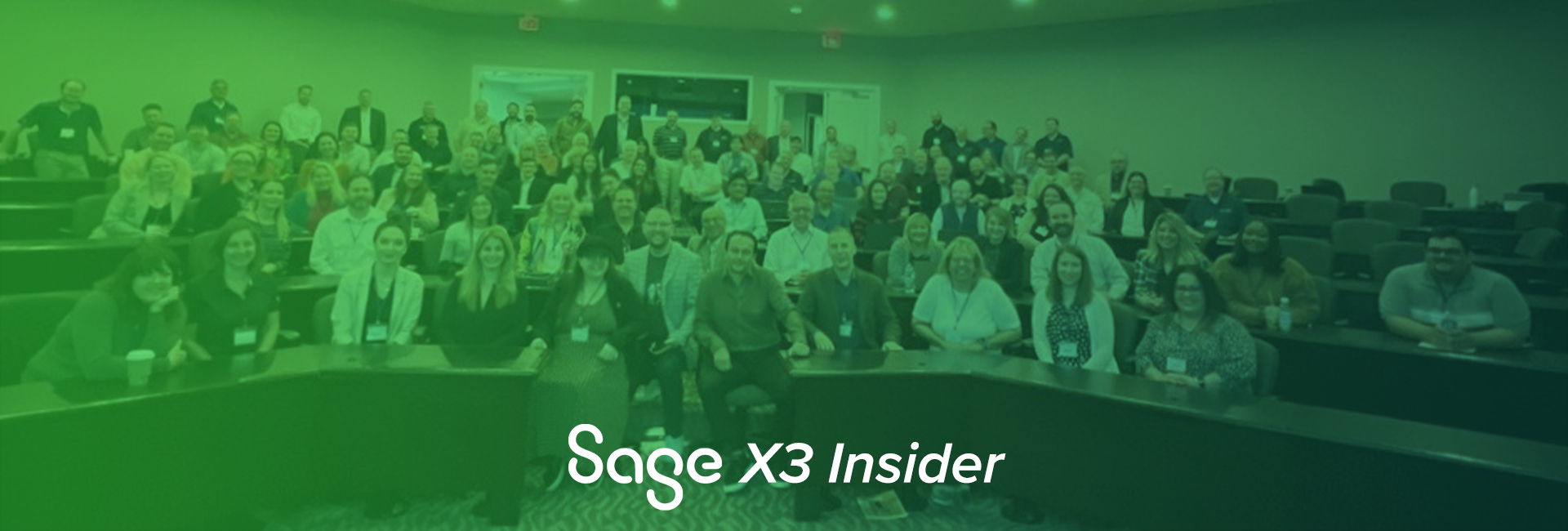
The Net at Work Sage X3 team held our multi-day team offsite event this week, and it was packed full of team building, fun and celebrating! The Sage X3 team met to collaborate and learn from each other and our sponsors. We even had Rob Sinfield, SVP of Sage X3, join us from England to present the top-secret roadmap (and we can’t wait to share some of the news!)
We had sessions on everything from patching best practices to cost accounting – a great mix of functional and technical topics for the team. It was great to see everyone – almost 90 people across our Sales, Consulting, and Executive Management teams. We talked a lot of shop and had a little fun to foster a deeper sense of community and team spirit. Amazing how this team has grown. It was great to be together.
A small group of clients joined us to share ideas and opportunities around Sage X3 and working with Net at Work. The collaboration and knowledge sharing were extremely valuable, and we have some great ideas for improving in 2023! We will be doing more regional events in the coming months.
Thank you to all our sponsor partners for your support and for joining us in Virginia. And thank you for your patience as we catch up a little bit but rest assured that we are returning from this trip better educated and excited to bring you more value to unleash the power of your business!
Thank You To Our Partner Sponsors
Read more

CRM
Taking the “C” out of CRM
Not too long ago, I (virtually) met with a client of mine, who was telling me about all the frustrations their team is experiencing with their current ‘issue tracking tool’. She detailed all the enhancements her team had been asking for, such as improved visibility into customer information; simplified data entry process, historical data presence, tracking ability, reviewing user performance and availability, scheduling services, dashboards for key indicators, mobile usage, etc. While I was listening all I could think of was “CRM can do that!”, and my thoughts were interjected by her question: Can you recommend some tools that can do all of that for us? Tools, I said? The only TOOL I can think of is CRM. I was stopped right there saying that they do not need a sales tool, since they are not selling anything. Well, that’s where I started on my story about how CRM is so much more than Sales.
It is a great Sales tool, there is no doubt about it, however, Dynamics CRM is capable of so much more than the ‘traditional’ contact repository or selling functions. I can go into hundreds of the CRM functionalities, but I would like to stick to the story and emphasize a few that will help you get your mind off of the “C” in CRM!
Central Data Repository – one unified system that touches on all customer points from every department, so Customer Service has visibility on the Sales and vice versa. (Left hand is aware of the right hand’s actions).
Streamline data entry processes to increase efficiency and productivity
Keep historical records from day one, and access the same with one click
Track progress on all levels, from a lead all the way to sales, and from reporting an issue all the way to resolution
Track user performance and oversee results (act as a ‘Big Brother’ if/when needed)
Schedule resources, based on availability and skills, with a click of a button
Build and access Dashboards based on different key metrics for visual interpretation of current data
Data access via phone and tablet, even when you have no network coverage
I can go on and on, on how CRM can be utilized to improve business processes and efficiency, and how it can help in increasing your profitability and letting you focus on the customer relationships that matter. CRM should work for you, not the other way around!
Read more

ERP
Sage 100 Schedule a Visual Integrator
This article will show you how can schedule a Visual Integrator (VI) import or export job to run automatically in Sage 100. For best results, is recommended that the steps below be performed directly on your server, rather than on a workstation.
Open the Task Scheduler found under Library Master> Main> Task Scheduler.
Configure the Scheduled Task by Filling in the Following on Tab #1 (Schedule)
Job Name (no spaces permitted)
Description
Company Code
The Sage user login (which has permissions to run the VI job) and password
The Windows user login, an administrative level user ID and password
Select how frequently the job should run: Daily, Weekly, Monthly, Once.
Enter a frequency such as “Every n” days, weeks, months.
If you choose “Weekly,” you can select the day of the week for the job to run.
Monthly gives you the choose of first, second, third, fourth, and last day of the week.
Enter a start date and end date.
Enter a start time.
On Tab #2 (Tasks)
Select “Import” or “Export” under the “V/I Job Type”
Select the V/I Job you want to schedule
Click Accept when complete.
Note that you can also use the “Run Now” button to test your scheduled test on the spot.
Also, you can review the history of the task and whether it ran successfully or with errors by running the Log.
Read more

ERP
What’s New in Sage X3? Exploring 2022 R3
Sage recently released Sage X3 Version 12 2022 R3 with some nice new features and enhancements to existing features. In this blog post, we’ll review the capabilities delivered by some of the key new features & enhancements in this latest release. For a full description of all the new features and enhancements delivered with this release please refer to the What’s New section of the Sage X3 Online help center.
NOTE: The content of this blog post was originally posted in the Sage X3 Online Help Center in August 2022.
Finance
In the VAT entities function (GESVATGRP), select the Enable VAT on payments checkbox to display the related fields in the VAT returns function (GESVFE). If this checkbox is not selected, the fields are hidden.
Distribution
Sage X3 Mobile Automation
Purchase receipt transaction
In the Purchase receipt transaction, you can search a product using the product supplier code or the supplier UPC code.
Unlink an LPN
You can now use the LPN unlinking transaction to unlink stock lines from a License plate number.
Manufacturing
Sage X3 Mobile Automation
Time tracking
For an improved user experience, a new Mobile Automation Time tracking transaction has been enhanced to track time for an unplanned operation. A Standard operation can also be selected as an unplanned operation.
Material consumption enhancements
The Mobile Automation material consumption functionality has been enhanced to only display lots and sublots available in stock when selecting lots and sublots for a component.
Sage X3 Web Scheduling
New sedApta version : 2022
This release introduces a new brand interface with a simpler installation package. For pre-installation recommendations please visit the Sage X3 Online help center.
Platform
To enhance your user experience, a number of add-ins have been delivered with the Sage X3 platform, including:
Notification server
Notifiction server screen enhancements hve been made, there are also new transport types for the notification server and workflow emails.
File Uploads – Invalid Characters
To improve accuracy and save time, an error displays when you upload files with invalid characters.
API’s
GraphQL API
Enhancements have been made to the Sage X3 GraphQL schema to add various nodes and properties, find below. For more information and supporting materials, please click here.
Attribute values for Finite scheduler
Finite scheduler custom values
Managing deletions for Finite scheduler
Optimization matrices for Finite scheduler
Setup matrix for Finite scheduler
Setup time exception lines for Finite scheduler
Work order link for Finite scheduler
Time Entry Line (mutation)
Sage X3 Automated Test Platform
Enhancements have been made to the Sage X3 Automated Test Platform version 2.8.0 for your user experience, this contains:
Screenshots on demand
Platform installation and update using a new setup wizard to install and update the Sage X3 Automated Test Platform library
Want to learn more?
For more information, please visit the Sage X3 Online Help Center or download the Sage X3 What’s New 2022 R3 release guide.
Read more

ERP
From Microsoft Dynamics SL to Sage Intacct: How Marketing Communications and Training Firm Alteris Group Positioned Itself for Growth
With headquarters in Detroit, Michigan, it’s no surprise that Alteris Group, LLC predominantly serves the automotive industry. The professional services company, founded in 2002, supports the in-dealership program and external marketing needs of some of the biggest auto manufacturing brands in the world through well-crafted training materials and video and digital platform development across its two entities in the United States and Canada.
CONTOURING ITS COURSE
The project management nature of its business – labor and deliverables, essentially – requires the company to track the hours personnel work on specific deliverables, as well as monitor the status, estimated and actual costs and dedicated labor to projects as a whole. Its disjointed setup of Microsoft Dynamics SL, however, made it tricky to effectively do so. All billing was handled exclusively by its American entity, for example.
The act of pulling billing data to its Canadian location involved “a lot of manual processes back and forth,” recalled Hannah Rees, Senior Project Manager for Alteris Group. The company would export project costing reports into a custom Excel database in order to adapt invoicing to the particular specifications of its client base, which must include project details, and then generate full invoices out of Excel.
At one point, the legacy Microsoft Dynamics SL system was not compatible with iOS, a preferred platform for design-intensive organizations like Alteris Group. So Alteris Group created its own time sheet system. “We were doing time sheets in one system,” explained Rees. “And then having to copy those over to the other system. Eventually Microsoft caught up with its own iOS compatibility, but by then we were too far gone with our own development and it wasn’t worth the investment to create a module that would still involve manual processes.”
“It wasn’t worth the investment to create a module that would still involve manual processes.”
PUTTING ON THE BRAKES
After puttering along with these business systems for 20 years, Alteris Group consulted with Net at Work to undergo a Business Health Assessment. Net at Work, a top-ranked technology advisor, provides a variety of services, including managed, Fractional CIO and CTO services as well as software sourcing, evaluation and implementation services, to thousands of small-to-medium sized businesses across North America. As a result of Net at Work’s assessment, Alteris Group was able to compare the Total Cost of Ownership (TCO) of a Next Generation Enterprise Resource Planning (ERP) software solution to its current deployment.
“We looked at each aspect of what we were doing manually, like the hours of time dedicated to billing and the hours needed to upload monthly time sheets into the system, and what we’re spending with Dynamics for upgrades, add-ons and support,” said Rees. This exercise, matched with an anticipation of the eventual loss of Microsoft support, gave Alteris Group the direction it needed to go.
Learn more about Alteris Group’s journey to Next Generation ERP by accessing their full success story here.
Read more

IT / Infrastructure
The Drivers of a Digital-First Experience
Between expanding cloud services, increasing mobile apps, and our collective reliance on Internet of Things (IoT) technologies, digital transformation is booming.
It’s so prolific the entire Global Digital Transformation Market is expected to more than double, growing to USD $1,009.8 Billion by 2025. Experts predict it’ll pick up the pace with a Compound Annual Growth Rate (CAGR) of 16.5% year over year.
But what does that really mean for the end user? And how are these digital-first consumers shaping the evolution of digital transformation?
Digital Transformation Defined
Digital transformation can look several different ways: Automating business processes, adopting AI in your operations, moving to the cloud, and implementing new workplace technologies are all examples.
It’s a catch-all term that describes how businesses become digital-first and create new opportunities for growth while weathering disruption. Efforts may focus on evolving internal models, like leveraging data, or external factors, such as driving better customer experiences through tech like chatbots.
Or, as this MIT Sloan Management Review offers, “Digital Transformation is better thought of as continual adaptation to a constantly changing environment.” Others, like Red Hat, simply describe it as, “Better living through software.”
End User-Driven Digital Transformation
The technological advances from decade to decade have never been more pronounced. But they’re not just the work of gifted software engineers or digital disruptors. Digital transformation is in large part a response to customer demands and changing expectations.
Forbes illustrates this with its recounting of Netflix’s attunement to the movie marketplace, “Founded during the decade-long decline of brick-and-mortar Blockbuster, Netflix changed the game by delivering the latest movies right to customers’ front doors, then went on to completely digitize its experience.” Though they’re quick to point out that it takes more than technology alone to make such an impactful arch. “Netflix’s success involved the careful collection and curation of customer data – habits and preferences that have since influenced everything from the design of its user interface to its raved-about productions.”
Digital transformation is the same reason the sharing economy exists, all but replacing taxis with ride-sharing services and hotels with Airbnb or VRBO listings. In the same way phone books disrupted word-of-mouth marketing, smartphones have made these relics almost obsolete, showcasing again how digital advances come as the result of shifting consumer movements.
On the other side of the spectrum, digital pioneers know how to outperform their competition and drive customer loyalty by meeting them where they’re at.
As IBM explains, the world’s most recognizable disruptors tend to use technologies that help them adapt, reinvent, and optimize their:
Business models (e-commerce, electronic delivery).
Business processes (supply chain management, new feature development).
Customer’s experience (in-context customer reviews, personalized recommendations).
The point is: Great leaders understand that all industries face disruption in the digital age. The key is to prioritize your customer and let them inform your digital evolution so you can provide the most valuable experience possible.
No two digital transformation journeys will look the same. But if you can reverse engineer for the ideal customer experience and supplement it with a comprehensive mix of tech-supported changes, you have the best opportunity to transform beyond disruption.
Read more
ERP
Sage 300 Security Alert: Updates That May Affect Use of Sage 300 – OAuth and TLS
Sage recently sent an email (see it at the bottom of this thread) where they announced two important items that may directly impact your company’s ability to work within the Sage 300 product.
For your convenience, we have highlighted the key points and next steps below. We also hosted an informative webinar: Changes to Sage 300 that May Impact Your Ability to Operate, where we went over this in detail, as well as the options available so your staff can continue to work efficiently.
The Impact to Sage 300
The changes announced affect those who are not upgraded to Sage’s currently supported versions, as well as those not fully patched on the current editions.
Here are instructions on how to check what version of Sage 300 you are running.
Emailing From Sage 300 Stops Working On October 1, 2022
On 10/1/2022 Microsoft is disabling basic email authentication. Google shut this off in June of 2022. Basic email authentication is currently used in many versions of Sage 300 and allows your company to be able to do the following:
Email Invoices to Customers – this also applies to quotes and orders
Email Statements to Customers
Email Purchase Orders to Vendors
Email remittance advices to Vendors and Customers
Email reports to your team
Sage 300 Will Go Into “READ ONLY” Mode – September 2023
Transport Layer Security (TLS) is a common methodology used for servers to communicate with each other. Some editions of Sage 300 use TLS 1.0 and 1.1 which are seen as security risks by the software industry. Most published have depreciated these versions and now use TLS 1.2 or 1.3. Sage is joining the other publishers in depreciating TLS for 1.0 and 1.1 if you are not upgraded and fully patched on current editions by September of 2023.
FAQ: What Can you Do in “Read Only” Mode
Both these changes impact all users – even those organizations only using an instance of Sage 300 for reporting or Inquires.
NEXT STEP – Watch Our Webinar
Changes to Sage 300 That May Impact Your Ability To Operate
Watch Now
We reviewed the details around Sage’s end of support for Transport Layer Security (TLS): and the options your company has so that your staff can continue to efficiently work. Agenda:
What is OAuth and why will my email stop working 10/1/2022
What is Transport Layer Security & why may Sage 300 go into “Read Only”
Why Avalara customers have to update their Sage 300 before 12/31/2022
Options and Alternatives available for OAuth emailing
Options and Alternatives for READ ONLY mode
Creating a Digital Road Map Plan for the future / keeping Sage 300 current
Q/A
Read more