



On November 16, 2010, Sage announced the availability of Sage ERP MAS 200 SQL version 4.45. It combines the innovative customization capabilities and the features and functionality of Sage ERP MAS 200 with the efficiency of Microsoft SQL Server. A migration path for existing Sage ERP MAS 90 and 200 customers to the new SQL product is expected to be available sometime in 2011.


Blog
ERP
Sage ERP MAS 200 SQL v 4.45

ERP
02 Apr 2019
Chemical Regulatory Management & Reporting with Sage X3
The Chem at Work edition of Sage X3 provides regulation management functionality for the ever-changing regulatory landscape of the global chemical distribution & manufacturing industries. The management, tracking, and reporting of chemical inventories is a requirement for companies that manufacture, store, label, ship, distribute, or handle controlled substances and hazardous materials.
In this post we describe how Chem at Work, the Chemical ERP for Sage X3 helps you manage the regulations, and report to the governing bodies as required by the chemical industry business processes and commitments.
Regulation Maintenance
Chem at Work comes standard with 70 pre-loaded regulations and allows for you to track as many more regulations as your specific industry requires. Once defined, regulations may be assigned to CAS numbers, products and/or Safety Data Sheets.
The fields for each regulation include:
Regulation code, section(s), and description
The regulation’s governing body and the country/union and State/Province which enforces the regulation, if applicable
The Import/Manufacture Limit – the inventory receipt limit for a chemical, based upon the country’s inventory list.
Reporting Quantity (RQ) Threshold – The maximum daily weight reporting threshold for the regulation. These limits can be further defined on the CAS Master Regulations tab for a specific chemical.
Reporting Required/On List – Defines the regulation default of whether the regulation prints as “required” or “on list” on the SDS report.
Inventory List – Inventory list regulations are regulations listed on a specific country’s list of toxic chemicals. Regulations that are defined as inventory lists are automatically added to each CAS record that is created.
SDS Messages that will appear based on characteristics of the chemicals and CAS #s
LOLI data for clients that are integrated with a LOLI service.
CAS Maintenance
The maintenance then requires specification of which CAS numbers fall beneath which regulations. This is manually created & maintained unless your Chem at Work system is integrated with a 3rd party application or service – a user is also free to add to the list of regulations w/in CAS maintenance screen.
Product Maintenance
The last step in maintaining the regulations is to specify which CAS numbers associate with each product. Here again Chem at Work provides for either manual maintenance or automated updates via 3rd party authoring tools like Hazox, ERA, Verisk 3E, or any others with APIs or ODBC connections.
The regulations will load to the product based on CAS assignment and may also be loaded individually on the product record.
Chemicals Regulatory Reporting
The Chem at Work Sage Enterprise Management Chemicals Regulation Reporting feature calculates weight totals received, present or manufactured during a definable period and for chemicals approaching or exceeding a limit imposed by a regulation. These limits may be imposed by the chemical inventory lists of the country where the company is located, or community notification rules based upon storage amounts. If a company has locations in multiple countries, each site may have different requirements.
Imposed limits are generally based on one of the following totals during the period:
maximum quantity on hand
average quantity on hand during the period
manufacture limits
import limits
Examples of regulations with a manufacture or import limit are U.S. TSCA or the Canadian Domestic or Non-Domestic Substances List. An example of a regulation with a reporting requirement based on the storage amount is the U.S. Community Right to Know Act, commonly known as SARA.
This module is not intended to replace or eliminate the need for companies to file the regulatory reports in the formats required — it is used to provide all the supporting data to streamline form completion.
This feature uses the concept of a reporting sessions for the retrieval and capture of the regulatory data. A reporting session is a record that stores the results for each regulatory calculation. With definable filters, such as site, warehouse, CAS# or date, a reporting session calculates and saves results for future reference. Calculations are performed and reported for both products and CAS records based on site, date range, and several other optional criteria.
System data for each CAS# is validated against the threshold and import/manufacture limits for each regulation defined on the CAS master record. If the CAS total exceeds the threshold % or the import/manufacture limit % that is defined, then the results are presented with the product that contributed the most to the violation of the limit(s) indicated as well.
The session may also be established to return values for indicated CAS#s that are approaching a regulatory threshold or limit, in this manner, business decisions may be made to slow procurement or perhaps delay production campaigns.
This information can also be reported via the reports menu:
Updating and Refreshing Regulations in Chemical Inventory
When a user updates the Regulation Library with a new entry or modifies an existing regulation, they may run an update utility to push that update to CAS, SDS and/or Product records.
For more information on regulatory maintenance and reporting in Sage X3 with Chem at Work, please contact us.
Read more

Credit Card Processing
ERP
Payment Solutions
05 May 2011
Fully Integrated Credit Card Processing with Sage ERP
With Sage Payment Processing powered by Sage Exchange, you can now have the convenience of credit card processing fully integrated with your Sage ERP system, and the peace of mind of knowing that sensitive data is stored in compliance with Payment Card Industry (PCI) requirements.
Sage Exchange is a fully PCI-compliant payment platform that provides you with access to a complete credit card processing solution – Sage Payment Processing.
Sage Payment Processing supports all the required transaction types involved with credit card processing, including pre-authorization of credit card payments, capture of pre-authorized payments, and performance of void or refund transactions.
Your organization can process credit card payments directly from within your Sage ERP Order Entry and Accounts Receivable modules. Fraud prevention features protect you and your customer from unauthorized credit card usage.
Order Entry And Accounts Receivable Integration
You will be able to capture pre-authorizations, authorizations, and payments in Order Entry and Shipment Entry, with the ability to easily void a transaction when necessary. Tight integration with Accounts Receivable allows you to process receipts, prepayments, and miscellaneous receipts using credit card transactions. You also can pay multiple invoices with a single credit card, apply partial credit card payments, and process refunds.
Watch Recorded Webinar – Sage 100 Credit Card Processing
Watch this 30 minute demo and see firsthand how you can simplify your credit card processing needs.Watch Now CVV2 And Address Verification Services Built in Credit Card Verification (CVV2) validation helps verify card authenticity and reduces charge-back fees for e-commerce and mail order purchases. Address verification services add another layer of authentication by comparing the purchaser’s billing address with the billing address on record. Merchant Account Provided Sage Payment Solutions includes the merchant account needed for credit card processing. Funds collected are automaticity deposited into your existing business bank account. Online Reporting Secure online access to all your key transaction information is included for your merchant account. You can increase your operational efficiency with full online reporting, including historical data. Real-time reports allow you to see settled batches, deposit amounts, charge backs, and complete transaction history. Sage Payment Processing powered by Sage Exchange also includes developer tools. If you have a custom billing program or other specialized add-on to Sage ERP we can integrate it with Sage Exchange to meet Payment Card Industry-Data Security Standards (PCI-DSS) certification requirements. Give your Sage ERP Accpac, MAS 90, MAS 200 or MAS 500 account rep a call to discuss the benefits of implementing integrated credit card processing through Sage Payment Processing for your organization.
Watch this 30 minute demo and see firsthand how you can simplify your credit card processing needs.Watch Now CVV2 And Address Verification Services Built in Credit Card Verification (CVV2) validation helps verify card authenticity and reduces charge-back fees for e-commerce and mail order purchases. Address verification services add another layer of authentication by comparing the purchaser’s billing address with the billing address on record. Merchant Account Provided Sage Payment Solutions includes the merchant account needed for credit card processing. Funds collected are automaticity deposited into your existing business bank account. Online Reporting Secure online access to all your key transaction information is included for your merchant account. You can increase your operational efficiency with full online reporting, including historical data. Real-time reports allow you to see settled batches, deposit amounts, charge backs, and complete transaction history. Sage Payment Processing powered by Sage Exchange also includes developer tools. If you have a custom billing program or other specialized add-on to Sage ERP we can integrate it with Sage Exchange to meet Payment Card Industry-Data Security Standards (PCI-DSS) certification requirements. Give your Sage ERP Accpac, MAS 90, MAS 200 or MAS 500 account rep a call to discuss the benefits of implementing integrated credit card processing through Sage Payment Processing for your organization.
Read more
CRM
13 Nov 2024
Power Up Your Business with Creatio 8.2 Energy
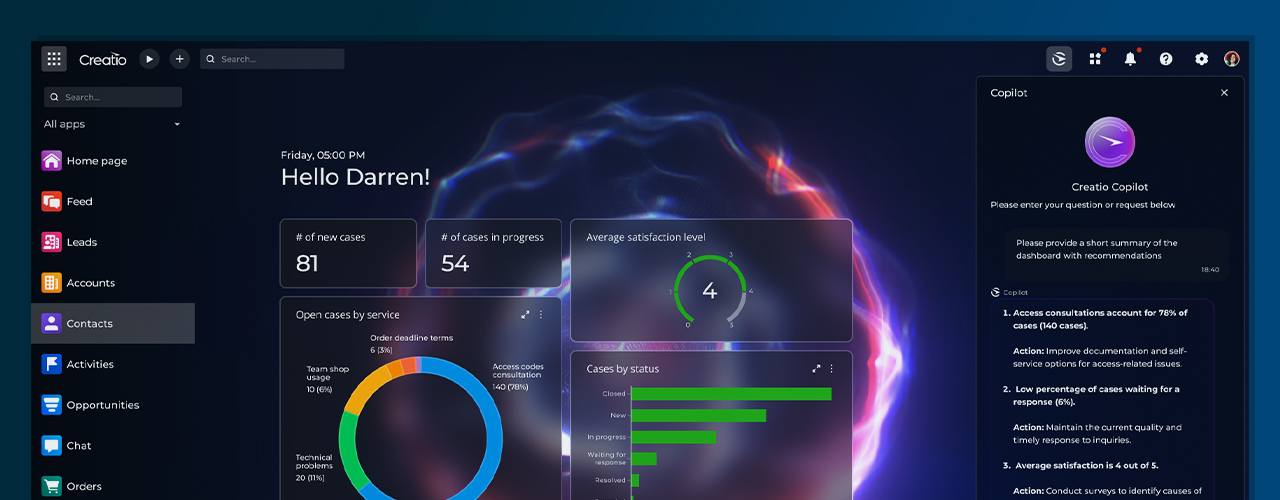
Creatio, global vendor of a leading sales, customer service and marketing CRM, recently announced the release of Creatio 8.2 Energy. Combining the capabilities of next-generation AI tools with a powerful no-code platform, Creatio stated in a recent event that this release can help organizations realize productivity savings of up to 80% for key knowledge worker roles.
The primary capabilities of this release include:
Copilot and AI: This tool is a comprehensive AI Command Center through which businesses can manage, modify and create AI scenarios. Copilot includes more than 20 new out-of-the-box AI use cases for CRM and assisted development. In keeping with the existing no-code platform, all teaching is done using natural language.
CRM Excellence: Creatio 8.2 includes new features and updates for advanced order and proposal management, lead generation, and marketing campaign automation, along with marketplace extensions.
No-code: Expanded Freedom UI capabilities, new drag-and-drop components, and simplified tools for designing no-code integrations.
Howden’s, the premiere trade kitchen supplier in the United Kingdom, was an early adopter of Creatio 8.2 Energy. When the company needed to replace legacy CRM systems, they chose Creatio for its no-code platform as well as its emphasis on an efficient, speedy user experience.
Since their implementation, Howden’s teams at multiple locations are seeing value in having one shared system, starting with improved communication through a shared dashboard used throughout the company. And now that employees can share data seamlessly, their strike rates (ratio of the number of prospects or inquiries to the number of sales) have improved due to better lead tracking. Howden’s can also keep a closer eye on contacts with their customer contacts, and they have been able to improve targeting of different audiences.
All Creatio customers can begin using the AI Command Center today and begin applying AI capabilities to their own specific use cases while taking advantage of a wealth of enhanced features.
Interested in learning more about how a next-generation CRM can help unleash the power of your organization? Contact us to learn more about how you can scale up your sales, customer experience, and marketing.
Read more
0 Comments