




Traceability is no longer a luxury, it’s a necessity. In industries like manufacturing and distribution, where quality, safety, and compliance are paramount, the ability to trace products from origin to destination is critical. Thankfully, Sage X3 has comprehensive traceability tools to help businesses meet regulatory requirements, improve operational efficiency, and respond swiftly whenever quality issues may occur.
Introduction: Why Traceability Matters and Supporting Features in Sage X3
For supply chain and quality managers, traceability provides:
- Visibility: Track the movement and transformation of products across the supply chain.
- Accountability: Identify the source of defects or non-compliance quickly.
- Compliance: Meet industry regulations such as FDA, ISO, and GxP.
- Efficiency: Streamline recalls, audits, and quality control processes.
Whether you’re dealing with food safety, pharmaceutical integrity, or industrial manufacturing standards, traceability ensures that every component and product can be accounted for.
Sage X3 supports traceability through several integrated features:
- Lot Tracking: Monitor batches of products with expiration dates, quality status, and/or supplier information.
- Serial Number Management: Track individual items for precision from receipt to post-sale service.
- Traceability Reports: Generate detailed reports for audits, recalls, and compliance checks.
These tools are designed to work seamlessly across manufacturing, inventory, and distribution modules, giving users a unified view of product history and movement.
Now, let’s explore the core components of traceability in Sage X3 listed below:
- Lot Tracking – How to configure and use lot tracking effectively.
- Serial Number Management – Precision tracking for high-value or regulated products.
- Traceability Reports – Turning data into actionable insights.
- Compliance Integration – Aligning traceability with quality and regulatory workflows.
- Advanced Tips & Trends – Future-proofing your traceability strategy
Part 1: Lot Tracking – The Backbone of Product Traceability
Lot tracking is a cornerstone of effective traceability in Sage X3. It enables businesses to monitor product batches throughout their lifecycle: from procurement and production to distribution and post-sale. This capability is especially vital in industries where quality, safety, and compliance are non-negotiable.
What is Lot Tracking?
Lot tracking refers to the ability to assign and monitor a unique identifier (lot number) to a batch of products. This identifier links the batch to key information such as:
- Supplier or production source
- Manufacturing or receipt date
- Expiration, recontrol or use-by date
- Quality control status
In Sage X3, lot tracking is deeply integrated across inventory, manufacturing, and distribution modules, allowing for seamless traceability.
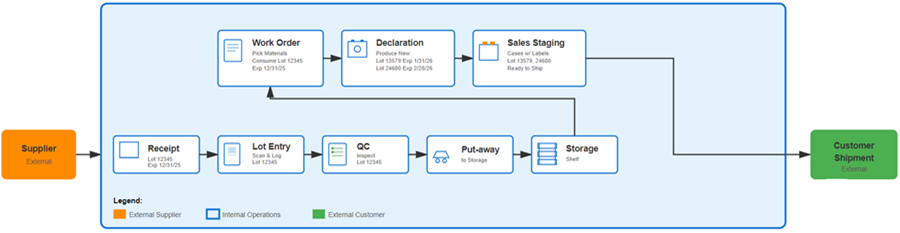
Steps to Configure Lot Tracking in Sage X3
- Product Setup:
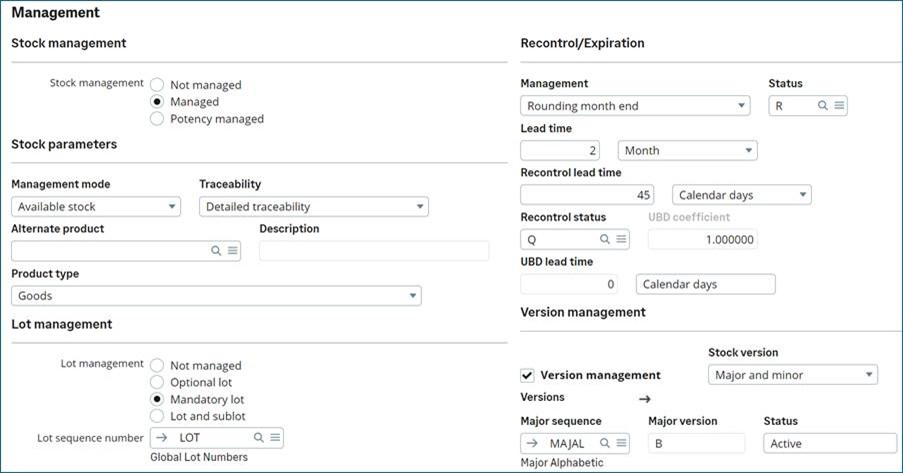
- Product must be stock managed
- Traceability modes:
- Detailed traceability: Every movement of this product is recorded on a log file.
- Summary traceability: Movements that relate to a single product, lot, status, document and transaction are totaled and recorded on a log file.
- No traceability: Stock movements for this product are not recorded on a log file.
- Lot management options:
- Optional lot: lot is not mandatory at receipt, I can be added later, or ignored
- Mandatory lot: lot has to be entered at receipt (purchase or production declaration)
- Not that if received at a dock location type, the entry is optional to allow quick truck unloading, it will be mandatory during put-away plan
- Lot and sublot will add one layer of traceability
- Lot sequence number: If assigned, a lot will automatically be assigned at receipt without user entry.
- If empty, lot will be entered at receipt
- Stock management rules and product category specific receipt rules can add another layer of control to the entry of the lot at receipt
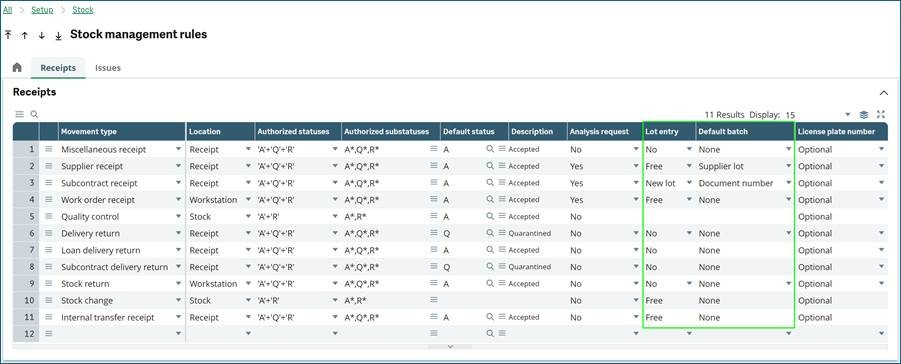
- Expiration, recontrol and use-by-date Management: Set shelf-life parameters and expiration rules with status when expired or recontroled.
- If you want the system to change status automatically every day based on expiration and or recontrol, use recurring tasks:
- FUNSTOP for expiration
- FUNSTOLTI for recontrol
- Note that if you are expecting to have FUNSTOLTI changing stock from A to Q for recontrol, but recontrol was not done on time before expiration, FUNSTOP will not pick Q status stocks, and won’t change it to R
- Additional setup is at the stock movement and product category issue and rules to manage behavior
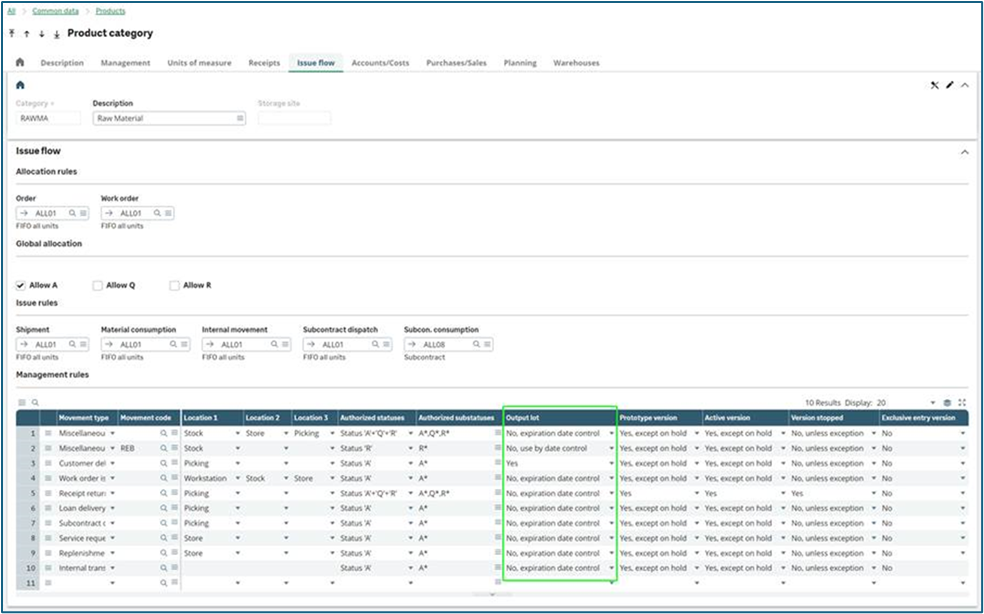
- If you want the system to change status automatically every day based on expiration and or recontrol, use recurring tasks:
These configurations ensure that each lot is traceable and its status is visible throughout the system.
Maximizing the value of Lot Tracking in Sage X3
Best Practices Include:
- Standardize Lot Numbering: Use consistent formats to simplify identification.
- You can also record the supplier lot for future communication with your suppliers.
- Automate Where Possible: Reduce manual errors with automatic lot assignment.
- Integrate with Quality Control: Link lot tracking to quality checks and inspections.
- Train Users: Ensure staff understand how to manage and trace lots effectively.
Avoid These Common Mistakes:
- Incomplete Configuration: Missing setup steps can lead to traceability gaps.
- Manual Errors: Manual lot entry increases the risk of mistakes.
- Lack of Expiration Controls: Not managing shelf life can result in expired stock
Part 2: Serial Number Management – Precision in Product Identification
Serial number management in Sage X3 provides a higher level of traceability than lot tracking by assigning a unique identifier to each individual item. This is essential for industries where precision and accountability are critical, such as electronics, medical devices, and high-value equipment.
Why Serial Number Management Matters
Unlike lot tracking, which groups items under a batch, serial tracking ensures that every single unit can be traced throughout its lifecycle. This enables:
- Regulatory Compliance: Meet strict standards for traceability in regulated industries.
- Warranty and Service Management: Track individual items for repairs and returns.
- Asset Control: Prevent theft and manage high-value inventory.
How Serial Number Management Works in Sage X3
Sage X3 allows you to:
- Assign unique serial numbers during receipt, production, and shipment.
- Link serial numbers to product history, transactions, and quality checks.
- Especially for manufacturing, you can link Material serials that were used to make each finished product unique serial number.
- Integrate serial tracking with inventory, manufacturing, and after-sales service.
Configuring Serial Number Management on the product:
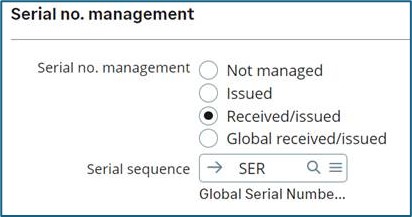
Enable Serial Control: Activate serial number management at the product level:
- Issued: products are received in bulk, no serial is assigned, following internal transactions will not require any serial entry
- Entry is mandatory when the stock is issued: WO material consumption, Sales picking / delivery
- Note that with this setup the serial linking for WO function is not available.
- Received and Issued: Serial number is entered at receipt, except for receipt at dock, where is can be left blank for a quick truck unloading, they will be entered at time of put-away.
- For every transaction, stock location change for example, counts will require a serial# entry.
- Stock is managed by unit, 1 stock line per serial
- Global Received and Issued: similar to Received and Issued, but global manages a group of serials instead of having a stock line per serial
- Negative stock is not authorized.
- The stock needs to be managed with stock units / Eaches
- Receipt at dock will not allow you to enter serials, only during put-away
- A product with serial numbers managed by Global received / issued cannot be used as a component in a subcontract BOM.
- Serial numbers are not automatically determined during the automatic allocation determination (GENSTOALL component), but they are during the automatic determination of the stock to be issued (GENSTOSORW component).
- The serial numbers can be identified on the detailed allocations of pick lists, deliveries and supplier returns. They cannot be identified on sales orders, work orders, subcontract orders and project tasks. Thus the WO serial linkage is not available.
- You cannot change this value from Not managed or Issued to Global received / issued once stock transactions for this product have been recorded.
- You cannot change this value from Received / issued to Global received / issued. Use the Serial management modification function (FUNSERMGT) to do this instead.
Use Cases
- Medical Devices: Ensure compliance with health regulations.
- Electronics: Manage warranty claims and service history.
- Luxury Goods: Authenticate products and prevent counterfeiting.
Best Practices
- Automate serial number generation to reduce errors.
- Validate serial numbers during transactions.
- Train staff on scanning and recording serials accurately.
Common Pitfalls
- Duplicate Serials: Avoid manual entry errors.
- Incomplete Tracking: Ensure serial numbers are captured at every stage.
In summary, serial number management in Sage X3 complements lot tracking to deliver full traceability. By implementing best practices and leveraging automation, businesses can achieve precision, compliance, and operational efficiency.
Part 3: Traceability Reports – From Data to Decisions
Traceability reports in Sage X3 transform raw data into actionable insights. They allow businesses to track product movements, identify sources of issues, and demonstrate compliance with regulatory standards. For supply chain and quality managers, these reports are essential tools for decision-making and risk management.
Why Traceability Reports Are Important
- Compliance: Provide documented proof for audits and regulatory checks.
- Recall Management: Quickly identify affected lots or serial numbers.
- Quality Assurance: Detect patterns in defects or non-conformance.
- Operational Efficiency: Reduce time spent searching for product history.
Types of Traceability Reports in Sage X3
- Inquiry screen: Traceability [CONSSTK]
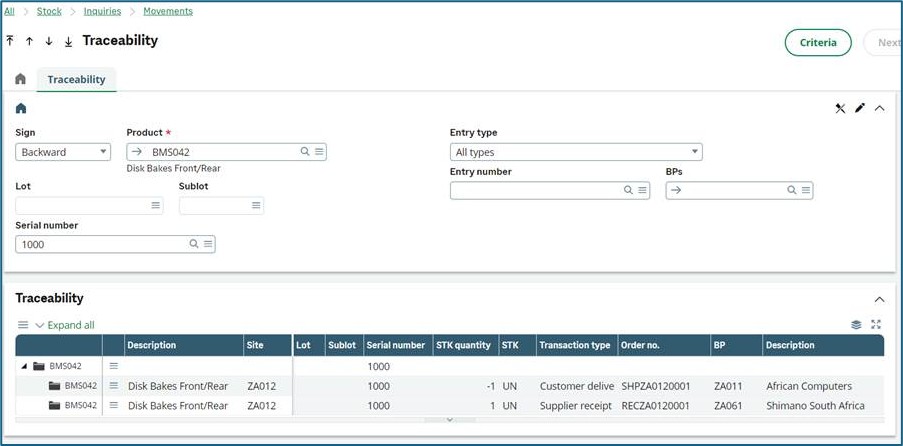
- Lot Traceability Report: Shows the complete lifecycle of a lot—from purchase to production and sale.
- Serial Number Traceability Report: Tracks individual items across transactions.
- Upstream and Downstream Traceability: Identify all components used in a finished product and all customers who received it.
- Compliance Reports: Generate documentation for industry standards (e.g., FDA, ISO).
- The entire history of transactions is stored in X3, you can create reports to pull that data for your audits.
How to Generate Traceability Reports
- Navigate to Stock > Traceability in Sage X3.
- Select the report type (Lot or Serial).
- Apply filters: product, lot number, date range, transaction type.
- Export reports in PDF or Excel for audits and internal reviews.
Best Practices for Using Traceability Reports
- Regular Reviews: Schedule periodic checks to ensure data accuracy.
- Integrate with Quality Control: Link reports to inspection results for deeper insights.
- Prepare for Audits: Keep reports organized and accessible.
- Leverage Analytics: Use data trends to improve processes and reduce risks.
Common Pitfalls
- Incomplete Data: Missing lot or serial information can compromise report accuracy.
- Poor Filtering: Incorrect filters lead to misleading results.
- Manual Errors: Ensure data entry processes are standardized and automated where possible.
Conclusion on Traceability Reports
These are more than just compliance tools—they’re also strategic assets when used appropriately. By mastering these reports, businesses can enhance transparency, improve quality, and respond swiftly to challenges.
Part 4: Integrating Traceability with Quality and Compliance Workflows
Traceability in Sage X3 becomes truly powerful when integrated with quality control and compliance processes. This ensures that every lot and/or serial number, not only moves through the supply chain, but also meets regulatory and internal quality standards.
Why Integration Matters
- Regulatory Compliance: Industries such as pharmaceuticals, food & beverage, and aerospace require documented proof of quality checks linked to traceability.
- Risk Mitigation: Detect and isolate non-conforming products before they reach customers.
- Operational Efficiency: Automate workflows to reduce manual intervention and errors.
How Sage X3 Supports Integration
Sage X3 provides tools to link traceability with quality and compliance:
- Quality Control Module: Attach inspection plans to lots and serial numbers.
- Non-Conformance Management: Flag and manage defective items during QC.
- Workflow Automation: Trigger alerts and approvals based on quality status.
- Compliance Documentation: Generate reports for audits and certifications.
Key Integration Points
- Receiving: Perform quality checks on incoming lots and record results.
- Production: Validate raw material lots before consumption in work orders.
- Finished Goods: Inspect declared products and assign quality status.
- Shipping: Ensure only approved lots are staged for delivery.
Best Practices
- Standardize Inspection Plans: Define clear criteria for each product category.
- Automate Quality Status Updates: Link QC results to lot availability.
- Maintain Audit Trails: Keep detailed records of inspections and approvals.
- Train Teams: Ensure staff understand integrated workflows.
Common Pitfalls
- Disconnected Systems: Avoid manual processes that break traceability.
- Incomplete QC Data: Missing inspection results can lead to compliance gaps.
- Delayed Approvals: Automate workflows to prevent bottlenecks.
Conclusion
Integrating traceability with quality and compliance workflows in Sage X3 strengthens end-to-end control, supports regulatory readiness, and builds customer confidence. With the right automations and best practices in place, businesses can transform compliance from a requirement into a competitive advantage.
If you have questions or would like to explore how traceability can be integrated into your Sage X3 system, contact Net at Work. We are here to help whenever you need us.