
Another year has passed and it’s time to say hello to 2025. Net at Work and the Sage 100 team cannot thank everyone enough for allowing us to be your technical & trusted advisor and help you unleash the power of your businesses.

Sage 100 Newsletter – Q1 2025
Keeping You Up-To-Date With Information About Sage 100
How to Create a New User In Sage 100 – Part 2
In the previous newsletter, we covered the basics of creating a user account and assigning existing roles to it. This is part two of two, which walks you through creating a security role.
Microsoft will Deprecate the SMTP Auth Protocol Starting in September 2025
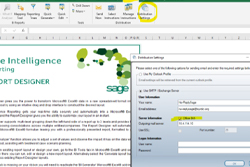
Starting in September 2025, Microsoft will deprecate the SMTP AUTH protocol for applications connecting to Office 365. This affects any clients using Paperless Office in Sage 100, Sage Alerts (formerly KnowledgeSync), or Sage Intelligence for sending emails.
How Modern ERP Systems Drive Growth and Efficiency

If you’re still relying on a legacy ERP, you might miss out on significant opportunities for growth and innovation. Let’s explore how migrating to a modern ERP solution can transform your business and set you up for long-term success.
Effective Risk Management & Tax Compliance
In this on-demand webinar our partners and tax & compliance experts at Avalara highlight the common risks of compliance and how automation can reduce exposure and enhance operational efficiency.
In the News: Net at Work Recognized for Managed Security Services Excellence for Seventh Consecutive Year
At a time of accelerating growth, Net at Work recognized as a top technology provider in the managed services landscape.
Featured Sage 100 Consultant: Venessa Griffin

I have been working in the Sage 100 world for over 20 years both as an end user and a consultant. As an end user I enjoy finding a solution that can assist our clients in streamlining and simplifying their processes.
Sage 100 Quick Tips
By Brett Zimmerman, Senior Business Analyst / Consultant
By Brett Zimmerman, Senior Business Analyst / Consultant
How to stop users from deleting Sales Order invoices
This relates to invoice data entry, not invoice history which cannot be deleted. Although you can enable the ‘Retain Deleted [invoice entry] Invoices’ setting in A/R Options on the A/R Setup menu > tab 6 History (left-side), you may wish to not allow certain users/Roles from even having the ability to Delete:
- Access Role Maintenance from the Library Master module > Security menu or Main menu depending on your version.
- Select the Role to edit.
- Typically on tab 1 Tasks: expand Sales Order, then Maintenance/Data Entry, then Invoice Data Entry – and uncheck ‘Remove’ (which will hide the Delete button in invoice entry).
- You can then optionally do the same for A/R Invoice Entry, P/O Receipt of Goods, and P/O Receipt of Invoice.



