Sage 100 Newsletter – Q1 2025
Keeping You Up-To-Date With Information About Sage 100
Microsoft will Deprecate the SMTP Auth Protocol Starting in September 2025
Starting in September 2025, Microsoft will deprecate the SMTP AUTH protocol for applications connecting to Office 365. This affects any clients using Paperless Office in Sage 100, Sage Alerts (formerly KnowledgeSync), or Sage Intelligence for sending emails.
To ensure continued functionality, users relying on Office 365 must switch to OAuth if they haven’t already. The below versions support OAuth, but require special configuration, if you haven’t done it already.
- Sage Alerts: You must be running version 10.05.01 or higher. (Though it’s recommended that you update to the latest version as additional changes have been made.)
- Paperless Office in Sage 100: OAuth configuration is supported with the following versions:
- 2021.4
- 2022.2
- Any newer versions
- Sage Intelligence: If you use Office 365 for sending reports, please contact your account manager to apply a hotfix.
Alternative Options:
If OAuth is not feasible for your setup, here are some alternatives:
- Middleware solutions like SendGrid
- Setting up an SMTP relay of your own
For more details, we encourage you and your IT team to review the information on Microsoft’s page under the section “POP, IMAP, and SMTP AUTH.” Please reach out to us with questions.
Deprecation of Basic Authentication in Exchange Online.
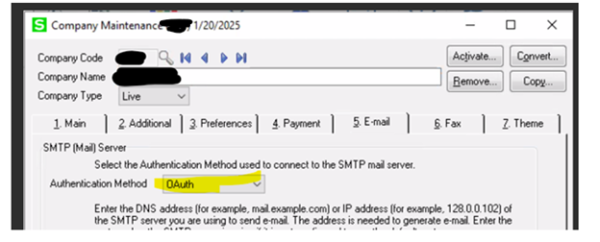
To see if you’re already using OAuth in Sage 100:
Open Library Master> Main> Company Maintenance. The Authentication Method on the E-mail tab (tab 5) should have OAuth selected.
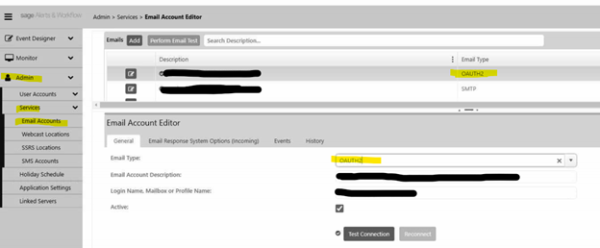
To see if you’re already using OAuth in Sage Alerts:
- Expand Admin> Services> Email Accounts
- The Email Type listed next to your email account should display “OAUTH2”
- You can also click the edit icon button next to the account and refer to the Email Type drop-down there.
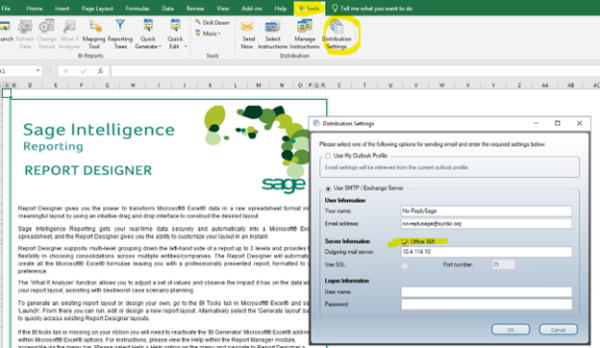
To see if you’re already using OAuth in Sage Intelligence:
- Open a Sage Intelligence report
- Click on the BI Tools menu in the ribbon
- Click Distribution Settings
- Office 365 should be checked if you are using OAuth