
Net at Work is hiring!
Grow your career with us.   Apply Now X
Need Help?
  • Application Remote Support
  • Infrastructure Remote Support
  • Sage HRMS Remote Support
  • Helpdesk
  • General Inquiry
1-800-719-3307
Net at Work Net at Work
  • Solutions & Services
    • ERP/Accounting
      Software & Vendor Selection
      ERP Implementation Services
      ERP Migration Services
      Acumatica
      NetSuite
      Sage X3
      Sage Intacct
      SDMO
      Sage 100 ERP
      Sage 300 ERP
      Sage 500 ERP
      CRM
      Strategic Advisory Services
      CRM Training Camp
      Creatio
      Sage CRM
      Employee Experience
      Sage HRMS
      Rippling
      Workforce Go
      Criterion
      Miviva
      Enterprise Content Management
      Imaging / Scanning
      Document Management
      Workflow Automation
      Solutions
      Nonprofit Solutions
      Abila by Community Brands
      NetSuite
      Sage
      Salesforce
      IT and Security Services
      Managed IT Services
      Fractional CIO Services
      Cloud Services
      Cloud at Work Sage Hosting
      DR/Business Continuity Planning
      Compliance & Security
      Storage & Recovery
      Networking
      IT Security Services
      Communications
      Web Solutions
      Services Overview
      B2B Technology Suite
      Magento eCommerce
      WordPress CMS
      Systems Integration
      Website Managed Services
      Online Marketing & SEO
      ERP eCommerce Integration
      Additional Solutions
      Enterprise Business Intelligence
      Avalara Automated Tax Solutions
      Fortis Payments
      Sage Fixed Assets
      Vertex SMB Sales and Use Tax
      Prime Foodservice Software
      Rental 360
  • Industries
    • Industries
      Chemicals
      Construction
      Discrete Manufacturing
      Field Service
      Food & Beverage
      Healthcare
      Industrial Manufacturing & Equipment
      Medical Devices
      Nonprofit
      Private Equity
      Retail
      Wholesale Distribution
  • Learning Center
    • Online Resources
      Recorded Webinars
      Whitepapers
      Ebooks
      Success Stories
      Upcoming Events
      Live Webinars
      Seminars
      Virtual Training Courses
      Training Courses
      View all available training course options
  • Company
    • Why Us
      Who We Are
      Management
      Our Partners
      Locations
      Careers
      News
      Press Releases
      Success Stories
      Net at Work Blog
      Contact Us
      1.800.719.3307
      Email Us
      Programs
      Alliance Partnership Program
      Women at Work
      Diversity and Inclusion
  • Blog
  • Contact Us
  • Contact Us

Home » Newsletters » Sage 300 Newsletter – April 2016 » The Basics of Connecting to Sage 300 Using the API

Sage 300

Sage 300 Newsletter – April 2016

Keeping You Up-To-Date With Information About Sage 300

The Basics of Connecting to Sage 300 Using the API

By: Ronnie Burle, Senior Technical Architect

sage300-article-api When integrating with Sage 300, the first step is to establish a connection. A valid connection will allow your system to read and write data from Sage 300 per your particular needs. There are two basic ways to establish a connection: programmatic or implementing Signon manager. Depending on the type and specifications of your integration, you would choose one method over the other.

SignOn Manager

You would use Signon Manager if you have an integration that requires a user to interactively sign into Sage 300. There are a number of reasons to use this method. For example, if you wanted to track which users were creating transactions in Sage 300, you would have them log in using Signon Manager. Another reason would be if you wanted to make your UI company independent. You would have the user log in using Signon Manager which includes choosing which company to log into. In fact, Signon Manager is the same interface used by Sage 300, so users will have a familiar login screen in your application. You don’t have to write any authentication routines, it is all built into the control.

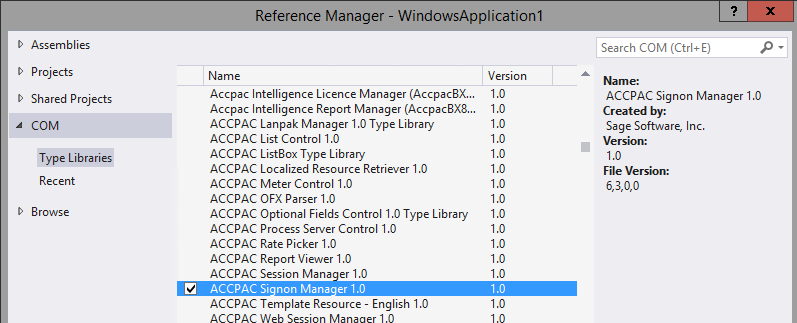
To use Signon manager in your application, you will need to add a reference to it. Here is an example of adding the reference in Visual Studio:
sage-300-api-01

Note that it will also add a reference to the “Accpac COM API” if you do not have it because there is a dependency.

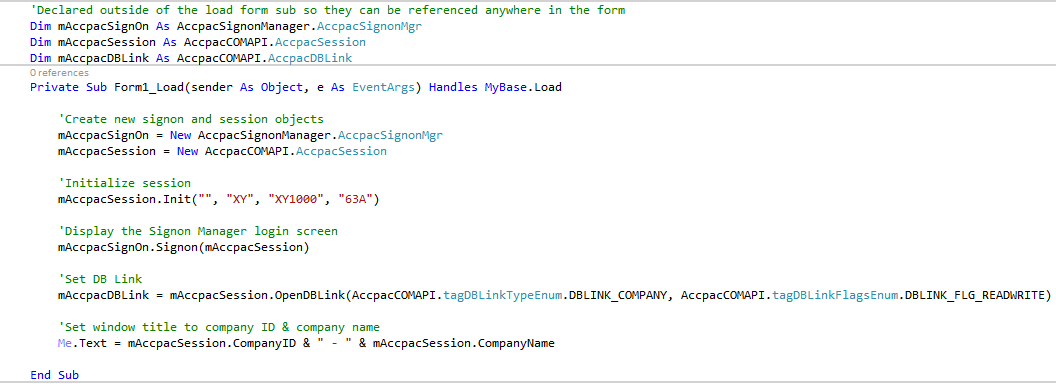
After adding a reference, you can instantiate Signon manager in code. Here is a VB.NET example:
sage-300-api-06

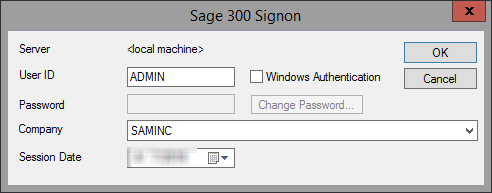
Using the Signon method will pop up the login screen Sage 300 users are accustomed to:
sage-300-api-02

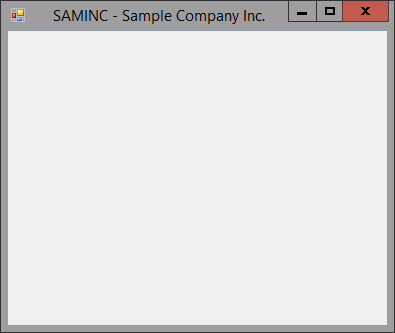
Once signed in, the code above displays the company ID and name in the title:
sage-300-api-03

Once you have your session via the Signon manager, you can open a DB link and from there you can interact with the company’s data. As you can see from the sample code above, in just a few lines of code you can be on your way to integrating with Sage 300.

Connecting programmatically

You would use this method of connecting to Sage 300 if your integration did not require any user interaction. Your application would need to store the user name, password and company ID that you will be connecting to. Typically, you would create a generic user or use the “Admin” user for this method. The same principles apply as the Signon manager method. You would need to initialize a session object, then login, then establish your DB link. First, you need to add a reference to the Accpac COM API. Here is an example of adding the reference in Visual Studio:
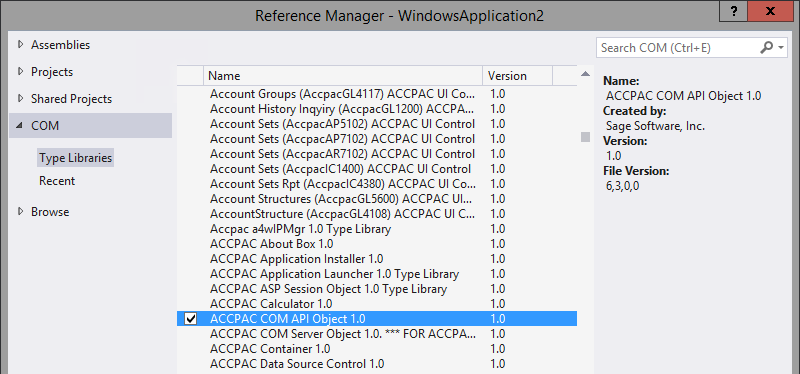
sage-300-api-04

Here is an example of establishing a connection using VB.NET:
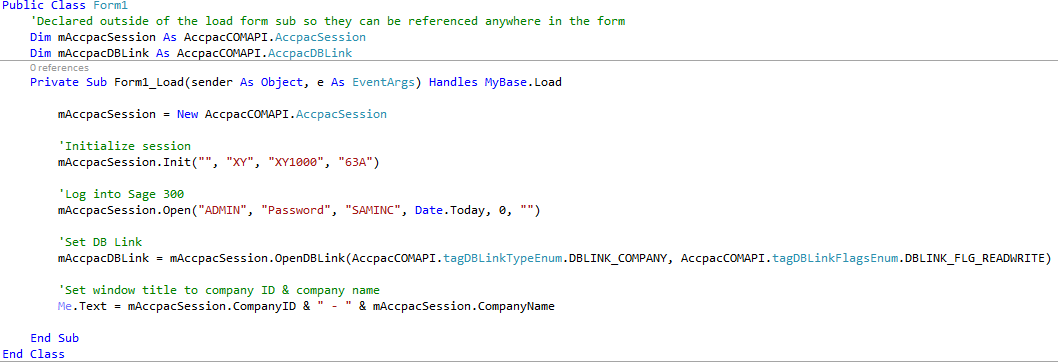
sage-300-api-05

Using the “Open” method and supplying the credentials will let you log into Sage 300 programmatically.

As you can see, there are different methods to connect to Sage 300 and depending on the integration, you will choose the more appropriate one. If you need assistance with any integration needs, our team at Net at Work will be happy to help.


« Return to Newsletter
  • This field is for validation purposes and should be left unchanged.
In This Issue
  • From the Desk of the Sage 300 Practice Director
  • Sage 300 Backup Procedures
  • Sage 300 Payment Processing: Ten Reasons to Integrate Your Payments
  • Managing Large Capital Projects in Sage 300
  • Sage 300 Tips: Look Up Payment Information & AP/AR Invoice Entry Quick Mode
  • The Basics of Connecting to Sage 300 Using the API
  • Are You Spending Too Much on Your Business Technology? Or Too Little?
  • Sage 300 Support

    Helpdesk:
    P: 888.494.9479
    E: helpdesk@netatwork.com

    Upcoming Live Webinars

    Sage 300 Virtual Educational Courses – See Dates/Times

    Supercharge Sage 300 with Fortis Payments
    October 8 | 2pm ET
    Register Here

    Year End CRM Evaluation: 2025 Platform Comparison Guide
    October 8 | 2pm ET
    Register Here

    Stop Microsoft 365 Attacks Before They Hit
    October 14 | 2pm ET
    Register Here

    Popular Recorded Webinars

    The Case for Hosting Sage 300 in the Cloud

    Sage 300 & Finance Leadership in Action: Outpace the Competition for Top Talent

    Extend the Power of Sage 300 with Seamless eCommerce Integration

    Sage + DocLink – Document Management, Less Paper, and Smarter Workflow

    Sage 300 Webinar Archive

    View our library of on-demand recorded webinars.

    Newsletter Archive

    Read our previous Sage 300 Newsletters here

    Connect With Us

    Business Applications

    • Overview
    • Software & Vendor Selection
    • ERP Implementation Services
    • ERP Migration Services
    • Cloud ERP
    • CRM
    • Employee Experience
    • ECM
    • Nonprofit Solutions

    Learning Center

    • White Papers & Guides
    • Ebooks
    • Training Courses
    • Virtual Training Courses
    • Success Stories
    • Live Webinars
    • Recorded Webinars
    • Trials

    Infrastructure Solutions

    • Managed IT Services
    • Fractional CIO & Advisory Services
    • Cloud Services
    • Cloud at Work Sage Hosting

    Support

    • Application Remote Support
    • Infrastructure Remote Support
    • Sage HRMS Remote Support
    • General Inquiry
    • Helpdesk

    Web Development

    • Services Overview
    • Magento eCommerce
    • WordPress CMS
    • Systems Integration
    • Website Managed Services
    • ERP eCommerce Integration

    Company Information

    • Why Us
    • Alliance Partnership Program
    • Women at Work
    • Diversity and Inclusion
    • Partners
    • Careers
    • News
    • Blog
    • Privacy Policy
    • Contact Us

    Additional Solutions

    • Enterprise Business Intelligence
    • Avalara Automated Tax Solutions
    • Fortis Payments
    • LeaseQuery Lease Accounting
    • Sage Fixed Assets (Sage FAS)
    • Vertex SMB Sales and Use Tax
    • Prime Foodservice Software
    • Rental 360
    • SDMO

    Industries

    • Chemicals
    • Construction
    • Discrete Manufacturing
    • Field Service
    • Food & Beverage
    • Healthcare
    • Industrial Manufacturing & Equipment
    • Medical Devices
    • Nonprofit
    • Private Equity
    • Wholesale Distribution
    Net at Work
    Net at Work (HQ)
    575 8th Ave
    New York, NY 10018

    P: (800) 719-3307
    info@netatwork.com
    Locations Across North America »
    Visit our sister companies:
    Cloud at Work - Sage Application Hosting
    Pixafy - An eCommerce Agency
    Docutrend
    WordPress Image Lightbox Plugin


    Our website uses cookies to ensure you get the best experience. Learn more.

    I Understand

