
Net at Work is hiring!
Grow your career with us.   Apply Now X
Need Help?
  • Application Remote Support
  • Infrastructure Remote Support
  • Sage HRMS Remote Support
  • Helpdesk
  • General Inquiry
1-800-719-3307
Net at Work Net at Work
  • Solutions & Services
    • ERP/Accounting
      Software & Vendor Selection
      ERP Implementation Services
      ERP Migration Services
      Acumatica
      NetSuite
      Sage X3
      Sage Intacct
      SDMO
      Sage 100 ERP
      Sage 300 ERP
      Sage 500 ERP
      CRM
      Strategic Advisory Services
      CRM Training Camp
      Creatio
      Sage CRM
      Employee Experience
      Sage HRMS
      Rippling
      Workforce Go
      Criterion
      Miviva
      Enterprise Content Management
      Imaging / Scanning
      Document Management
      Workflow Automation
      Solutions
      Nonprofit Solutions
      Abila by Community Brands
      NetSuite
      Sage
      Salesforce
      IT and Security Services
      Managed IT Services
      Fractional CIO Services
      Cloud Services
      Cloud at Work Sage Hosting
      DR/Business Continuity Planning
      Compliance & Security
      Storage & Recovery
      Networking
      IT Security Services
      Communications
      Web Solutions
      Services Overview
      B2B Technology Suite
      Magento eCommerce
      WordPress CMS
      Systems Integration
      Website Managed Services
      Online Marketing & SEO
      ERP eCommerce Integration
      Additional Solutions
      Enterprise Business Intelligence
      Avalara Automated Tax Solutions
      Fortis Payments
      Sage Fixed Assets
      Vertex SMB Sales and Use Tax
      Prime Foodservice Software
      Rental 360
  • Industries
    • Industries
      Chemicals
      Construction
      Discrete Manufacturing
      Field Service
      Food & Beverage
      Healthcare
      Industrial Manufacturing & Equipment
      Medical Devices
      Nonprofit
      Private Equity
      Retail
      Wholesale Distribution
  • Learning Center
    • Online Resources
      Recorded Webinars
      Whitepapers
      Ebooks
      Success Stories
      Upcoming Events
      Live Webinars
      Seminars
      Virtual Training Courses
      Training Courses
      View all available training course options
  • Company
    • Why Us
      Who We Are
      Management
      Our Partners
      Locations
      Careers
      News
      Press Releases
      Success Stories
      Net at Work Blog
      Contact Us
      1.800.719.3307
      Email Us
      Programs
      Alliance Partnership Program
      Women at Work
      Diversity and Inclusion
  • Blog
  • Contact Us
  • Contact Us

Home » Newsletters » Sage X3 Newsletter – Q4 2019 » How to Setup and Control Sales Rep Access in Sage X3

Sage X3

Sage X3 Newsletter – Q4 2019

Keeping You Up-To-Date With Information About Sage X3

How to Setup and Control Sales Rep Access in Sage X3

By: Net at Work Team

In the competitive world of sales, it is critical for sales reps to have sales statistics at their fingertips. At the same time, it is critical for companies to limit the access of a sales rep to their assigned accounts. For this reason, Sage X3 offers a simple way to restrict a user’s access, while allowing for transactions related to the rep to be accessible. This article explains in detail the process for setting up a sales rep and aligning the rep to an X3 user ID.

Create a Sales Rep ID:

Follow: Common data > BPs > Sale rep

1. Select new
2. Enter a Sales Rep ID and other relevant information related to the sales rep
3. Click create

Assign Row Level Permissions:

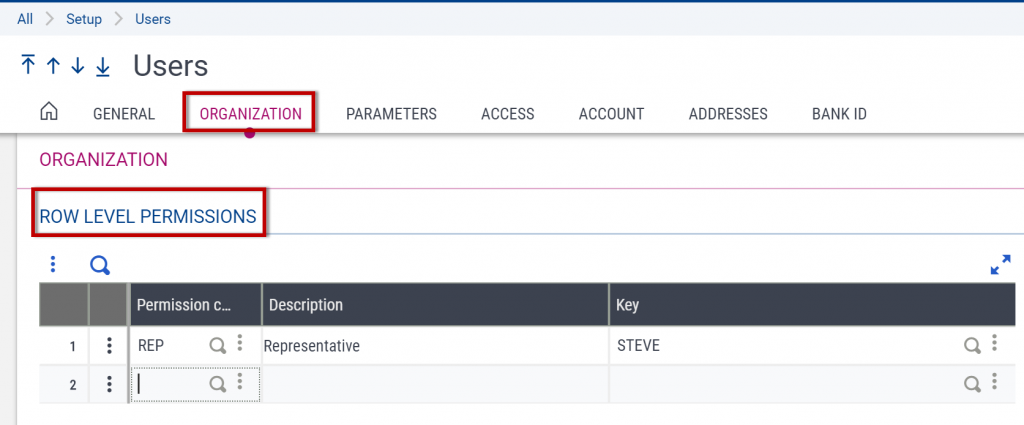
The Row Level permissions are the source for filtering out specific information based on the rule selected and value assigned to the rule. With these settings a user will only see customers that are assigned to the specified sales rep as well as quotes, orders, deliveries, and invoices that are created for these customers.

Follow: Setup > Users > User

1. Select the user ID that will be assigned to the sales rep
2. Select the organization tab
3. Under Row Level Permissions enter permission code REP – Representative
4. For the Key enter the Sales Rep code that is assigned to the specific user
Sales Rep Access - Sage X3

Linking a Sales Rep to a User:

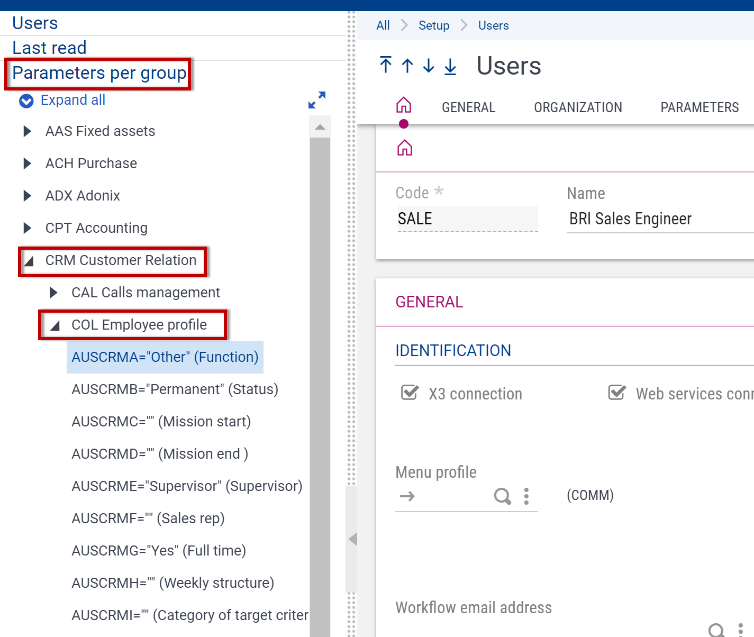
1. From the left-hand navigation on the user entry screen, select Parameters Per Group
2. Select CRM Customer Relations
3. Select COL Employee Profile then click on the first parameter to access the parameter chapter detail
Sales Rep Access - Sage X3

Assign Parameters:

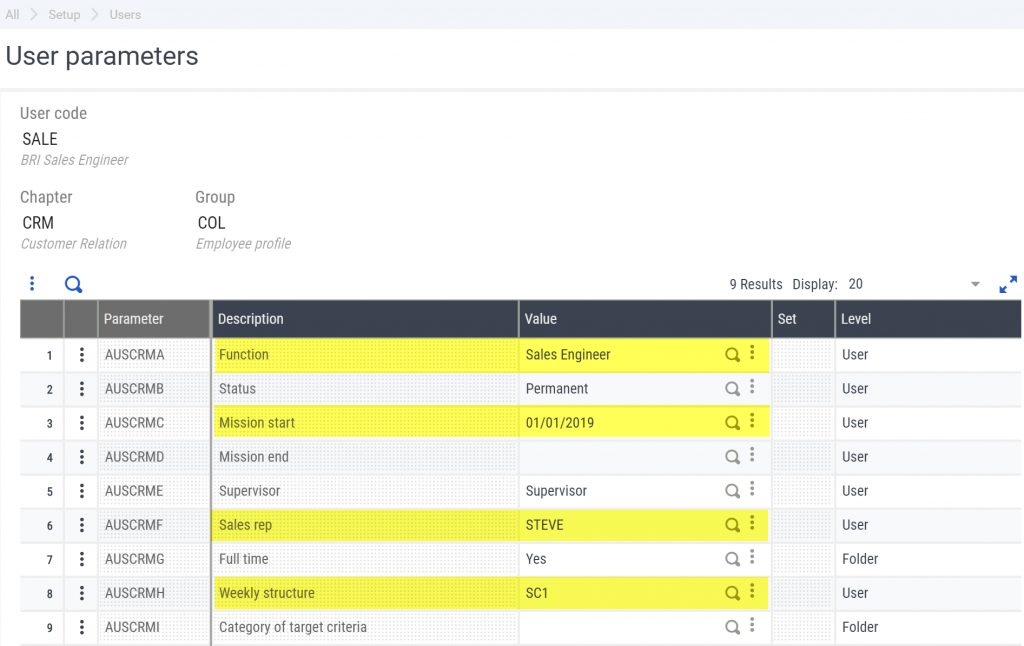
The parameter chapter detail is where the sales rep parameters will be defined. By defining these parameters, the user and the sales rep that has been created as a BP will be linked in Sage X3. For this to work properly the following parameters must be defined:

1. Function = Sales Engineer
2. Mission Start Date = Date of hire
3. Sales Rep Number = Sales Rep ID created in the sales rep function of the common data module
4. Weekly Structure = SC1 is 5 days 8 hours a day
Sales Rep Access - Sage X3

Row level permissions will work as designed without being linked to a sales rep ID code. However, by linking the user ID to the sales rep the user’s activities will now be tied to the sales rep and the user will be able to take advantage of the Sage X3 enhancements that were designed and developed specifically for the sales team.


« Return to Newsletter
  • This field is for validation purposes and should be left unchanged.
In This Issue
  • Sage X3 ERP Mexican Fiscal Enhancement for Better Control of Taxes
  • Sage X3 Tips: The Upcoming Microsoft LDAP Security Update
  • How to Setup and Control Sales Rep Access in Sage X3
  • Windows 10 Upgrade Guide
  • Project Spotlight: Net at Work and Sage X3 ERP Amplify the Long-Term Success of Vcom IMC
  • Support for Sage X3

    Helpdesk:
    P: 888.494.9479
    E: helpdesk@netatwork.com


    Upcoming Live Webinars & Events

    Sage X3 and the Power of the Cloud
    Date: Jan 8, 2020
    Time: 2 – 3 PM ET
    Learn More

    3 CRM Themes for Manufacturers in 2020
    Date: Jan 25, 2020
    Time: 2 – 3 PM ET
    Learn More

    Better Budgeting, Forecasting & Planning in Sage X3
    Date: Feb 12, 2020
    Time: 2 – 3 PM ET
    Learn More

    Be Prepared for 2020 Sales Tax Changes
    Date: Feb 26, 2020
    Time: 2 – 3 PM ET
    Learn More

    Popular Recorded Webinars

    Sage ERP & CRM Integration: Seamless, Real Time, and Bi-Directional

    Sage X3 Document Management by Altec

    Sage X3 Integrated Credit Card & Payment Processing

    Sage X3 Webinar Archive

    View our library of on-demand recorded webinars.

    Refer a friend, get a $100 Gift Card!

    Submit a Referral / Learn More!
    Do you have a friend or colleague whose company might benefit from utilizing a Net at Work service or solution? If so, refer them to us below and receive a $100 gift card or donation to your charity of choice!

    Connect With Us

    Business Applications

    • Overview
    • Software & Vendor Selection
    • ERP Implementation Services
    • ERP Migration Services
    • Cloud ERP
    • CRM
    • Employee Experience
    • ECM
    • Nonprofit Solutions

    Learning Center

    • White Papers & Guides
    • Ebooks
    • Training Courses
    • Virtual Training Courses
    • Success Stories
    • Live Webinars
    • Recorded Webinars
    • Trials

    Infrastructure Solutions

    • Managed IT Services
    • Fractional CIO & Advisory Services
    • Cloud Services
    • Cloud at Work Sage Hosting

    Support

    • Application Remote Support
    • Infrastructure Remote Support
    • Sage HRMS Remote Support
    • General Inquiry
    • Helpdesk

    Web Development

    • Services Overview
    • Magento eCommerce
    • WordPress CMS
    • Systems Integration
    • Website Managed Services
    • ERP eCommerce Integration

    Company Information

    • Why Us
    • Alliance Partnership Program
    • Women at Work
    • Diversity and Inclusion
    • Partners
    • Careers
    • News
    • Blog
    • Privacy Policy
    • Contact Us

    Additional Solutions

    • Enterprise Business Intelligence
    • Avalara Automated Tax Solutions
    • Fortis Payments
    • LeaseQuery Lease Accounting
    • Sage Fixed Assets (Sage FAS)
    • Vertex SMB Sales and Use Tax
    • Prime Foodservice Software
    • Rental 360
    • SDMO

    Industries

    • Chemicals
    • Construction
    • Discrete Manufacturing
    • Field Service
    • Food & Beverage
    • Healthcare
    • Industrial Manufacturing & Equipment
    • Medical Devices
    • Nonprofit
    • Private Equity
    • Wholesale Distribution
    Net at Work
    Net at Work (HQ)
    575 8th Ave
    New York, NY 10018

    P: (800) 719-3307
    info@netatwork.com
    Locations Across North America »
    Visit our sister companies:
    Cloud at Work - Sage Application Hosting
    Pixafy - An eCommerce Agency
    Docutrend
    WordPress Image Lightbox Plugin


    Our website uses cookies to ensure you get the best experience. Learn more.

    I Understand

