
Net at Work is hiring!
Grow your career with us.   Apply Now X
Need Help?
  • Application Remote Support
  • Infrastructure Remote Support
  • Sage HRMS Remote Support
  • Helpdesk
  • General Inquiry
1-800-719-3307
Net at Work Net at Work
  • Solutions & Services
    • ERP/Accounting
      Software & Vendor Selection
      ERP Implementation Services
      ERP Migration Services
      Acumatica
      NetSuite
      Sage X3
      Sage Intacct
      SDMO
      Sage 100 ERP
      Sage 300 ERP
      Sage 500 ERP
      CRM
      Strategic Advisory Services
      CRM Training Camp
      Creatio
      Sage CRM
      Employee Experience
      Sage HRMS
      Rippling
      Workforce Go
      Criterion
      Miviva
      Enterprise Content Management
      Imaging / Scanning
      Document Management
      Workflow Automation
      Solutions
      Nonprofit Solutions
      Abila by Community Brands
      NetSuite
      Sage
      Salesforce
      IT and Security Services
      Managed IT Services
      Fractional CIO Services
      Cloud Services
      Cloud at Work Sage Hosting
      DR/Business Continuity Planning
      Compliance & Security
      Storage & Recovery
      Networking
      IT Security Services
      Communications
      Web Solutions
      Services Overview
      B2B Technology Suite
      Magento eCommerce
      WordPress CMS
      Systems Integration
      Website Managed Services
      Online Marketing & SEO
      ERP eCommerce Integration
      Additional Solutions
      Enterprise Business Intelligence
      Avalara Automated Tax Solutions
      Fortis Payments
      Sage Fixed Assets
      Vertex SMB Sales and Use Tax
      Prime Foodservice Software
      Rental 360
  • Industries
    • Industries
      Chemicals
      Construction
      Discrete Manufacturing
      Field Service
      Food & Beverage
      Healthcare
      Industrial Manufacturing & Equipment
      Medical Devices
      Nonprofit
      Private Equity
      Retail
      Wholesale Distribution
  • Learning Center
    • Online Resources
      Recorded Webinars
      Whitepapers
      Ebooks
      Success Stories
      Upcoming Events
      Live Webinars
      Seminars
      Virtual Training Courses
      Training Courses
      View all available training course options
  • Company
    • Why Us
      Who We Are
      Management
      Our Partners
      Locations
      Careers
      News
      Press Releases
      Success Stories
      Net at Work Blog
      Contact Us
      1.800.719.3307
      Email Us
      Programs
      Alliance Partnership Program
      Women at Work
      Diversity and Inclusion
  • Blog
  • Contact Us
  • Contact Us

Home » Newsletters » Sage X3 Newsletter – July 2018 » Creating Selection Filters in Sage X3

Sage X3

Sage X3 Newsletter – July 2018

Keeping You Up-To-Date With Information About Sage X3

Creating Selection Filters in Sage X3
By: Net at Work Team

Creating Selection Filters

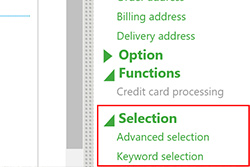
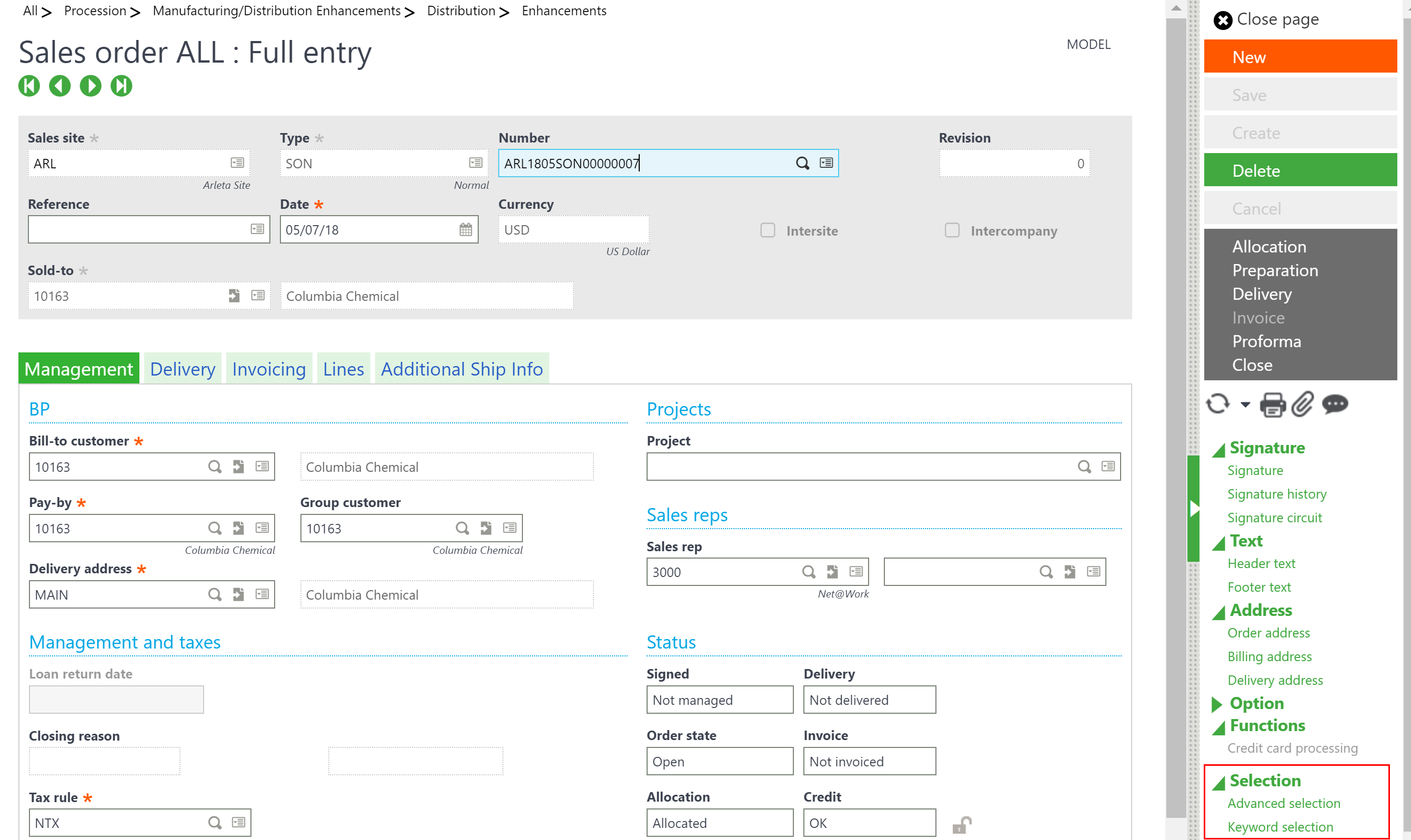
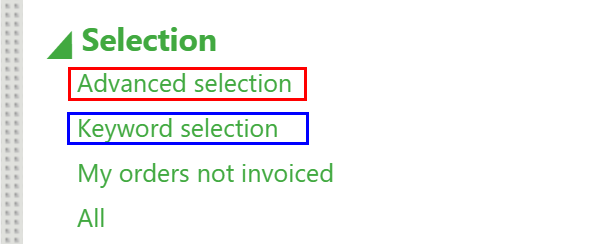
In every Sage X3 function a Selections tab can be found on the right-side menu; this tab contains two options “Advanced selection” and “Keyword selection.”  These enable users to filter the content of the left list, which reduces the number of records making it easier to navigate to relevant records more quickly.
Advanced object selection

Use Advanced object selection for advanced search capabilities when searching for specific fields that are stored in the header of a specific function.

  • For example, when entering a sales order, you can use the Advanced object selection to search for specific orders by not invoiced and creation user
  • It is accessed by clicking the Actions icon and selecting Advanced selection.
  • After selecting the Advanced selection link, the following Object selection window appears allowing you to filter items to narrow your search.
  • Using the multiple lines to filter using the And/Or options will allow for searches to be narrowed by multiple criteria simultaneously. In the example below only records with an invoice status of “Partially Invoiced and Not Invoiced” created by the NAW user will appear in the left list.
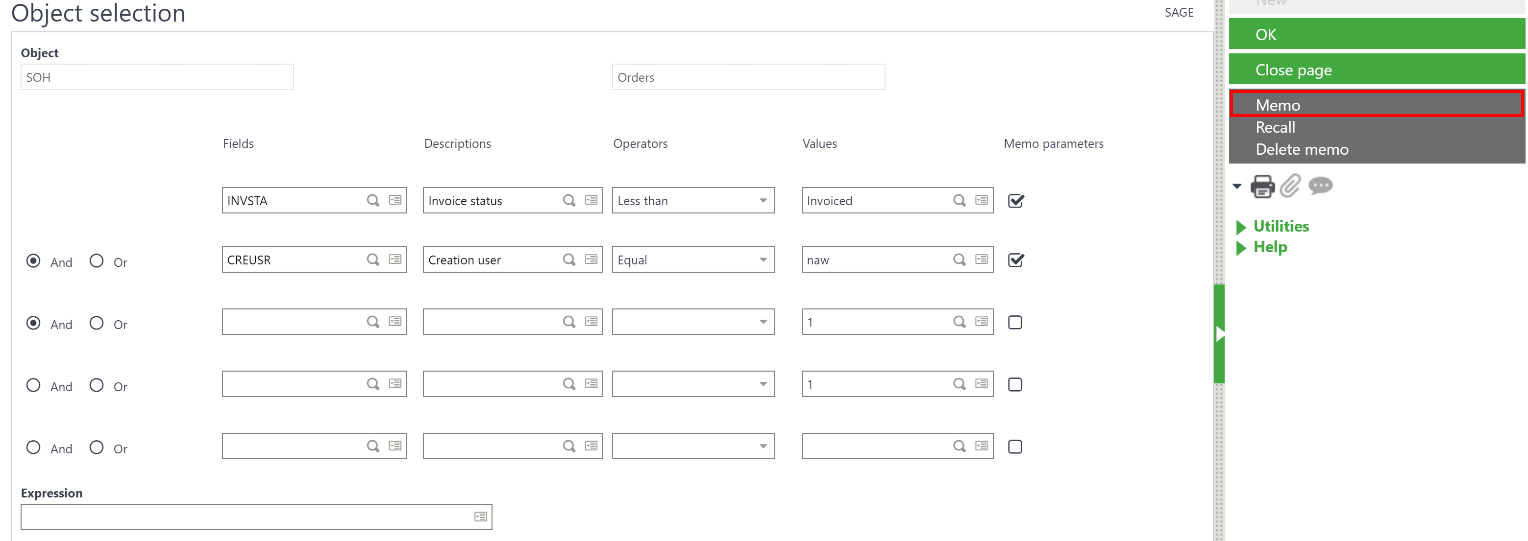
  • Selecting the Memo parameters check boxes allows you to change the parameters before each search is performed.
  • In the fields column use the Selection icon in the field to select a specific field to filter on
  • The description will populate automatically
  • Then based on the value that is either selected or keyed in use the operator to define whether the filter is greater than, less than, equal to, etc.
  • After entering all the needed filters, click OK. The Left list redisplays with the filtered information.
  • The criteria of these selections can be saved by clicking Memo in the right panel of the object selection window to save the filter
  • The Recall button can be used to enter any saved filters.
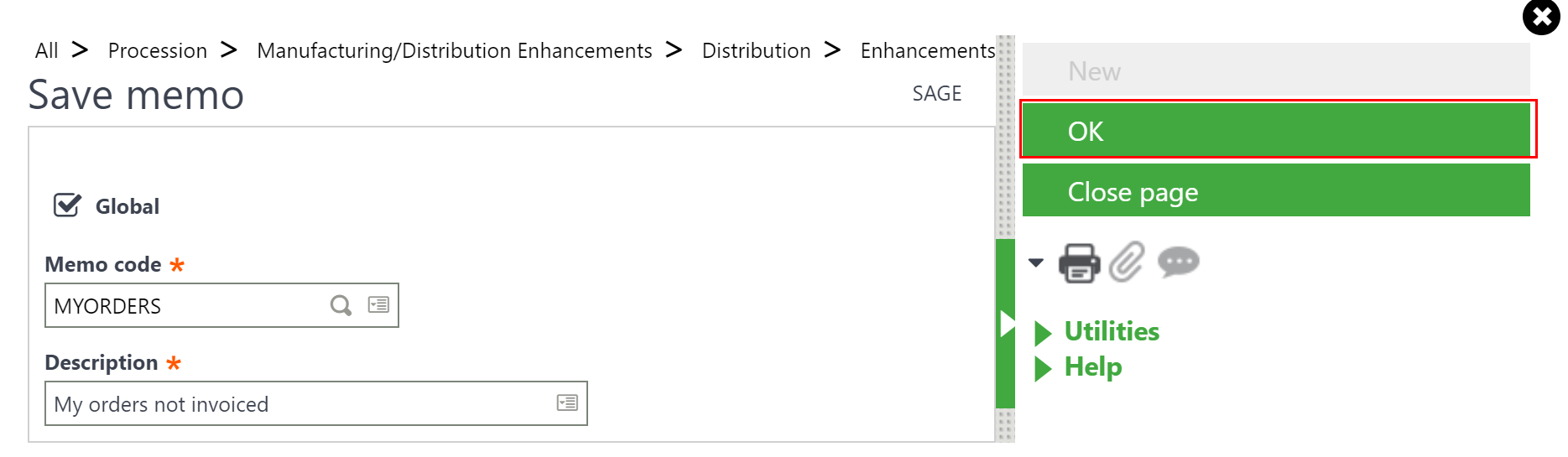
  • Selecting the Global check box to make the selection available to all users when it is saved.
  • Click OK to save the memo settings.
  • After saving the memo and description close out of the current function and return to see the new code description on the right-side menu under the selection tab.
  • Selecting All removes any filters and shows all records available for this function. It is a fast way for clearing out any predefined filters.
  • The Memo can also be deleted by selecting delete in the object selection window shown above. This will remove the description from the selection tab on the right-side menu of the function once the user exits the screen (sale order in this case) and re-enters the function.
  • Note: Entering the STD (Standard) code will have the left list display this default filter of the left list records every time a user reenters the function. The factory STD memo is for all records to be displayed without any filter.

Keyword Selection

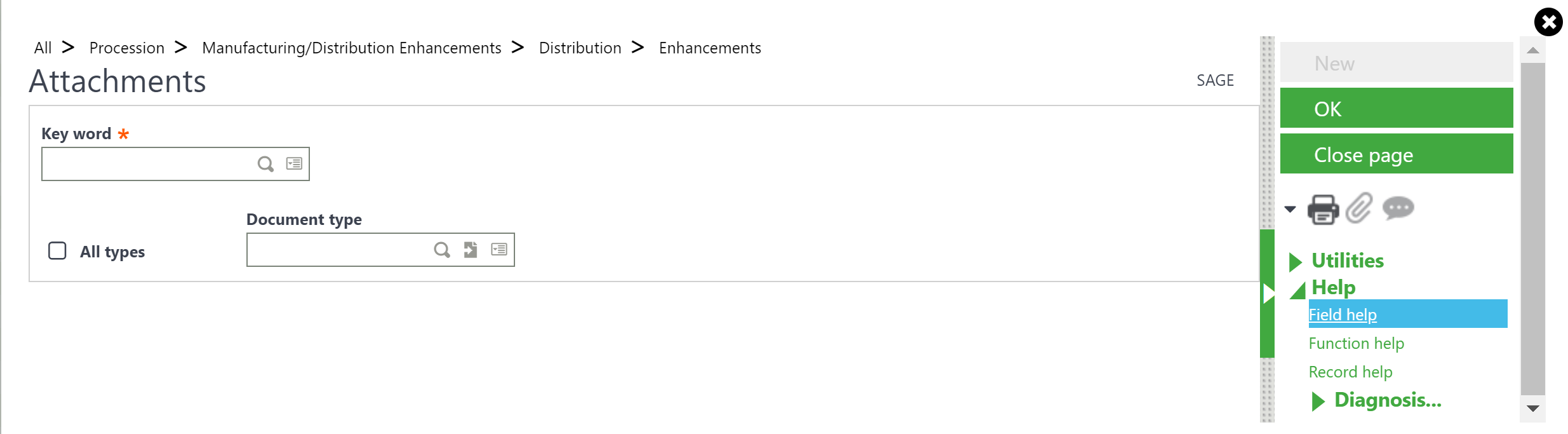
The keyword selection is a basic one time use filter for searching for attachments associated with the record.  When saving an attachment using a keyword this filter will display any records that contain this key word within the attachment description.

« Return to Newsletter
  • This field is for validation purposes and should be left unchanged.
In This Issue
  • From the Desk of the Sage (X3) Enterprise Management Practice Director
  • E-commerce Sales Tax
  • Sage X3 Tips & Tricks: Subcontract Orders Without a Work Order
  • Sage Enterprise Intelligence Tips & Tricks: Column Formatting in Sage X3
  • Sage (X3) Enterprise Management Supporting Compliance with GDPR
  • Creating Selection Filters in Sage X3
  • Chemical Corner: Container Management
  • Support for Sage X3

    Helpdesk:
    P: 888.494.9479
    E: helpdesk@netatwork.com


    Upcoming Live Webinars & Events

    Sage X3 and the Power of the Cloud
    Date: Jan 8, 2020
    Time: 2 – 3 PM ET
    Learn More

    3 CRM Themes for Manufacturers in 2020
    Date: Jan 25, 2020
    Time: 2 – 3 PM ET
    Learn More

    Better Budgeting, Forecasting & Planning in Sage X3
    Date: Feb 12, 2020
    Time: 2 – 3 PM ET
    Learn More

    Be Prepared for 2020 Sales Tax Changes
    Date: Feb 26, 2020
    Time: 2 – 3 PM ET
    Learn More

    Popular Recorded Webinars

    Sage ERP & CRM Integration: Seamless, Real Time, and Bi-Directional

    Sage X3 Document Management by Altec

    Sage X3 Integrated Credit Card & Payment Processing

    Sage X3 Webinar Archive

    View our library of on-demand recorded webinars.

    Refer a friend, get a $100 Gift Card!

    Submit a Referral / Learn More!
    Do you have a friend or colleague whose company might benefit from utilizing a Net at Work service or solution? If so, refer them to us below and receive a $100 gift card or donation to your charity of choice!

    Connect With Us

    Business Applications

    • Overview
    • Software & Vendor Selection
    • ERP Implementation Services
    • ERP Migration Services
    • Cloud ERP
    • CRM
    • Employee Experience
    • ECM
    • Nonprofit Solutions

    Learning Center

    • White Papers & Guides
    • Ebooks
    • Training Courses
    • Virtual Training Courses
    • Success Stories
    • Live Webinars
    • Recorded Webinars
    • Trials

    Infrastructure Solutions

    • Managed IT Services
    • Fractional CIO & Advisory Services
    • Cloud Services
    • Cloud at Work Sage Hosting

    Support

    • Application Remote Support
    • Infrastructure Remote Support
    • Sage HRMS Remote Support
    • General Inquiry
    • Helpdesk

    Web Development

    • Services Overview
    • Magento eCommerce
    • WordPress CMS
    • Systems Integration
    • Website Managed Services
    • ERP eCommerce Integration

    Company Information

    • Why Us
    • Alliance Partnership Program
    • Women at Work
    • Diversity and Inclusion
    • Partners
    • Careers
    • News
    • Blog
    • Privacy Policy
    • Contact Us

    Additional Solutions

    • Enterprise Business Intelligence
    • Avalara Automated Tax Solutions
    • Fortis Payments
    • LeaseQuery Lease Accounting
    • Sage Fixed Assets (Sage FAS)
    • Vertex SMB Sales and Use Tax
    • Prime Foodservice Software
    • Rental 360
    • SDMO

    Industries

    • Chemicals
    • Construction
    • Discrete Manufacturing
    • Field Service
    • Food & Beverage
    • Healthcare
    • Industrial Manufacturing & Equipment
    • Medical Devices
    • Nonprofit
    • Private Equity
    • Wholesale Distribution
    Net at Work
    Net at Work (HQ)
    575 8th Ave
    New York, NY 10018

    P: (800) 719-3307
    info@netatwork.com
    Locations Across North America »
    Visit our sister companies:
    Cloud at Work - Sage Application Hosting
    Pixafy - An eCommerce Agency
    Docutrend
    WordPress Image Lightbox Plugin


    Our website uses cookies to ensure you get the best experience. Learn more.

    I Understand


