Net at Work is hiring!
Grow your career with us.   Apply Now X
Need Help?
  • Application Remote Support
  • Infrastructure Remote Support
  • Sage HRMS Remote Support
  • Helpdesk
  • General Inquiry
1-800-719-3307
Net at Work Net at Work
  • Solutions & Services
    • ERP/Accounting
      Software & Vendor Selection
      ERP Implementation Services
      ERP Migration Services
      Acumatica
      NetSuite
      Sage X3
      Sage Intacct
      SDMO
      Sage 100 ERP
      Sage 300 ERP
      Sage 500 ERP
      CRM
      Strategic Advisory Services
      CRM Training Camp
      Creatio
      Sage CRM
      Employee Experience
      Sage HRMS
      Rippling
      Workforce Go
      Criterion
      Miviva
      Enterprise Content Management
      Imaging / Scanning
      Document Management
      Workflow Automation
      Solutions
      Nonprofit Solutions
      Abila by Community Brands
      NetSuite
      Sage
      Salesforce
      IT and Security Services
      Managed IT Services
      Fractional CIO Services
      Cloud Services
      Cloud at Work Sage Hosting
      DR/Business Continuity Planning
      Compliance & Security
      Storage & Recovery
      Networking
      IT Security Services
      Communications
      Web Solutions
      Services Overview
      B2B Technology Suite
      Magento eCommerce
      WordPress CMS
      Systems Integration
      Website Managed Services
      Online Marketing & SEO
      ERP eCommerce Integration
      Additional Solutions
      Enterprise Business Intelligence
      Avalara Automated Tax Solutions
      Fortis Payments
      Sage Fixed Assets
      Vertex SMB Sales and Use Tax
      Prime Foodservice Software
      Rental 360
  • Industries
    • Industries
      Chemicals
      Construction
      Discrete Manufacturing
      Field Service
      Food & Beverage
      Healthcare
      Industrial Manufacturing & Equipment
      Medical Devices
      Nonprofit
      Private Equity
      Retail
      Wholesale Distribution
  • Learning Center
    • Online Resources
      Recorded Webinars
      Whitepapers
      Ebooks
      Success Stories
      Upcoming Events
      Live Webinars
      Seminars
      Virtual Training Courses
      Training Courses
      View all available training course options
  • Company
    • Why Us
      Who We Are
      Management
      Our Partners
      Locations
      Careers
      News
      Press Releases
      Success Stories
      Net at Work Blog
      Contact Us
      1.800.719.3307
      Email Us
      Programs
      Alliance Partnership Program
      Women at Work
      Diversity and Inclusion
  • Blog
  • Contact Us
  • Contact Us

Home » Newsletters » Sage X3 Newsletter – July 2018 » Sage X3 Tips & Tricks: Subcontract Orders Without a Work Order

Sage X3

Sage X3 Newsletter – July 2018

Keeping You Up-To-Date With Information About Sage X3

Sage X3 Tips & Tricks: Subcontract Orders Without a Work Order
By: Elliot Malkin, Senior Business Analyst/Consultant

Subcontract orders are created to purchase one or more services from a supplier without having to set up and use the Enterprise Management Manufacturing module.  Subcontract orders also allow tracking of components that come from stock and sent to a supplier along with components or material provided by the supplier.

Setup:

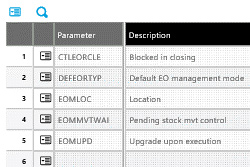
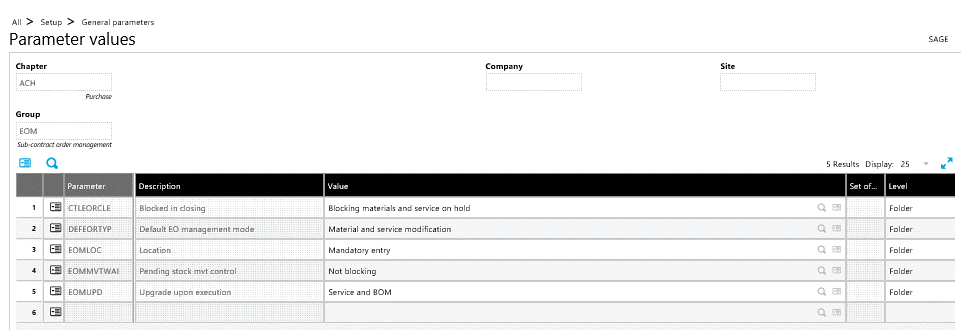
Purchasing subcontract parameters – EOM (Subcontract order management)
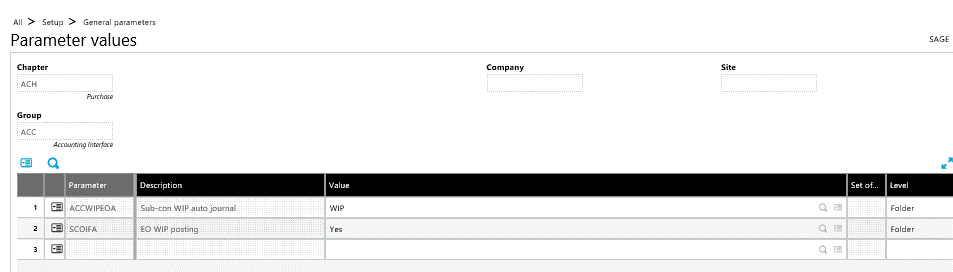
Purchasing subcontract parameters – ACC (Accounting Interface)
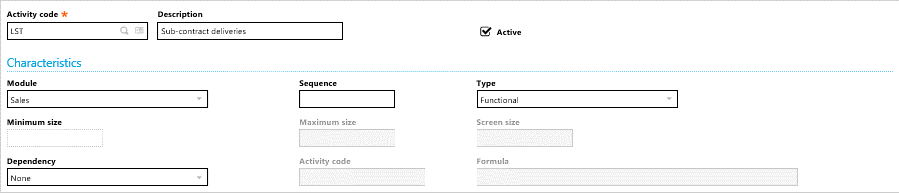
  • Activate Activity code LST – Subcontract deliveries
Supplier being sent the subcontract order will also need to be setup as a customer if components are being sent to the supplier.  This will facilitate subcontract shipments.
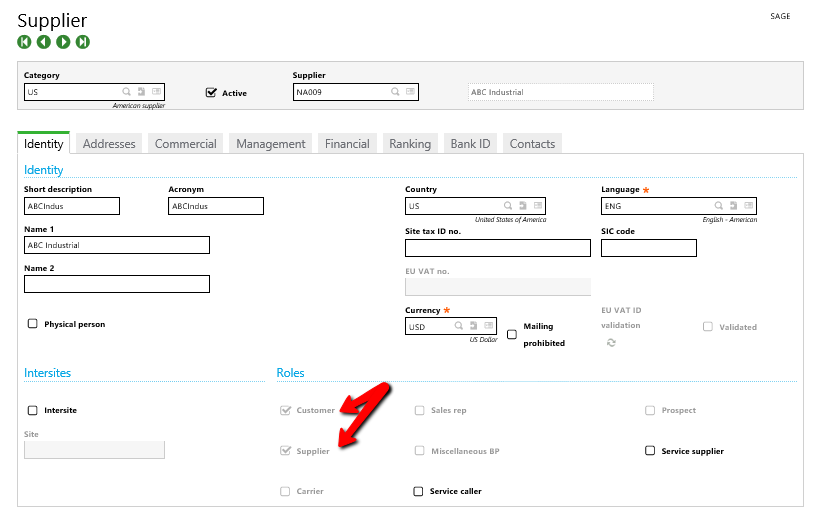
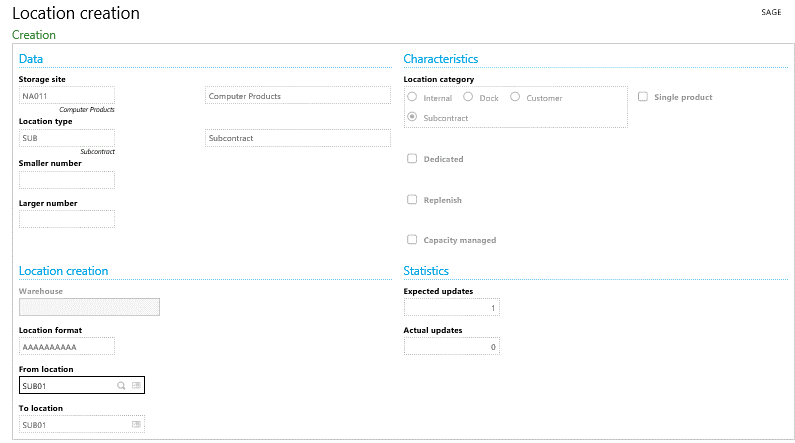
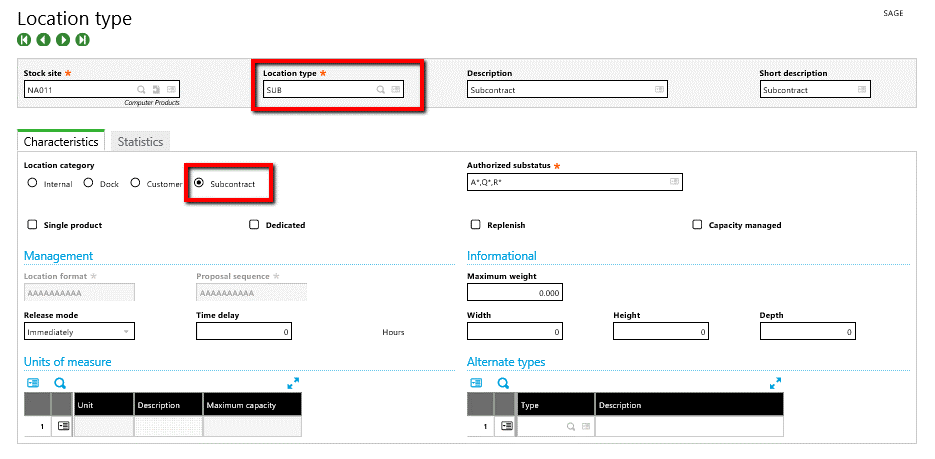
Create subcontract Location type and Locations.
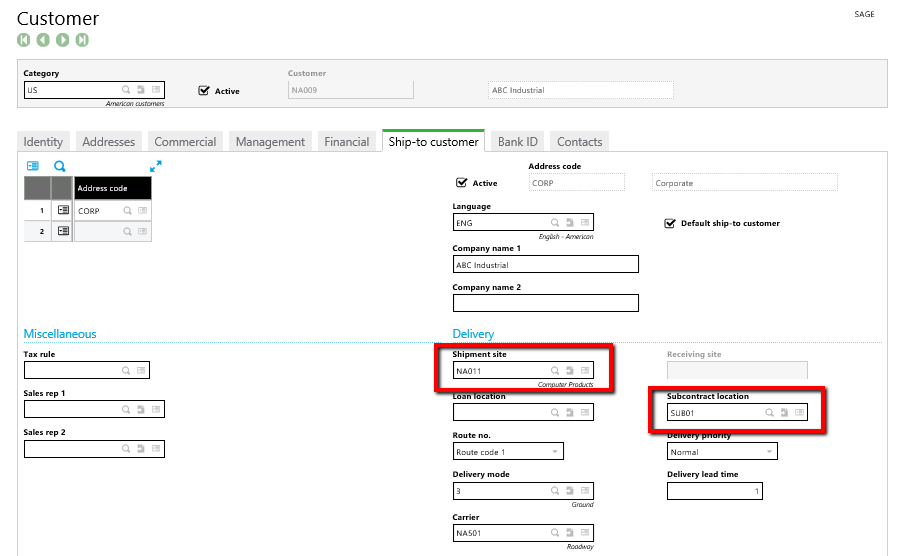
Setup subcontract parameters on the Ship-to customer in Customers
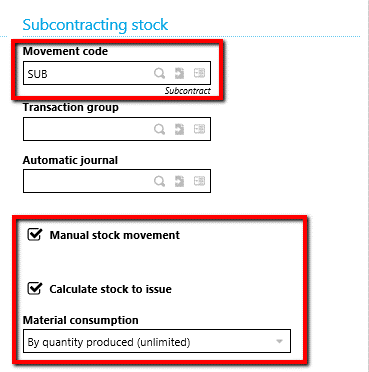
Subcontract receipts require a transaction entry parameter with Subcontracting stock outputs set up as below
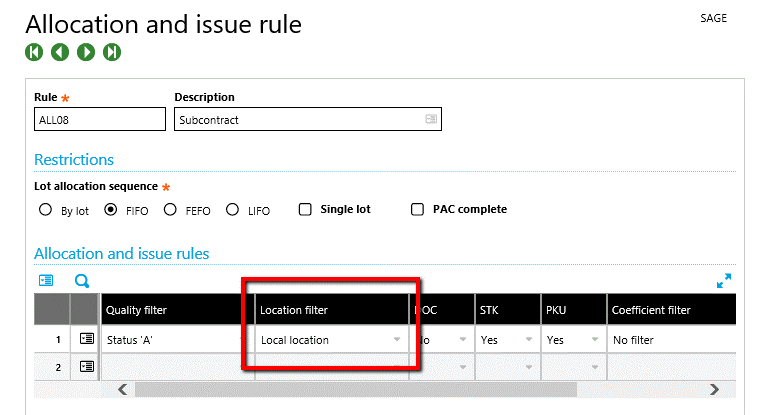
Modify allocation rule ALL08 (Setup>Stock>Allocation and issue rule) by setting the Location filter equal to “Local location” for Status “A”.
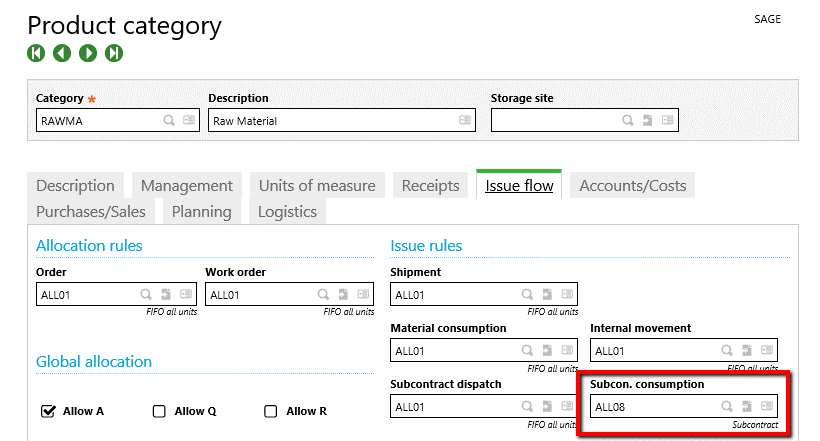
Add the allocation rule to Product categories associated with raw material or components shipped to subcontract suppliers. This is done on the Issue flow tab as indicated below.
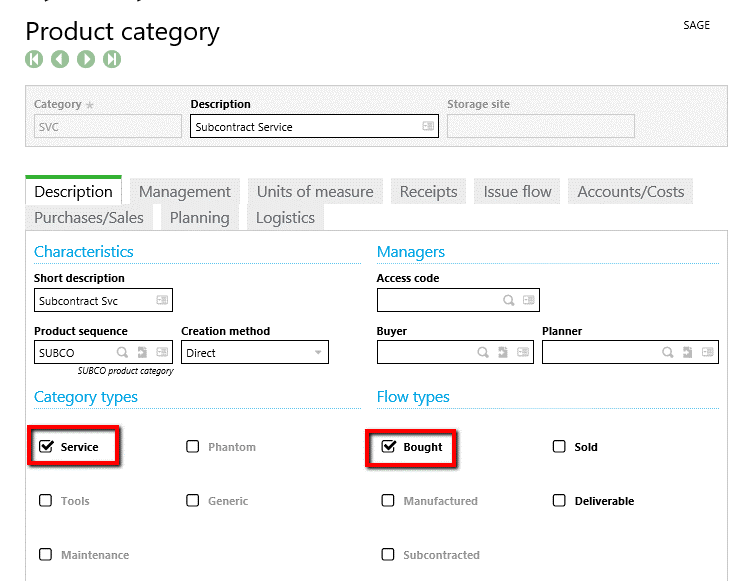
Create a new Product category for service parts.
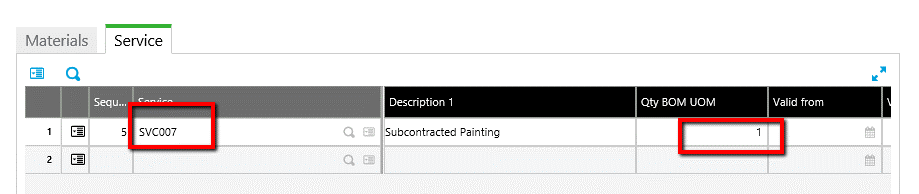
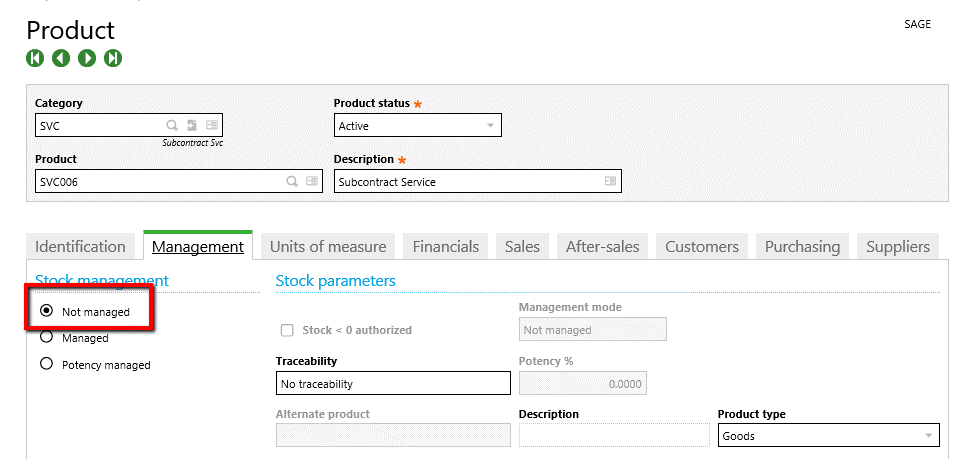
Create a subcontract service item.  Select the Subcontract Service category from above, and flag the item as Not managed and add supplier data as illustrated below.
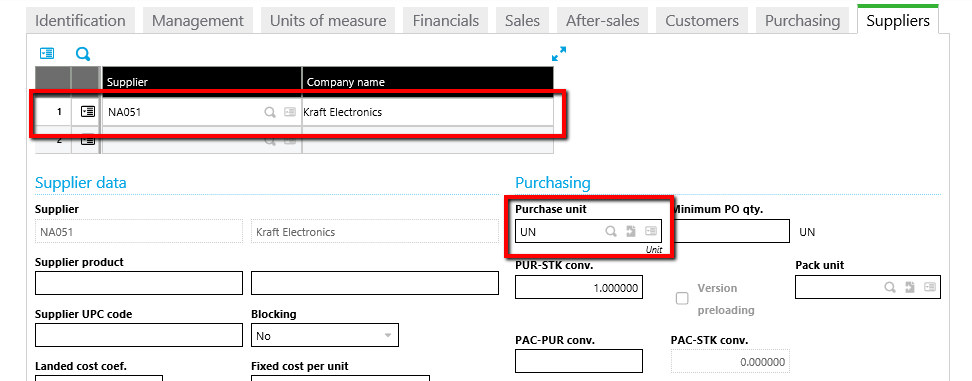
Make sure the Accounting code associated with the new service part has the PO Clearing account in rows 1 and 41 – and a subcontract variance account in row 47

Set up a Subcontract BOM code.
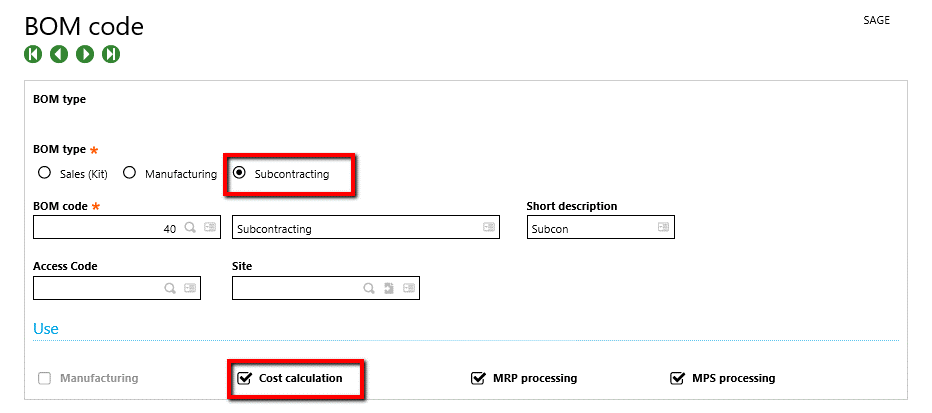
Create a subcontract BOM.
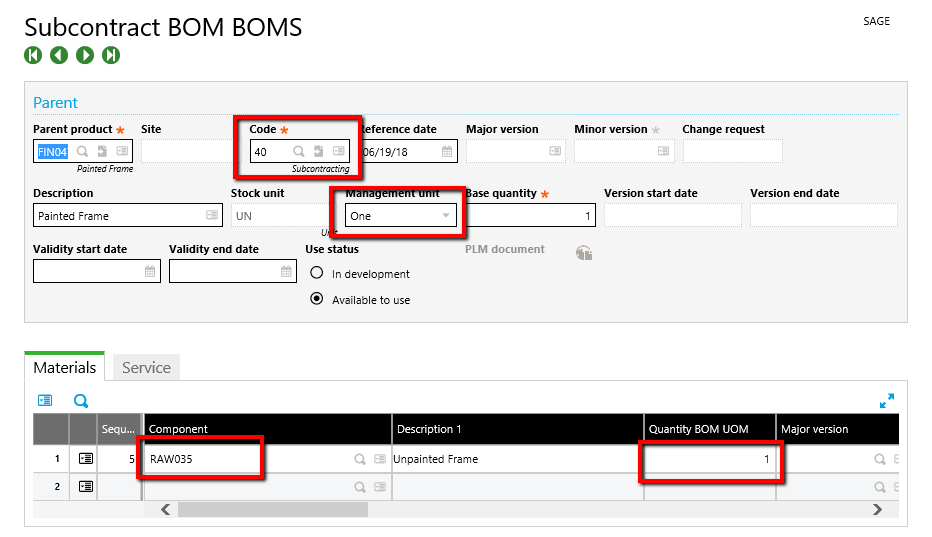
Perform a standard cost calculation for the subcontracted product. Costing>Cost calculations>Standard cost calculation.  Make sure select the subcontract BOM type.

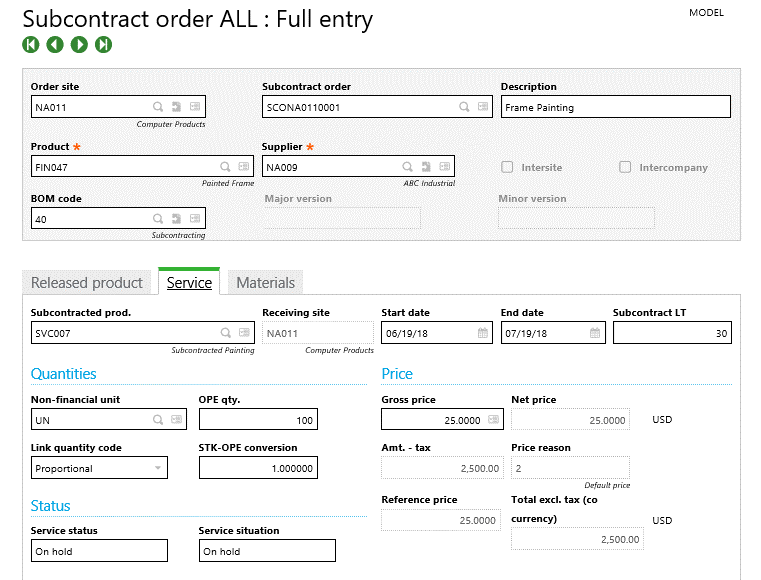
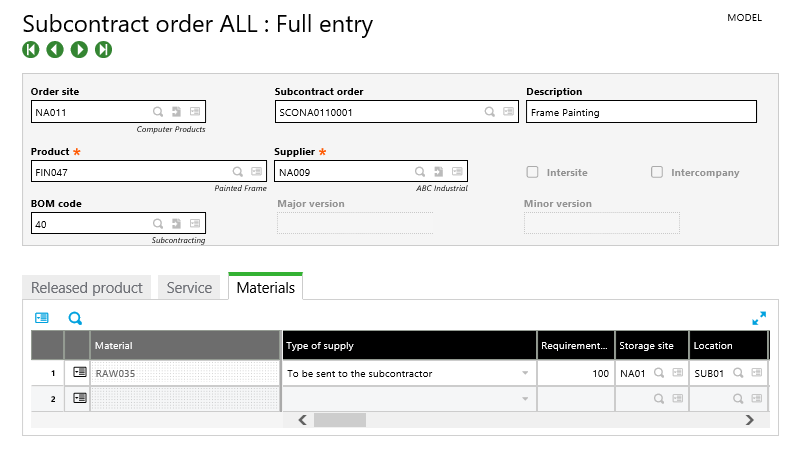
Create a new subcontract order.  Purchasing>Subcontract>Subcontract orders.
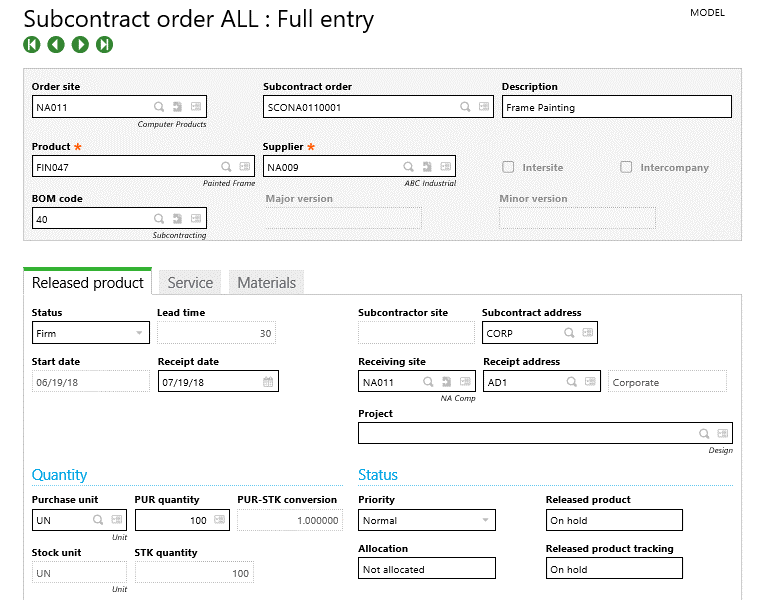
Click Order in the Specific actions menu on the right-hand panel and Order again to generate a subcontract PO.  A Log Reading will appear like the one below indicating the PO created for the subcontract order.
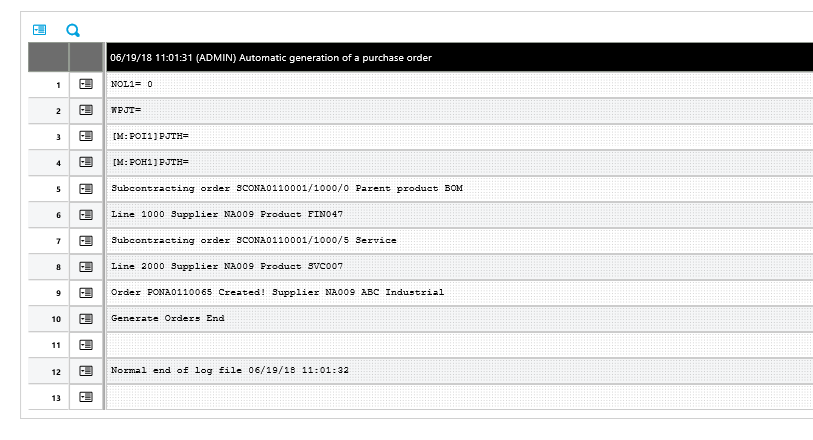
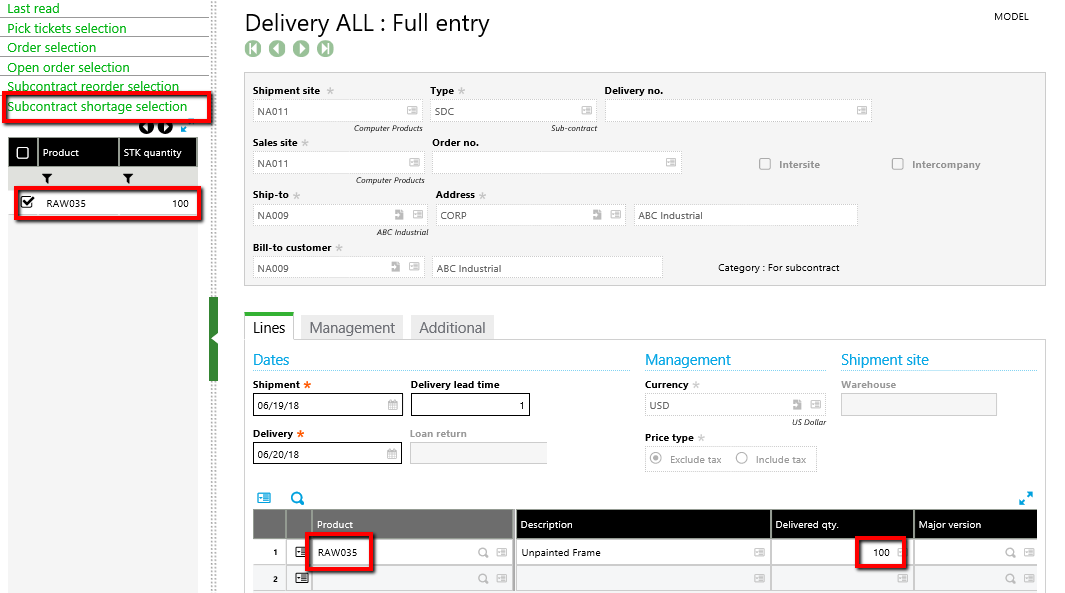
The raw materials can now be shipped to the Supplier.  Navigate to Sales>Deliveries>Deliveries and create a new delivery.  Be certain to use the Delivery type SDC for subcontract orders.  Your subcontract order will be in Subcontract shortage selection drawer in the Left list.
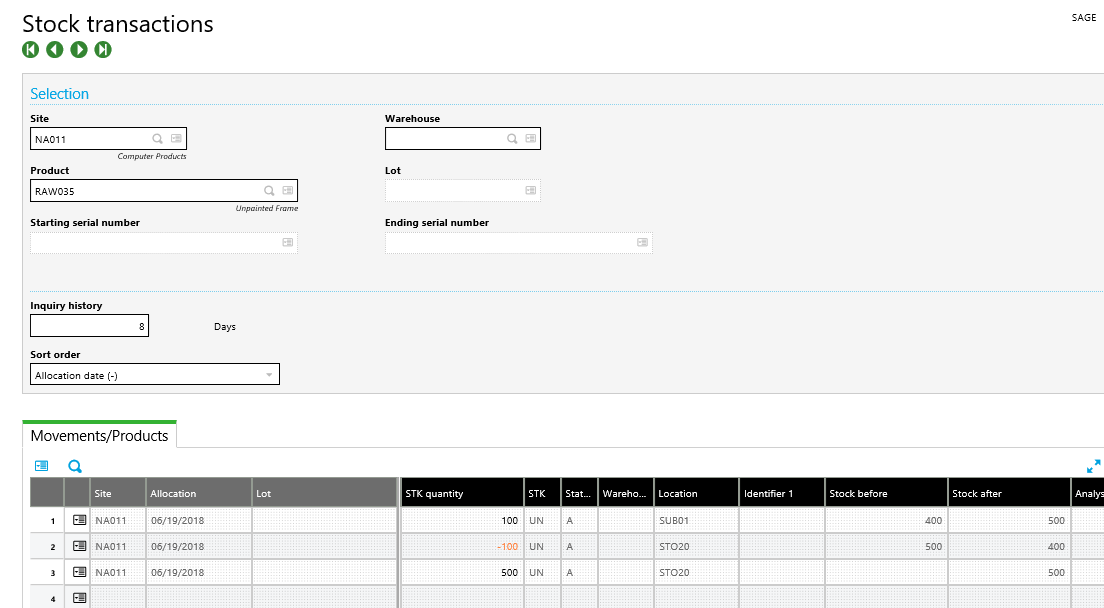
When the shipment is validated the stock is moved to the subcontract location assigned to the customer.  This happens automatically when setup properly. SUB01 below is the subcontract location assigned to customer.
After the supplier finishes the subcontract work they will return the subcontracted product entered on the subcontract order.  A Purchase Receipt (Purchasing>Receipts>Receipts) transaction will be executed to receive the product.
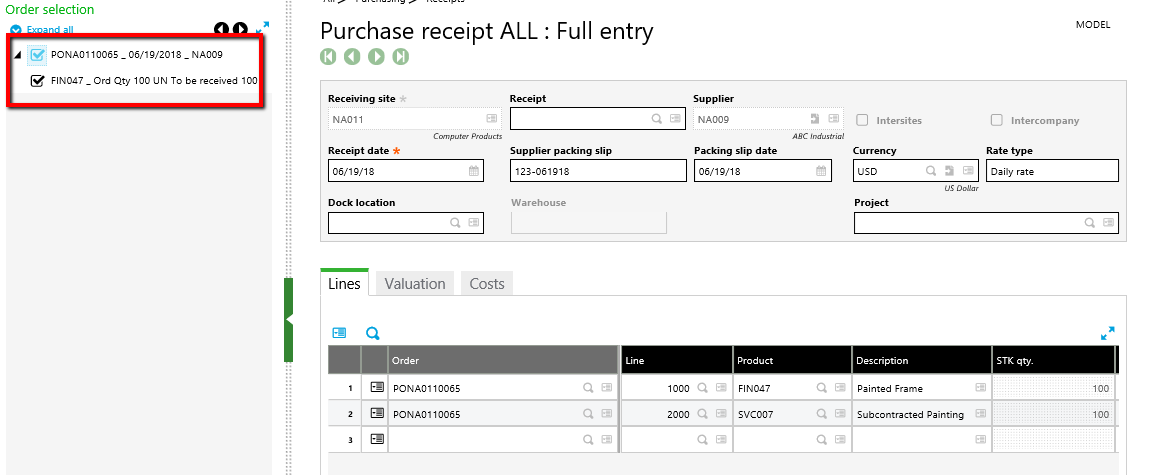
When the receipt is created the raw material is removed from the subcontract location and the subcontracted item is received into stock.
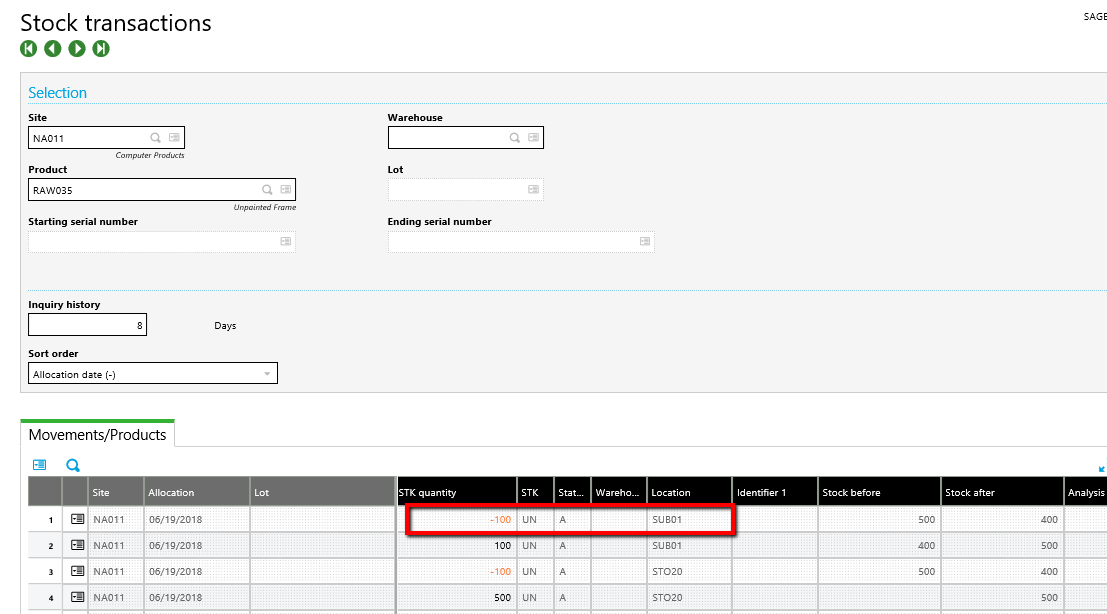
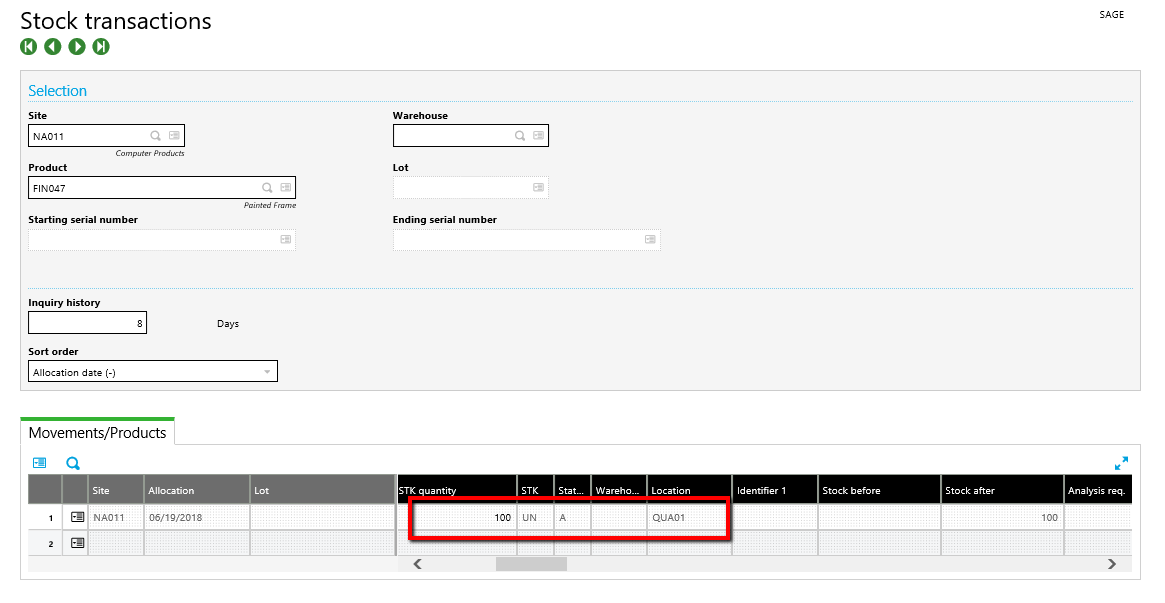
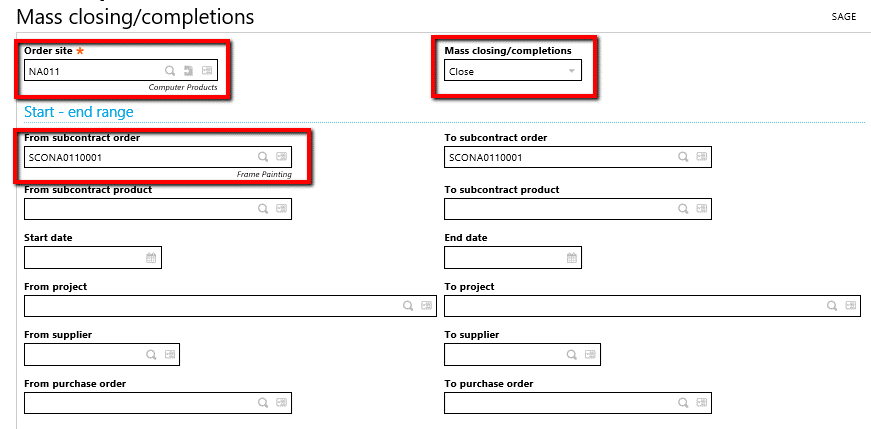
The Sub-contract order may now be closed. Navigate to Purchasing>Subcontract>Mass closing/completions.  Enter the Order site, Close (Mass closing/completions field), the subcontract order number and click OK.
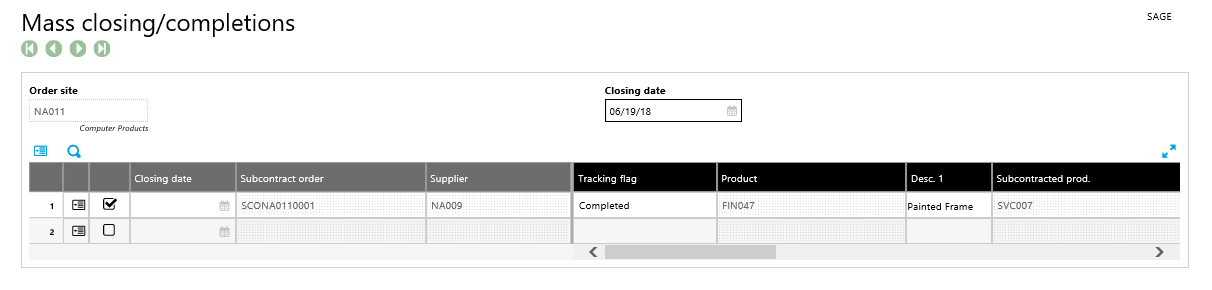
The Mass closing/completions window will appear with the order to be closed checked. Click Close to close the subcontract order.
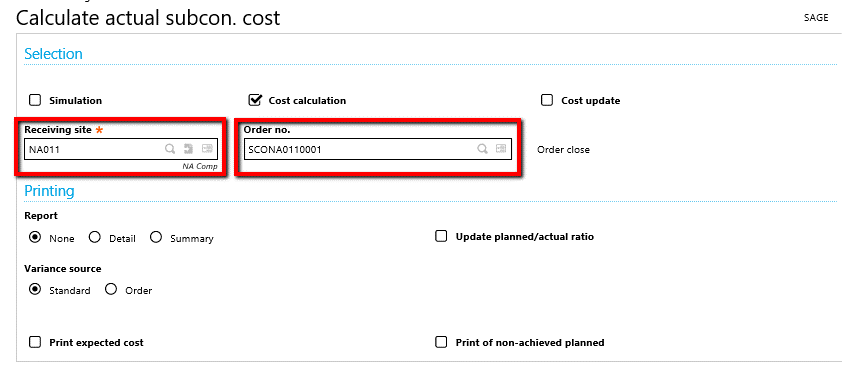
After the subcontract order is closed it must be costed.  Navigate to Costing>Subcontract cost>Calculate actual subcon. cost.  Enter the Receiving site, Order number and click OK.
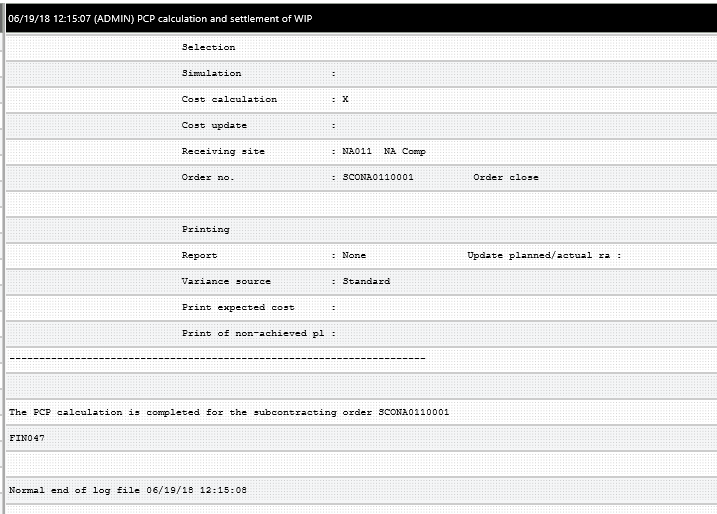
A Log File for the subcontract actual cost calculation is displayed.
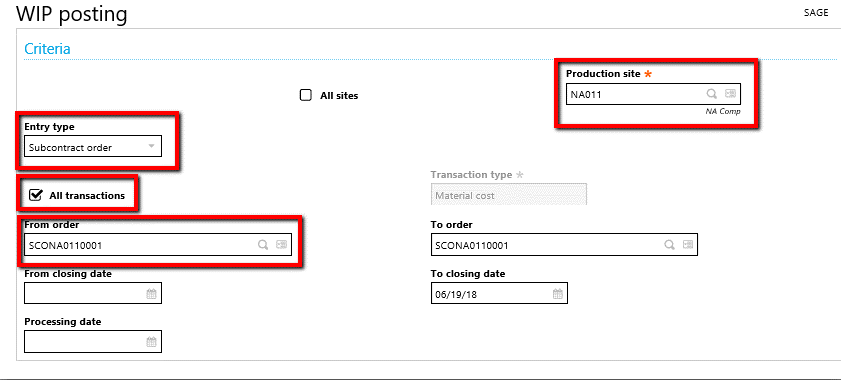
After the subcontract order is costed, the WIP accounting interface should be run. Navigate to Costing>WIP>WIP posting.  Enter the Production site, select the Entry type Subcontract order, select All Transactions and enter the order number then Click OK.
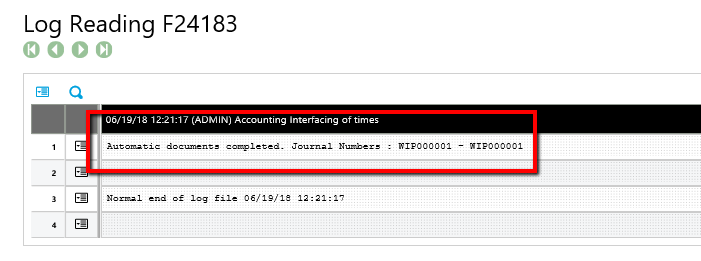
WIP posting will produce a Log Reading identifying the journal entry produced.
Note: This can be set up as a batch task.


« Return to Newsletter
  • This field is for validation purposes and should be left unchanged.
In This Issue
  • From the Desk of the Sage (X3) Enterprise Management Practice Director
  • E-commerce Sales Tax
  • Sage X3 Tips & Tricks: Subcontract Orders Without a Work Order
  • Sage Enterprise Intelligence Tips & Tricks: Column Formatting in Sage X3
  • Sage (X3) Enterprise Management Supporting Compliance with GDPR
  • Creating Selection Filters in Sage X3
  • Chemical Corner: Container Management
  • Support for Sage X3

    Helpdesk:
    P: 888.494.9479
    E: helpdesk@netatwork.com


    Upcoming Live Webinars & Events

    Sage X3 and the Power of the Cloud
    Date: Jan 8, 2020
    Time: 2 – 3 PM ET
    Learn More

    3 CRM Themes for Manufacturers in 2020
    Date: Jan 25, 2020
    Time: 2 – 3 PM ET
    Learn More

    Better Budgeting, Forecasting & Planning in Sage X3
    Date: Feb 12, 2020
    Time: 2 – 3 PM ET
    Learn More

    Be Prepared for 2020 Sales Tax Changes
    Date: Feb 26, 2020
    Time: 2 – 3 PM ET
    Learn More

    Popular Recorded Webinars

    Sage ERP & CRM Integration: Seamless, Real Time, and Bi-Directional

    Sage X3 Document Management by Altec

    Sage X3 Integrated Credit Card & Payment Processing

    Sage X3 Webinar Archive

    View our library of on-demand recorded webinars.

    Refer a friend, get a $100 Gift Card!

    Submit a Referral / Learn More!
    Do you have a friend or colleague whose company might benefit from utilizing a Net at Work service or solution? If so, refer them to us below and receive a $100 gift card or donation to your charity of choice!

    Connect With Us

    Business Applications

    • Overview
    • Software & Vendor Selection
    • ERP Implementation Services
    • ERP Migration Services
    • Cloud ERP
    • CRM
    • Employee Experience
    • ECM
    • Nonprofit Solutions

    Learning Center

    • White Papers & Guides
    • Ebooks
    • Training Courses
    • Virtual Training Courses
    • Success Stories
    • Live Webinars
    • Recorded Webinars
    • Trials

    Infrastructure Solutions

    • Managed IT Services
    • Fractional CIO & Advisory Services
    • Cloud Services
    • Cloud at Work Sage Hosting

    Support

    • Application Remote Support
    • Infrastructure Remote Support
    • Sage HRMS Remote Support
    • General Inquiry
    • Helpdesk

    Web Development

    • Services Overview
    • Magento eCommerce
    • WordPress CMS
    • Systems Integration
    • Website Managed Services
    • ERP eCommerce Integration

    Company Information

    • Why Us
    • Alliance Partnership Program
    • Women at Work
    • Diversity and Inclusion
    • Partners
    • Careers
    • News
    • Blog
    • Privacy Policy
    • Contact Us

    Additional Solutions

    • Enterprise Business Intelligence
    • Avalara Automated Tax Solutions
    • Fortis Payments
    • LeaseQuery Lease Accounting
    • Sage Fixed Assets (Sage FAS)
    • Vertex SMB Sales and Use Tax
    • Prime Foodservice Software
    • Rental 360
    • SDMO

    Industries

    • Chemicals
    • Construction
    • Discrete Manufacturing
    • Field Service
    • Food & Beverage
    • Healthcare
    • Industrial Manufacturing & Equipment
    • Medical Devices
    • Nonprofit
    • Private Equity
    • Wholesale Distribution
    Net at Work
    Net at Work (HQ)
    575 8th Ave
    New York, NY 10018

    P: (800) 719-3307
    info@netatwork.com
    Locations Across North America »
    Visit our sister companies:
    Cloud at Work - Sage Application Hosting
    Pixafy - An eCommerce Agency
    Docutrend
    WordPress Image Lightbox Plugin


    Our website uses cookies to ensure you get the best experience. Learn more.

    I Understand