
Net at Work is hiring!
Grow your career with us.   Apply Now X
Need Help?
  • Application Remote Support
  • Infrastructure Remote Support
  • Sage HRMS Remote Support
  • Helpdesk
  • General Inquiry
1-800-719-3307
Net at Work Net at Work
  • Solutions & Services
    • ERP/Accounting
      Software & Vendor Selection
      ERP Implementation Services
      ERP Migration Services
      Acumatica
      NetSuite
      Sage X3
      Sage Intacct
      SDMO
      Sage 100 ERP
      Sage 300 ERP
      Sage 500 ERP
      CRM
      Strategic Advisory Services
      CRM Training Camp
      Creatio
      Sage CRM
      Employee Experience
      Sage HRMS
      Rippling
      Workforce Go
      Criterion
      Miviva
      Enterprise Content Management
      Imaging / Scanning
      Document Management
      Workflow Automation
      Solutions
      Nonprofit Solutions
      Abila by Community Brands
      NetSuite
      Sage
      Salesforce
      IT and Security Services
      Managed IT Services
      Fractional CIO Services
      Cloud Services
      Cloud at Work Sage Hosting
      DR/Business Continuity Planning
      Compliance & Security
      Storage & Recovery
      Networking
      IT Security Services
      Communications
      Web Solutions
      Services Overview
      B2B Technology Suite
      Magento eCommerce
      WordPress CMS
      Systems Integration
      Website Managed Services
      Online Marketing & SEO
      ERP eCommerce Integration
      Additional Solutions
      Enterprise Business Intelligence
      Avalara Automated Tax Solutions
      Fortis Payments
      Sage Fixed Assets
      Vertex SMB Sales and Use Tax
      Prime Foodservice Software
      Rental 360
  • Industries
    • Industries
      Chemicals
      Construction
      Discrete Manufacturing
      Field Service
      Food & Beverage
      Healthcare
      Industrial Manufacturing & Equipment
      Medical Devices
      Nonprofit
      Private Equity
      Retail
      Wholesale Distribution
  • Learning Center
    • Online Resources
      Recorded Webinars
      Whitepapers
      Ebooks
      Success Stories
      Upcoming Events
      Live Webinars
      Seminars
      Virtual Training Courses
      Training Courses
      View all available training course options
  • Company
    • Why Us
      Who We Are
      Management
      Our Partners
      Locations
      Careers
      News
      Press Releases
      Success Stories
      Net at Work Blog
      Contact Us
      1.800.719.3307
      Email Us
      Programs
      Alliance Partnership Program
      Women at Work
      Diversity and Inclusion
  • Blog
  • Contact Us
  • Contact Us

Home » Newsletters » Sage 300 Newsletter – February 2018 » Sage 300 Tip: Bank Services Clear History

Sage 300

Sage 300 Newsletter – February 2018

Keeping You Up-To-Date With Information About Sage 300

Sage 300 Tip: Bank Services Clear History
By: Shirley Crocker, Senior Business Analyst

As Sage 300 consultants, we encounter many questions with regard to Bank Services and the bank reconciliations. One issue is speed. If you have been using Sage 300 for a long time and/or have a lot of transactions that affect the bank, you may have noticed a significant delay when selecting the Reconciliation tab when using the Reconcile Statements function.
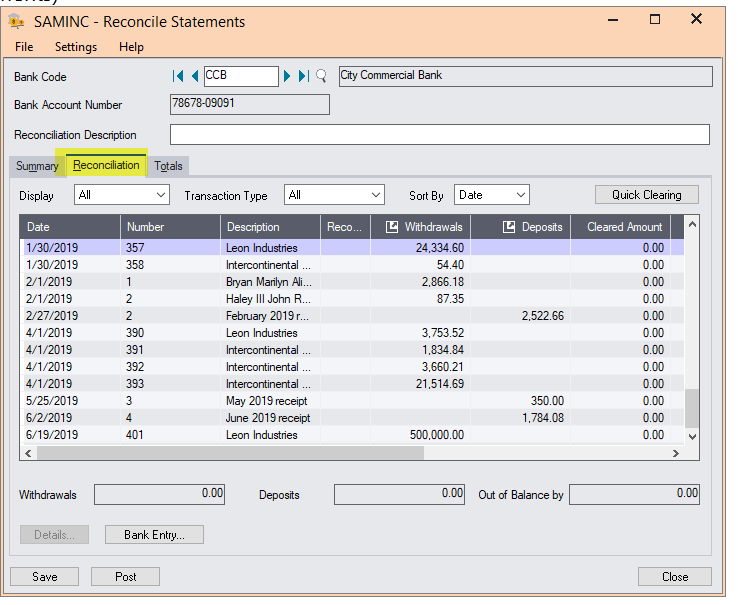
Prior to the release of version 2014, Sage 300 did not keep transaction history for bank services.  PIn versions 2014, 2016, 2017 and 2018, there is an option to clean out history.  We have had customers that have used the process outlined below and experienced significant speedups.  One customer went from a response time of taking almost 2 minutes any time a transaction was selected to 5 seconds!  Using the Bank Clear History function removes the following records from Bank Services:

  • Bank transactions. These are transactions created for your general ledger when you post bank reconciliations.

You specify the posting date through which to clear transactions. The program does not clear bank transactions posted after that date.

  • Bank entries. These are transactions recorded on the Bank Entry screen.
  • Printed posting journals. You clear reconciliation, transfer, and bank entry posting journals separately.

The program clears bank entries taking into account the minimum time you must keep them for each bank, which is specified for the bank record in the Days Before Eligible for Clearing field (on the Profile tab of the Banks screen).

The steps to clear out history are located below.  We strongly suggest that you contact your Sage 300 consultant to discuss the pros and cons of clearing history before taking these steps.  Additionally, please be sure to back up.  Once you clear history, it is gone it cannot be restored or recovered.   You would only need to perform the steps below if you are have performance issues in bank services only.

The process to clear history are as follows:

  1. Backup Sage 300
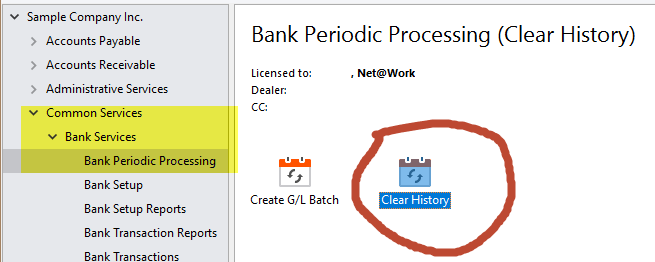
  2. Select Common Services, Bank Services, Bank Periodic Processing, Clear History
  1. Select Bank Transactions. Using the finder, select the bank code you wish to clean up in both the From and To fields.  Also, specify the posting date through which to clear transactions. The program does not clear bank transactions posted after that date.
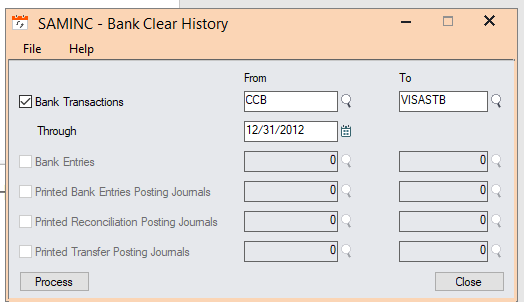
  2. Select Bank Entries (transactions recorded on the Bank Entry screen). The program clears bank entries taking into account the minimum time you must keep them for each bank, which is specified for the bank record in the Days Before Eligible for Clearing field (on the Profile tab of the Banks screen).

-when this option is selected a warning pops up
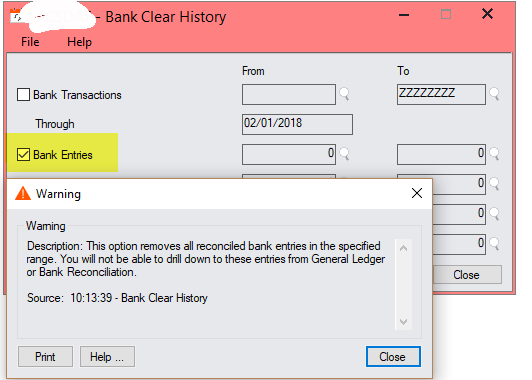
-select Close

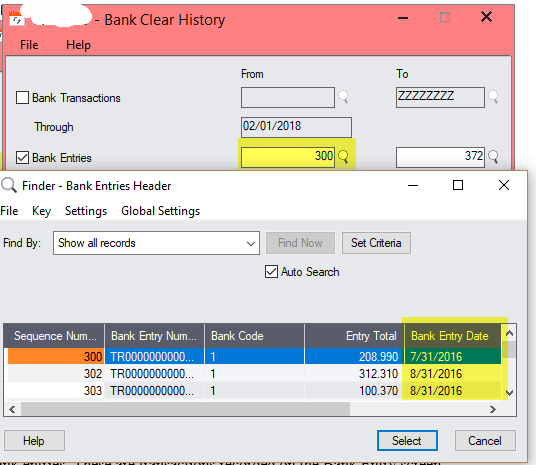
  1. Using the Finder, select the first and last entry sequence number you wish to clear

– using the Finder should reflect the dates of the entries for reference
  1. Select Printed Bank Entries Posting Journals. A warning per the screen below pops up
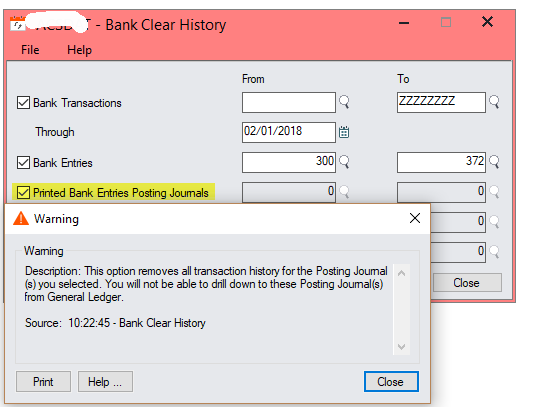
  2. Click Close on the Warning
  3. Use the finder to select the Posting Sequence numbers to use for both the From and To fields. Note that the process will only clear Printed Posting Journals.
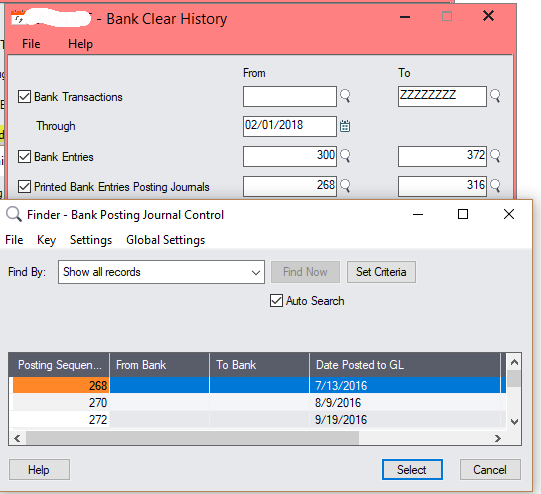
  4. Select Printed Reconciliation Posting Journals. Use the finder to select the Posting Sequence numbers to use for both the From and To fields.  Note that the process will only clear Printed Posting Journals.
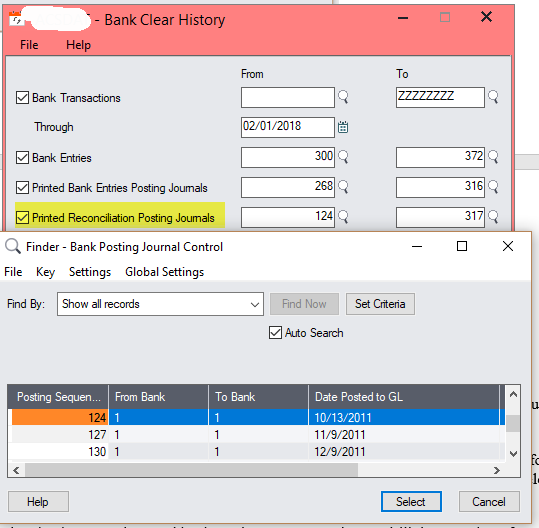
 

Please note that you can specify a range of bank transactions, bank entries, or posting journals to clear, or you can clear all records of a selected type.

Once you clear bank transactions and bank entries, you can no longer drill down to them from the General Ledger. However, if you do not clear these records periodically, the tables that accumulate them can become very large, potentially slowing your system to a noticeable degree.

As always, please reach out to a Net at Work Sage 300 consultant should you have any questions or would like assistance using this process.


« Return to Newsletter
  • This field is for validation purposes and should be left unchanged.
In This Issue
  • From the Desk of the Sage 300 Practice Director
  • Captain Your Business with Sage 300 Business Intelligence
  • Sage 300 Subscription License Incentives
  • Solving Your Business Gaps: A Preview of Our 2018 Sage 300 Webinar Series
  • Sage 300 Tax Updates – Government Compliance
  • Sage 300 Tip: Bank Services Clear History
  • Automate with SYSTRONICS Revenue and Expense Deferrals™
  • Sage 300 Support

    Helpdesk:
    P: 888.494.9479
    E: helpdesk@netatwork.com

    Upcoming Live Webinars

    Sage 300 Virtual Educational Courses – See Dates/Times

    Supercharge Sage 300 with Fortis Payments
    October 8 | 2pm ET
    Register Here

    Year End CRM Evaluation: 2025 Platform Comparison Guide
    October 8 | 2pm ET
    Register Here

    Stop Microsoft 365 Attacks Before They Hit
    October 14 | 2pm ET
    Register Here

    Popular Recorded Webinars

    The Case for Hosting Sage 300 in the Cloud

    Sage 300 & Finance Leadership in Action: Outpace the Competition for Top Talent

    Extend the Power of Sage 300 with Seamless eCommerce Integration

    Sage + DocLink – Document Management, Less Paper, and Smarter Workflow

    Sage 300 Webinar Archive

    View our library of on-demand recorded webinars.

    Newsletter Archive

    Read our previous Sage 300 Newsletters here

    Connect With Us

    Business Applications

    • Overview
    • Software & Vendor Selection
    • ERP Implementation Services
    • ERP Migration Services
    • Cloud ERP
    • CRM
    • Employee Experience
    • ECM
    • Nonprofit Solutions

    Learning Center

    • White Papers & Guides
    • Ebooks
    • Training Courses
    • Virtual Training Courses
    • Success Stories
    • Live Webinars
    • Recorded Webinars
    • Trials

    Infrastructure Solutions

    • Managed IT Services
    • Fractional CIO & Advisory Services
    • Cloud Services
    • Cloud at Work Sage Hosting

    Support

    • Application Remote Support
    • Infrastructure Remote Support
    • Sage HRMS Remote Support
    • General Inquiry
    • Helpdesk

    Web Development

    • Services Overview
    • Magento eCommerce
    • WordPress CMS
    • Systems Integration
    • Website Managed Services
    • ERP eCommerce Integration

    Company Information

    • Why Us
    • Alliance Partnership Program
    • Women at Work
    • Diversity and Inclusion
    • Partners
    • Careers
    • News
    • Blog
    • Privacy Policy
    • Contact Us

    Additional Solutions

    • Enterprise Business Intelligence
    • Avalara Automated Tax Solutions
    • Fortis Payments
    • LeaseQuery Lease Accounting
    • Sage Fixed Assets (Sage FAS)
    • Vertex SMB Sales and Use Tax
    • Prime Foodservice Software
    • Rental 360
    • SDMO

    Industries

    • Chemicals
    • Construction
    • Discrete Manufacturing
    • Field Service
    • Food & Beverage
    • Healthcare
    • Industrial Manufacturing & Equipment
    • Medical Devices
    • Nonprofit
    • Private Equity
    • Wholesale Distribution
    Net at Work
    Net at Work (HQ)
    575 8th Ave
    New York, NY 10018

    P: (800) 719-3307
    info@netatwork.com
    Locations Across North America »
    Visit our sister companies:
    Cloud at Work - Sage Application Hosting
    Pixafy - An eCommerce Agency
    Docutrend
    WordPress Image Lightbox Plugin


    Our website uses cookies to ensure you get the best experience. Learn more.

    I Understand

