
Net at Work is hiring!
Grow your career with us.   Apply Now X
Need Help?
  • Application Remote Support
  • Infrastructure Remote Support
  • Sage HRMS Remote Support
  • Helpdesk
  • General Inquiry
1-800-719-3307
Net at Work Net at Work
  • Solutions & Services
    • ERP/Accounting
      Software & Vendor Selection
      ERP Implementation Services
      ERP Migration Services
      Acumatica
      NetSuite
      Sage X3
      Sage Intacct
      SDMO
      Sage 100 ERP
      Sage 300 ERP
      Sage 500 ERP
      CRM
      Strategic Advisory Services
      CRM Training Camp
      Creatio
      Sage CRM
      Employee Experience
      Sage HRMS
      Rippling
      Workforce Go
      Criterion
      Miviva
      Enterprise Content Management
      Imaging / Scanning
      Document Management
      Workflow Automation
      Solutions
      Nonprofit Solutions
      Abila by Community Brands
      NetSuite
      Sage
      Salesforce
      IT and Security Services
      Managed IT Services
      Fractional CIO Services
      Cloud Services
      Cloud at Work Sage Hosting
      DR/Business Continuity Planning
      Compliance & Security
      Storage & Recovery
      Networking
      IT Security Services
      Communications
      Web Solutions
      Services Overview
      B2B Technology Suite
      Magento eCommerce
      WordPress CMS
      Systems Integration
      Website Managed Services
      Online Marketing & SEO
      ERP eCommerce Integration
      Additional Solutions
      Enterprise Business Intelligence
      Avalara Automated Tax Solutions
      Fortis Payments
      Sage Fixed Assets
      Vertex SMB Sales and Use Tax
      Prime Foodservice Software
      Rental 360
  • Industries
    • Industries
      Chemicals
      Construction
      Discrete Manufacturing
      Field Service
      Food & Beverage
      Healthcare
      Industrial Manufacturing & Equipment
      Medical Devices
      Nonprofit
      Private Equity
      Retail
      Wholesale Distribution
  • Learning Center
    • Online Resources
      Recorded Webinars
      Whitepapers
      Ebooks
      Success Stories
      Upcoming Events
      Live Webinars
      Seminars
      Virtual Training Courses
      Training Courses
      View all available training course options
  • Company
    • Why Us
      Who We Are
      Management
      Our Partners
      Locations
      Careers
      News
      Press Releases
      Success Stories
      Net at Work Blog
      Contact Us
      1.800.719.3307
      Email Us
      Programs
      Alliance Partnership Program
      Women at Work
      Diversity and Inclusion
  • Blog
  • Contact Us
  • Contact Us

Home » Newsletters » Sage 300 Newsletter – October 2015 » Sage 300 2016 Release – What’s New

Sage 300

Sage 300 Newsletter – October 2015

Keeping You Up-To-Date With Information About Sage 300

Sage 300 2016 Release – What’s New
By: Michael Macke, Sage 300 Business Consultant

sage300-article-whats-new-sage-300-2016Sage 300 2016 is slated for an official release this November, and a few lucky companies have been chosen to participate in the controlled release in early October. The newest version of Sage 300 2016 is a realization of Sage’s vision starting with the design of Sage 300 6.0. At that time, Sage 300 introduced users to a new web interface titled the portal. Welcoming Sage 300 to the web browser, the portal granted users the ability to customize links, perform data queries, and configure dashboards. Sage followed in version 2012 with new Visual Process Flows and expanded the capabilities in Sage 300 2014.

The latest installment of Sage 300 seeks to place the entire power of Sage 300 in the web. Unlike its predecessor, the portal, the new Sage 300 web screens do not link to the classic data entry screens. Sage 300 2016 provides a complete web experience for browsing and entering data. You now have four flexible options to access your Sage 300 data: Classic/Desktop Screens, The Portal, Visual Process Flows, and Sage 2016 Web Screens. The power in these options is that it allows users to view data in the most efficient way that makes sense to them. These methods are simply different access points. Best of all, on-premise installations can utilize the web screens without moving to the cloud. You are now able to have the look and feel of the cloud while still controlling your on-premise network and hardware.

Recorded Webinar:
Introduction to Sage 300 version 2016 – A look at the new release of Sage 300
Register/Learn More

In the initial release, Sage 300 Web Screens will be provided for Administrative Services, Common Services, Tax Services, Bank Services, Accounts Receivable, and Accounts Payable. The operations suite (Inventory Control, Order Entry, and Purchase Orders) will be implemented as part of the first product update. Sage also has plans to release development documents to start allowing you to bring your customized Sage 300 screens to the web and leverage web design to personalize your Sage 300 web experience.
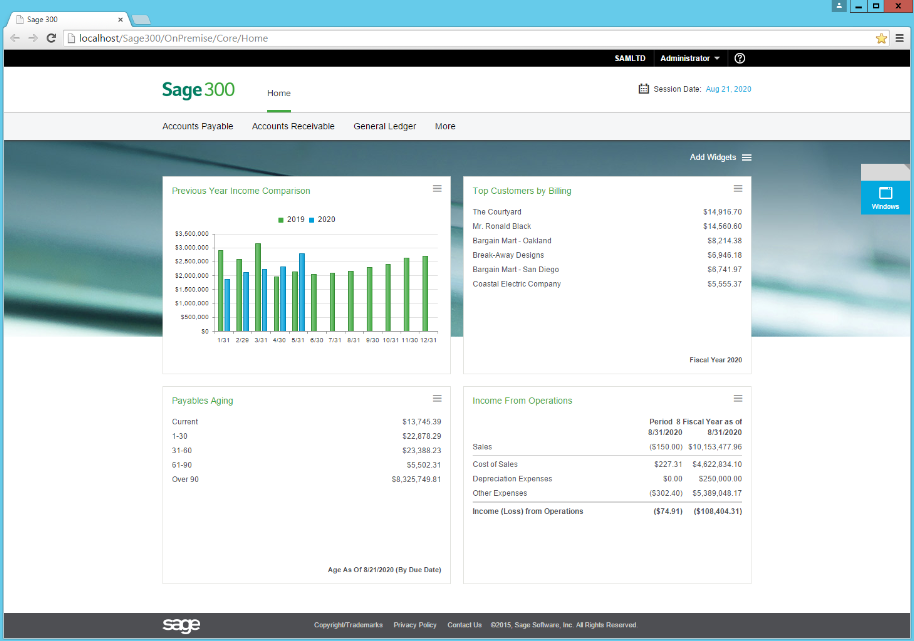
Along with the new screens, a KPI dashboard will serve as the homepage.

Along with the new screens, a KPI dashboard will serve as the homepage.

These are true web screens that run in all the main browsers including IE, Edge, Chrome, Firefox and Safari. There are no plug-ins required, everything is pure HTML, CSS and JavaScript. This means you can access these screens from all sorts of devices like Macs, Windows Desktops and Laptops, Chromebooks, iPads, Android Tablets, Linux Workstations, Raspberry Pi’s and many other devices. Source – Stephen Smith.
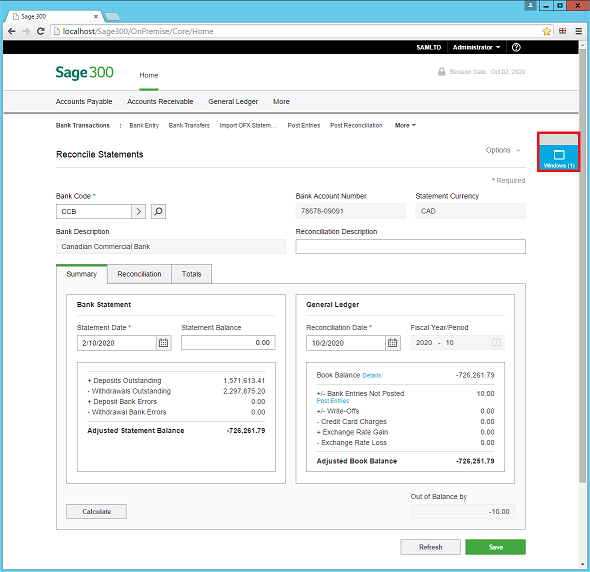
A menu icon will manage all open windows to help you easily navigate between modules/screens all within the same window.

A menu icon will manage all open windows to help you easily navigate between modules/screens all within the same window.

For a compiled list of new/updated modules in Sage 300 version 2016, click here.

« Return to Newsletter
  • This field is for validation purposes and should be left unchanged.
In This Issue
  • From the Desk of the Sage 300 Practice Director
  • Sage 300 2016 Release – What’s New
  • New Payroll v7.2 – Important News for Payroll Users
  • Sage 300 Tips and Tricks: Exporting and Importing Budgets – The Easy Way!
  • Don’t Get Caught with the Incorrect W2 Forms!
  • How to Select Your Next ERP System
  • Creating Cyber Awareness
  • Sage 300 Support

    Helpdesk:
    P: 888.494.9479
    E: helpdesk@netatwork.com

    Upcoming Live Webinars

    Sage 300 Virtual Educational Courses – See Dates/Times

    Supercharge Sage 300 with Fortis Payments
    October 8 | 2pm ET
    Register Here

    Year End CRM Evaluation: 2025 Platform Comparison Guide
    October 8 | 2pm ET
    Register Here

    Stop Microsoft 365 Attacks Before They Hit
    October 14 | 2pm ET
    Register Here

    Popular Recorded Webinars

    The Case for Hosting Sage 300 in the Cloud

    Sage 300 & Finance Leadership in Action: Outpace the Competition for Top Talent

    Extend the Power of Sage 300 with Seamless eCommerce Integration

    Sage + DocLink – Document Management, Less Paper, and Smarter Workflow

    Sage 300 Webinar Archive

    View our library of on-demand recorded webinars.

    Newsletter Archive

    Read our previous Sage 300 Newsletters here

    Connect With Us

    Business Applications

    • Overview
    • Software & Vendor Selection
    • ERP Implementation Services
    • ERP Migration Services
    • Cloud ERP
    • CRM
    • Employee Experience
    • ECM
    • Nonprofit Solutions

    Learning Center

    • White Papers & Guides
    • Ebooks
    • Training Courses
    • Virtual Training Courses
    • Success Stories
    • Live Webinars
    • Recorded Webinars
    • Trials

    Infrastructure Solutions

    • Managed IT Services
    • Fractional CIO & Advisory Services
    • Cloud Services
    • Cloud at Work Sage Hosting

    Support

    • Application Remote Support
    • Infrastructure Remote Support
    • Sage HRMS Remote Support
    • General Inquiry
    • Helpdesk

    Web Development

    • Services Overview
    • Magento eCommerce
    • WordPress CMS
    • Systems Integration
    • Website Managed Services
    • ERP eCommerce Integration

    Company Information

    • Why Us
    • Alliance Partnership Program
    • Women at Work
    • Diversity and Inclusion
    • Partners
    • Careers
    • News
    • Blog
    • Privacy Policy
    • Contact Us

    Additional Solutions

    • Enterprise Business Intelligence
    • Avalara Automated Tax Solutions
    • Fortis Payments
    • LeaseQuery Lease Accounting
    • Sage Fixed Assets (Sage FAS)
    • Vertex SMB Sales and Use Tax
    • Prime Foodservice Software
    • Rental 360
    • SDMO

    Industries

    • Chemicals
    • Construction
    • Discrete Manufacturing
    • Field Service
    • Food & Beverage
    • Healthcare
    • Industrial Manufacturing & Equipment
    • Medical Devices
    • Nonprofit
    • Private Equity
    • Wholesale Distribution
    Net at Work
    Net at Work (HQ)
    575 8th Ave
    New York, NY 10018

    P: (800) 719-3307
    info@netatwork.com
    Locations Across North America »
    Visit our sister companies:
    Cloud at Work - Sage Application Hosting
    Pixafy - An eCommerce Agency
    Docutrend
    WordPress Image Lightbox Plugin


    Our website uses cookies to ensure you get the best experience. Learn more.

    I Understand


