Net at Work is hiring!
Grow your career with us.   Apply Now X
Need Help?
  • Application Remote Support
  • Infrastructure Remote Support
  • Sage HRMS Remote Support
  • Helpdesk
  • General Inquiry
1-800-719-3307
Net at Work Net at Work
  • Solutions & Services
    • ERP/Accounting
      Software & Vendor Selection
      ERP Implementation Services
      ERP Migration Services
      Acumatica
      NetSuite
      Sage X3
      Sage Intacct
      SDMO
      Sage 100 ERP
      Sage 300 ERP
      Sage 500 ERP
      CRM
      Strategic Advisory Services
      CRM Training Camp
      Creatio
      Sage CRM
      Employee Experience
      Sage HRMS
      Rippling
      Workforce Go
      Criterion
      Miviva
      Enterprise Content Management
      Imaging / Scanning
      Document Management
      Workflow Automation
      Solutions
      Nonprofit Solutions
      Abila by Community Brands
      NetSuite
      Sage
      Salesforce
      IT and Security Services
      Managed IT Services
      Fractional CIO Services
      Cloud Services
      Cloud at Work Sage Hosting
      DR/Business Continuity Planning
      Compliance & Security
      Storage & Recovery
      Networking
      IT Security Services
      Communications
      Web Solutions
      Services Overview
      B2B Technology Suite
      Magento eCommerce
      WordPress CMS
      Systems Integration
      Website Managed Services
      Online Marketing & SEO
      ERP eCommerce Integration
      Additional Solutions
      Enterprise Business Intelligence
      Avalara Automated Tax Solutions
      Fortis Payments
      Sage Fixed Assets
      Vertex SMB Sales and Use Tax
      Prime Foodservice Software
      Rental 360
  • Industries
    • Industries
      Chemicals
      Construction
      Discrete Manufacturing
      Field Service
      Food & Beverage
      Healthcare
      Industrial Manufacturing & Equipment
      Medical Devices
      Nonprofit
      Private Equity
      Retail
      Wholesale Distribution
  • Learning Center
    • Online Resources
      Recorded Webinars
      Whitepapers
      Ebooks
      Success Stories
      Upcoming Events
      Live Webinars
      Seminars
      Virtual Training Courses
      Training Courses
      View all available training course options
  • Company
    • Why Us
      Who We Are
      Management
      Our Partners
      Locations
      Careers
      News
      Press Releases
      Success Stories
      Net at Work Blog
      Contact Us
      1.800.719.3307
      Email Us
      Programs
      Alliance Partnership Program
      Women at Work
      Diversity and Inclusion
  • Blog
  • Contact Us
  • Contact Us

Home » Newsletters » Sage 300 Newsletter – May 2018 » Extend the Functionality of Your Sage 300 with Orchid Extender

Sage 300

Sage 300 Newsletter – May 2018

Keeping You Up-To-Date With Information About Sage 300

Extend the Functionality of Your Sage 300 with Orchid Extender

By: Feng Lin, Software Developer

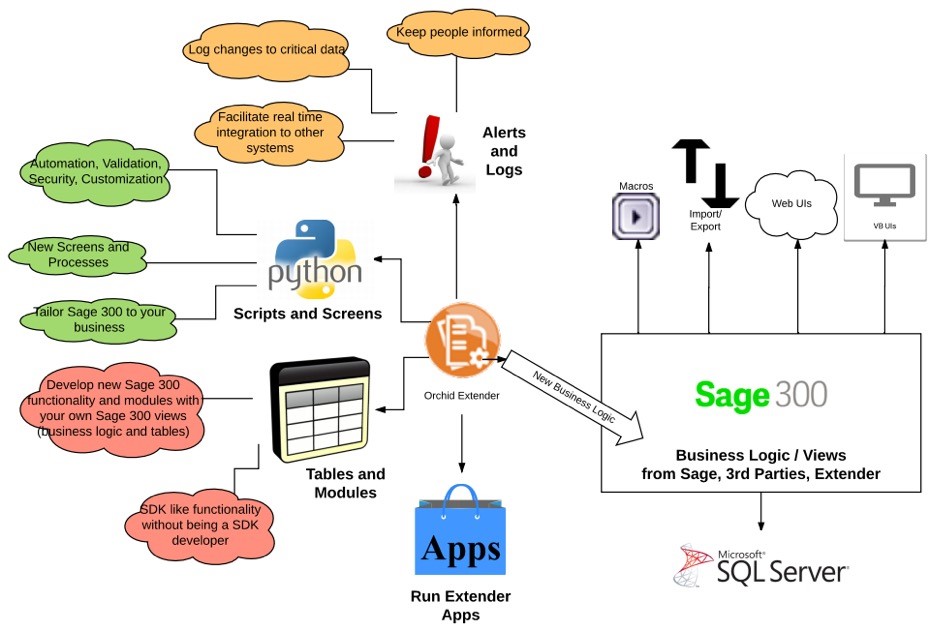
Developed by Orchid Systems, Extender for Sage 300 is a nice add-on to Sage 300 to facilitate additional functionalities that are not “Out of the box” via either configuring features or developing new features. In this article we’ll give an overview of this valuable add-on module and all its potential benefits to you.

What is Extender? 

It is an add-on module for Sage 300 to allow Sage 300 customers to extend the functionality of Sage 300 in many different ways, with its four editions: 

  • Runtime – Load and run Extender Certified Apps 
  • Configurator – Configure Events to monitor changes in Sage 300 data, log changes, enable alerts (via email or Orchid Notes), or trigger an external application (.exe file) 
  • Customizer – Customize Python scripts to automate business processes, enhance systems integration, develop Custom Screens, and provide tailored validation and alerting by extending Sage 300 business logic (Views) 
  • Developer – Develop Custom Tables that form part of the Sage 300 database and database dictionary, tailoring the core system to meet the user’s exact needs 
 

A Simple Walkthrough of Extender In Sage 300 v2018 

It is always easier to get an idea of what and how Extender works for your Sage 300 system with a walkthrough. 

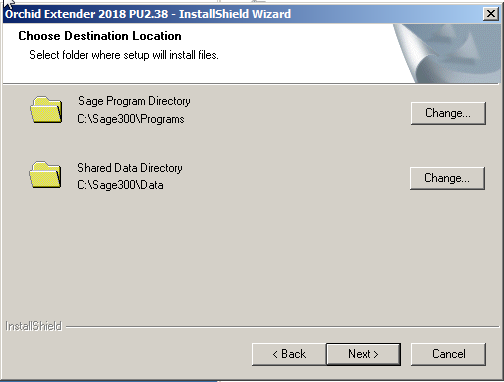
  • Installation – a standardized Sage 300 installation wizard
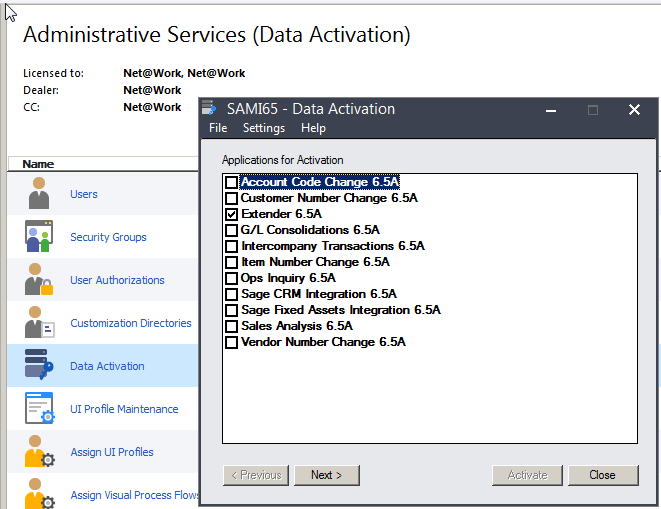
  • Data Activation in Administrative Services module in Sage 300 
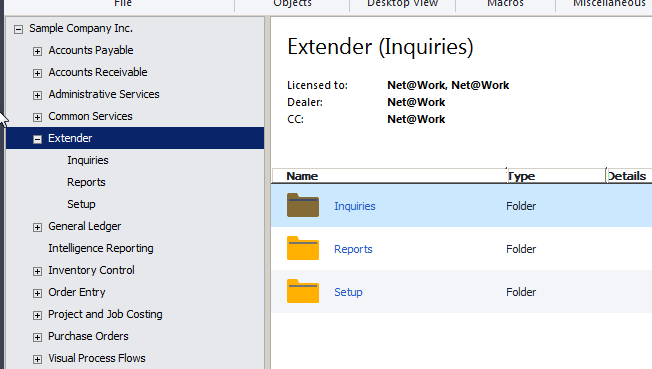
  • Extender folder in Sage 300 module tree after installation and data activation 
 

Examples – Let’s use a couple examples get an idea of what Extender can do:

Example #1: Log field value changes in Sage 300 

Case: log all changes to the A/R Customer Credit Limit using Orchid Extender
This functionality requires Extender Levels: Configurator, Customizer and Developer


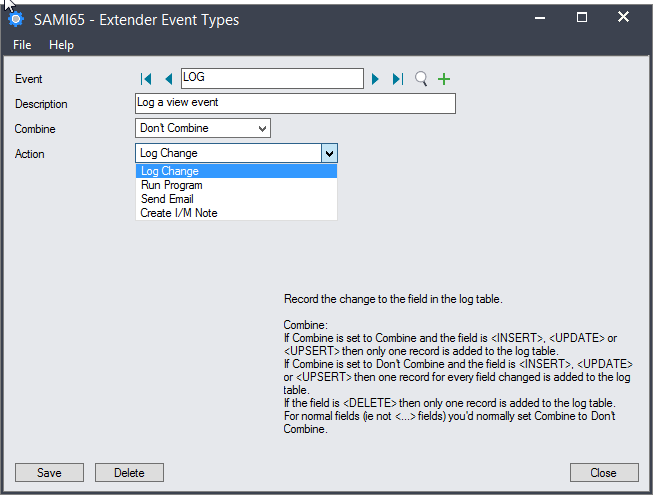
  • Extender Setup: Create a “LOG” Event Type in Extender Setup / Event Types 
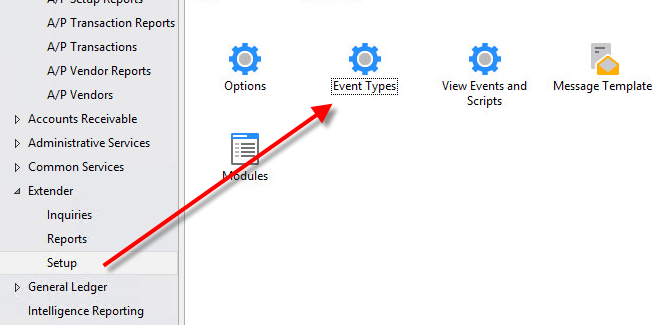
  • Enter Event Name “LOG” and a Description 
  • Choose “Don’t Combine” so that the original and new values are logged 
  • Choose “Log Change” as the Action in this example 
  • Action dropdown has 4 options to track the data change 
  • Save the Event Type.
     
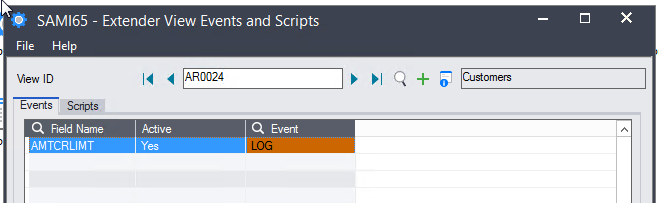
  • Attach the LOG Event to the A/R Customer Credit Field in Extender Setup / View Events and Scripts 
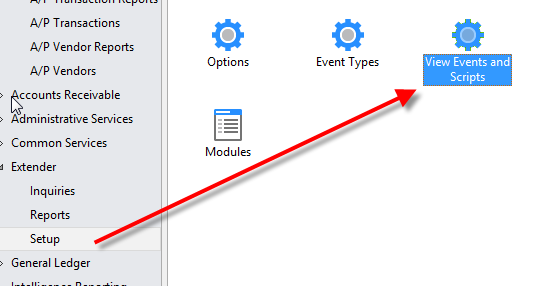
 

  • Enter AR0024 as the View ID for A/R Customer 
  • A list of active Sage 300 Views can be displayed by using F6 key 
  • Select AMTCRLIMT as the Field Name and choose LOG as the Event Code. 
  • Save the View Event 


View Log Details: 

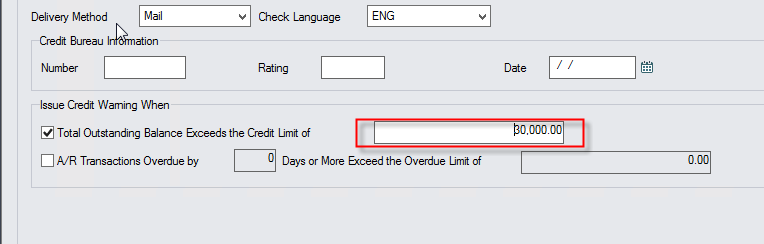
  • Open A/R Customers screen, in Processing tab, update the credit limit for Customer 1200, Mr. Ronald Black to be 30,000 
  • Save the customer record 


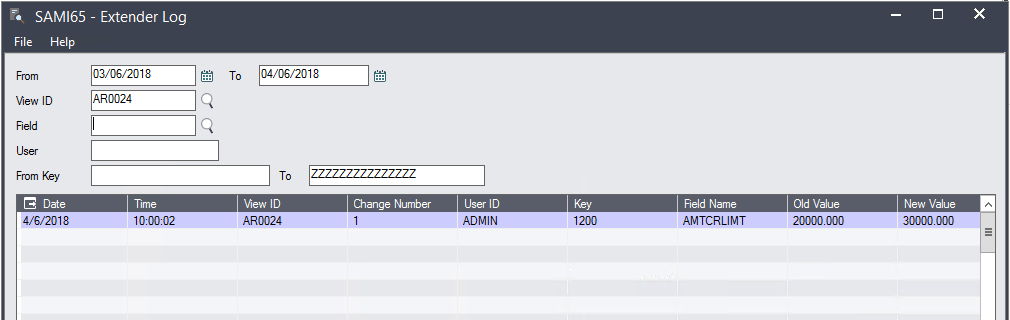
  • In Extender Inquiries/Log screen, filter View ID by using “AR0024” and return all the log records of the AR customer. The old value and new value of the credit limit show 
 

Example #2: Add additional validation rule in Sage 300 

Case: Make A/R Customer Credit Limit to be $10,000.00 for regular user
This functionality requires Extender Levels: Customizer and Developer 

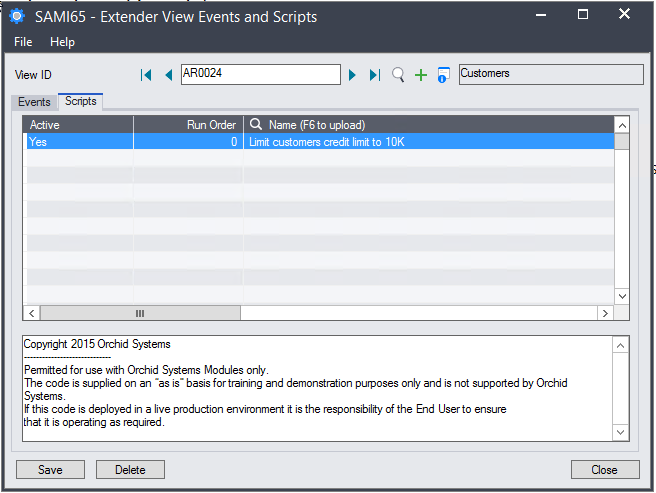
  • Extender Setup: Attach a script to A/R Customer in Extender Setup / View Events and Scripts. The Script file is a Python 3 script file developed to work on Sage 300 View level.  
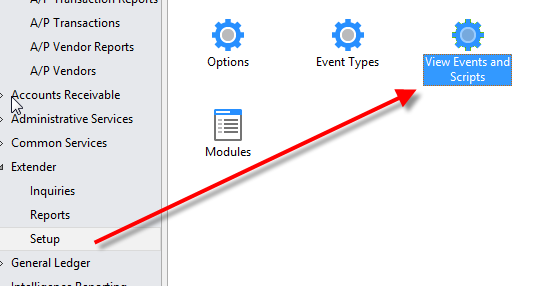
 

  • Enter AR0024 as the View ID for A/R Customer 
  • On the scripts Tab, insert a row and click F6 to open a browser 
  • Navigate to the folder to locate the script file, select script 
  • Save the View Event 


View Change Result: 

  • Login to Sage 300 as a Non Admin user  
  • Open A/R customer screen and try to update the AR Credit Limit for customer 1200 Mr. Ronald Black to an amount over $10,000 
  • An error message prompts when tab way from AR Credit Limit field 
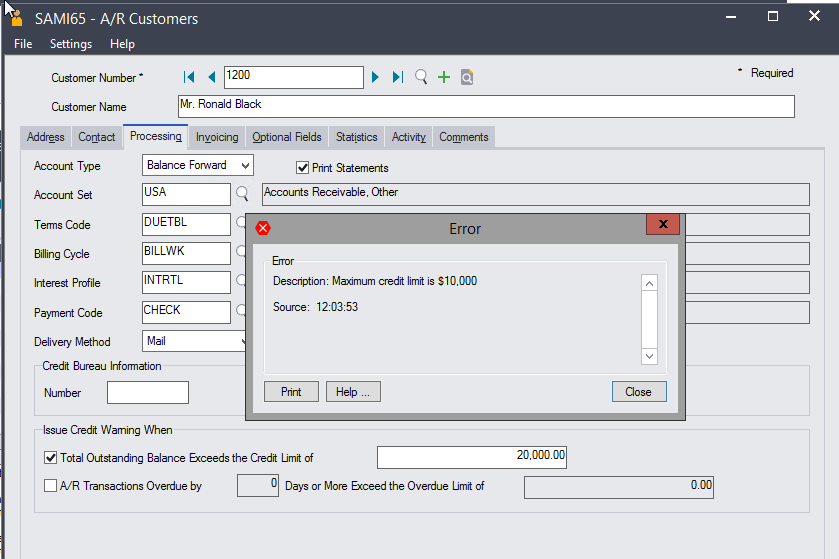
 

The above 2 examples are only some of features Orchid Extender can provide, which helps a lot of Sage 300 customers in their daily work.  

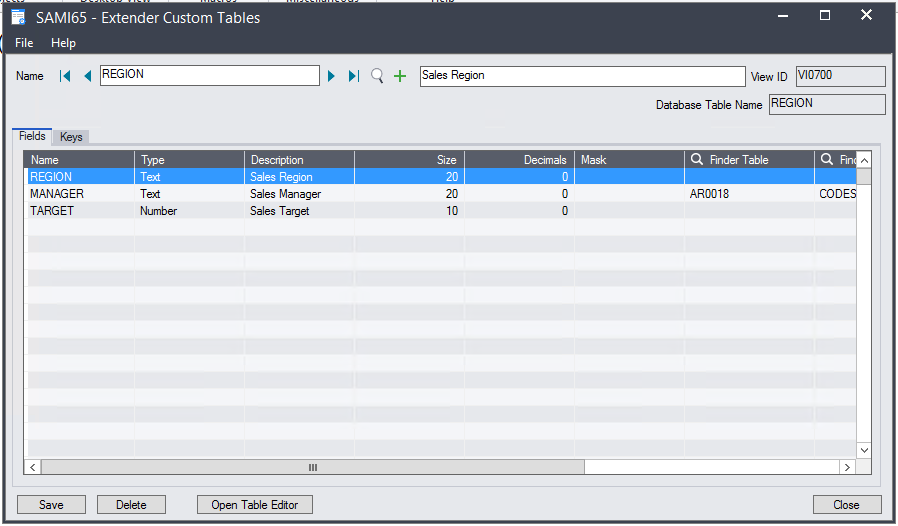
The Developer edition provides even more powerful features, e.g. an Integrated Development Environment to create Custom tables to track additional business data as part of Sage 300 database.  
 

Summary: 

Orchid Extender is a nice add-on for Sage 300. It is built to run across all Sage 300 modules. It can provide auditing capability on any table, any field, at any time, logging what changed, by whom and when, by monitoring changes made to specific data in a Sage 300 View in real time. The Python scripts and custom tables are saved as part of the Sage 300 company database. The multiple editions offered can be tailored for per Sage 300 customers’ needs. 

Per TPAC 2018 (Third Party Advantage Conference 2018), Orchid Systems will continue to evolve Extender to work with Sage 300 and new capability like creating Web Screens and Web Services is expected.  

Please contact your Net at Work Account Manager or main consultant to see if this product can help you. We will help select the best edition for your business needs.  

« Return to Newsletter
  • This field is for validation purposes and should be left unchanged.
In This Issue
  • From the Desk of the Sage 300 Practice Director
  • Making Sure Your Sage 300 is Upgraded, Not Outdated
  • Extend the Functionality of Your Sage 300 with Orchid Extender
  • Enabling Your Workforce with Advanced Scheduling: A Look at Service Manager – A Sage Endorsed Solution
  • Sage Has Decommissioned the Sage 300 Online Server: Now What?
  • Top Reasons to Consider Managed IT Services
  • Sage 300 Support

    Helpdesk:
    P: 888.494.9479
    E: helpdesk@netatwork.com

    Upcoming Live Webinars

    Sage 300 Virtual Educational Courses – See Dates/Times

    Supercharge Sage 300 with Fortis Payments
    October 8 | 2pm ET
    Register Here

    Year End CRM Evaluation: 2025 Platform Comparison Guide
    October 8 | 2pm ET
    Register Here

    Stop Microsoft 365 Attacks Before They Hit
    October 14 | 2pm ET
    Register Here

    Popular Recorded Webinars

    The Case for Hosting Sage 300 in the Cloud

    Sage 300 & Finance Leadership in Action: Outpace the Competition for Top Talent

    Extend the Power of Sage 300 with Seamless eCommerce Integration

    Sage + DocLink – Document Management, Less Paper, and Smarter Workflow

    Sage 300 Webinar Archive

    View our library of on-demand recorded webinars.

    Newsletter Archive

    Read our previous Sage 300 Newsletters here

    Connect With Us

    Business Applications

    • Overview
    • Software & Vendor Selection
    • ERP Implementation Services
    • ERP Migration Services
    • Cloud ERP
    • CRM
    • Employee Experience
    • ECM
    • Nonprofit Solutions

    Learning Center

    • White Papers & Guides
    • Ebooks
    • Training Courses
    • Virtual Training Courses
    • Success Stories
    • Live Webinars
    • Recorded Webinars
    • Trials

    Infrastructure Solutions

    • Managed IT Services
    • Fractional CIO & Advisory Services
    • Cloud Services
    • Cloud at Work Sage Hosting

    Support

    • Application Remote Support
    • Infrastructure Remote Support
    • Sage HRMS Remote Support
    • General Inquiry
    • Helpdesk

    Web Development

    • Services Overview
    • Magento eCommerce
    • WordPress CMS
    • Systems Integration
    • Website Managed Services
    • ERP eCommerce Integration

    Company Information

    • Why Us
    • Alliance Partnership Program
    • Women at Work
    • Diversity and Inclusion
    • Partners
    • Careers
    • News
    • Blog
    • Privacy Policy
    • Contact Us

    Additional Solutions

    • Enterprise Business Intelligence
    • Avalara Automated Tax Solutions
    • Fortis Payments
    • LeaseQuery Lease Accounting
    • Sage Fixed Assets (Sage FAS)
    • Vertex SMB Sales and Use Tax
    • Prime Foodservice Software
    • Rental 360
    • SDMO

    Industries

    • Chemicals
    • Construction
    • Discrete Manufacturing
    • Field Service
    • Food & Beverage
    • Healthcare
    • Industrial Manufacturing & Equipment
    • Medical Devices
    • Nonprofit
    • Private Equity
    • Wholesale Distribution
    Net at Work
    Net at Work (HQ)
    575 8th Ave
    New York, NY 10018

    P: (800) 719-3307
    info@netatwork.com
    Locations Across North America »
    Visit our sister companies:
    Cloud at Work - Sage Application Hosting
    Pixafy - An eCommerce Agency
    Docutrend
    WordPress Image Lightbox Plugin


    Our website uses cookies to ensure you get the best experience. Learn more.

    I Understand