
Net at Work is hiring!
Grow your career with us.   Apply Now X
Need Help?
  • Application Remote Support
  • Infrastructure Remote Support
  • Sage HRMS Remote Support
  • Helpdesk
  • General Inquiry
1-800-719-3307
Net at Work Net at Work
  • Solutions & Services
    • ERP/Accounting
      Software & Vendor Selection
      ERP Implementation Services
      ERP Migration Services
      Acumatica
      NetSuite
      Sage X3
      Sage Intacct
      SDMO
      Sage 100 ERP
      Sage 300 ERP
      Sage 500 ERP
      CRM
      Strategic Advisory Services
      CRM Training Camp
      Creatio
      Sage CRM
      Employee Experience
      Sage HRMS
      Rippling
      Workforce Go
      Criterion
      Miviva
      Enterprise Content Management
      Imaging / Scanning
      Document Management
      Workflow Automation
      Solutions
      Nonprofit Solutions
      Abila by Community Brands
      NetSuite
      Sage
      Salesforce
      IT and Security Services
      Managed IT Services
      Fractional CIO Services
      Cloud Services
      Cloud at Work Sage Hosting
      DR/Business Continuity Planning
      Compliance & Security
      Storage & Recovery
      Networking
      IT Security Services
      Communications
      Web Solutions
      Services Overview
      B2B Technology Suite
      Magento eCommerce
      WordPress CMS
      Systems Integration
      Website Managed Services
      Online Marketing & SEO
      ERP eCommerce Integration
      Additional Solutions
      Enterprise Business Intelligence
      Avalara Automated Tax Solutions
      Fortis Payments
      Sage Fixed Assets
      Vertex SMB Sales and Use Tax
      Prime Foodservice Software
      Rental 360
  • Industries
    • Industries
      Chemicals
      Construction
      Discrete Manufacturing
      Field Service
      Food & Beverage
      Healthcare
      Industrial Manufacturing & Equipment
      Medical Devices
      Nonprofit
      Private Equity
      Retail
      Wholesale Distribution
  • Learning Center
    • Online Resources
      Recorded Webinars
      Whitepapers
      Ebooks
      Success Stories
      Upcoming Events
      Live Webinars
      Seminars
      Virtual Training Courses
      Training Courses
      View all available training course options
  • Company
    • Why Us
      Who We Are
      Management
      Our Partners
      Locations
      Careers
      News
      Press Releases
      Success Stories
      Net at Work Blog
      Contact Us
      1.800.719.3307
      Email Us
      Programs
      Alliance Partnership Program
      Women at Work
      Diversity and Inclusion
  • Blog
  • Contact Us
  • Contact Us

Home » Newsletters » Sage X3 Newsletter – Q1 2019 » Chemical Corner: Regulation Management & Reporting with Sage Enterprise Management

Sage X3

Sage X3 Newsletter – Q1 2019

Keeping You Up-To-Date With Information About Sage X3

Chemical Corner: Regulation Management & Reporting with Sage Enterprise Management

By: Net at Work Team

The Chem at Work edition of Sage Enterprise Management provides regulation management functionality for the ever-changing regulatory landscape of the global chemical distribution & manufacturing industries. The management, tracking, and reporting of chemical inventories is a requirement for companies that manufacture, store, label, ship, distribute, or handle controlled substances and hazardous materials.

This article describes how the Chem at Work solution helps you manage the regulations, and report to the governing bodies as required by the chemical industry business processes and commitments.

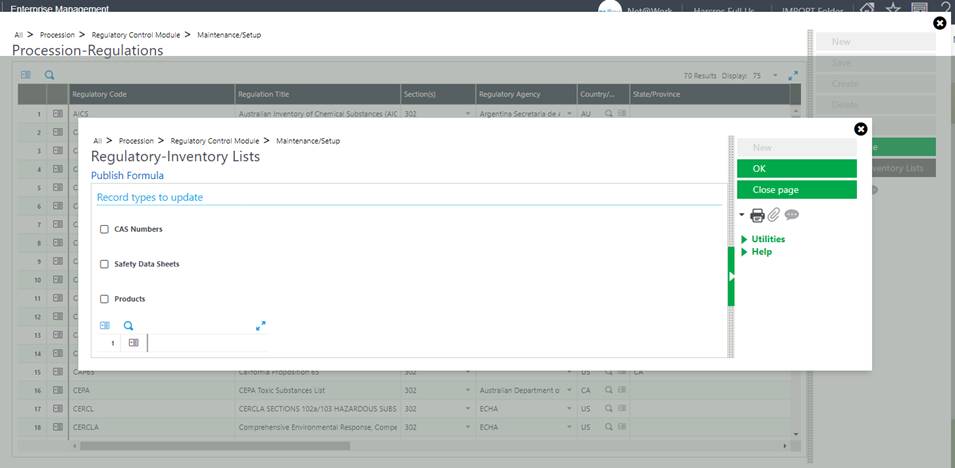
Regulation Maintenance

Chem at Work comes standard with 70 pre-loaded regulations and allows for you to track as many more regulations as your specific industry requires.  Once defined, regulations may be assigned to CAS numbers, products and/or Safety Data Sheets.
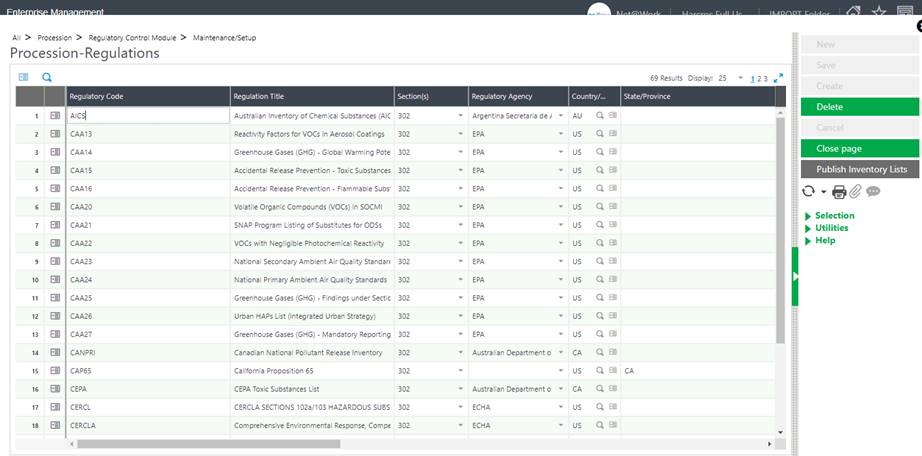
The fields for each regulation include:

  • Regulation code, section(s), and description
  • The regulation’s governing body and the country/union and State/Province which enforces the regulation, if applicable
  • The Import/Manufacture Limit – the inventory receipt limit for a chemical, based upon the country’s inventory list.
  • Reporting Quantity (RQ) Threshold – The maximum daily weight reporting threshold for the regulation. These limits can be further defined on the CAS Master Regulations tab for a specific chemical.
  • Reporting Required/On List – Defines the regulation default of whether the regulation prints as “required” or “on list” on the SDS report.
  • Inventory List – Inventory list regulations are regulations listed on a specific country’s list of toxic chemicals. Regulations that are defined as inventory lists are automatically added to each CAS record that is created.
  • SDS Messages that will appear based on characteristics of the chemicals and CAS #s
  • LOLI data for clients that are integrated with a LOLI service.

CAS Maintenance

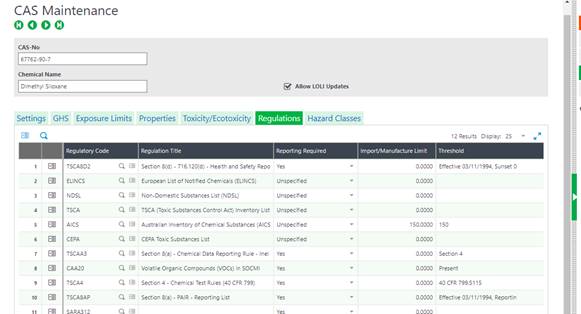
The maintenance then requires specification of which CAS numbers fall beneath which regulations.  This is manually created & maintained unless your Chem at Work system is integrated with a 3rd party application or service – a user is also free to add to the list of regulations w/in CAS maintenance screen.
Product Maintenance

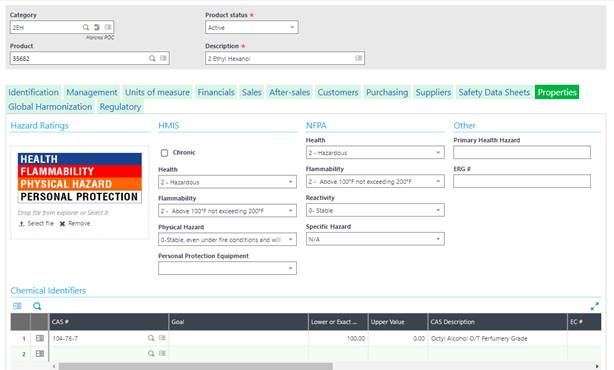
The last step in maintaining the regulations is to specify which CAS numbers associate with each product.  Here again Chem at Work provides for either manual maintenance or automated updates via 3rd party authoring tools like Hazox, ERA, Verisk 3E, or any others with APIs or ODBC connections.

The regulations will load to the product based on CAS assignment and may also be loaded individually on the product record.
Regulatory Reporting

The Chem at Work Regulation Reporting feature calculates weight totals received, present or manufactured during a definable period and for chemicals approaching or exceeding a limit imposed by a regulation. These limits may be imposed by the chemical inventory lists of the country where the company is located, or community notification rules based upon storage amounts. If a company has locations in multiple countries, each site may have different requirements.

Imposed limits are generally based on one of the following totals during the period:

  • maximum quantity on hand
  • average quantity on hand during the period
  • manufacture limits
  • import limits

Examples of regulations with a manufacture or import limit are U.S. TSCA or the Canadian Domestic or Non-Domestic Substances List. An example of a regulation with a reporting requirement based on the storage amount is the U.S. Community Right to Know Act, commonly known as SARA.

This module is not intended to replace or eliminate the need for companies to file the regulatory reports in the formats required — it is used to provide all the supporting data to streamline form completion.

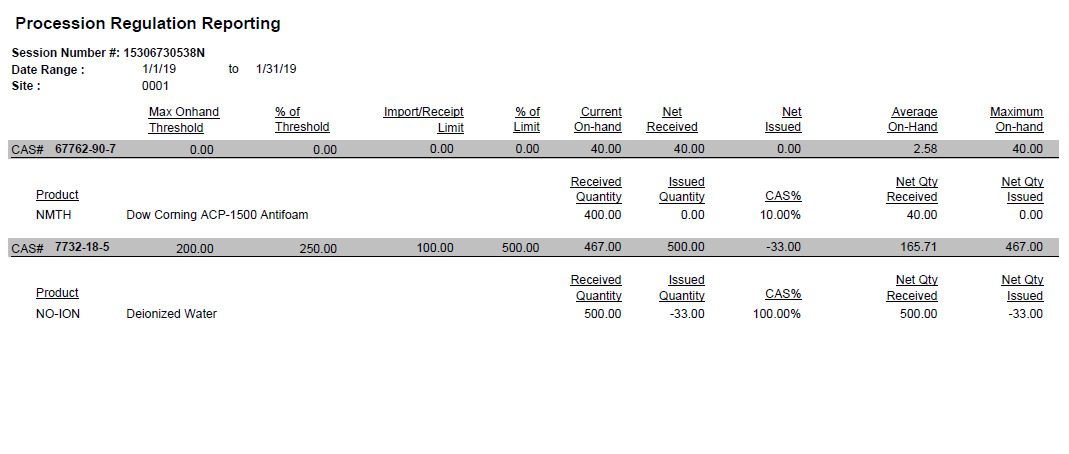
This feature uses the concept of a reporting sessions for the retrieval and capture of the regulatory data. A reporting session is a record that stores the results for each regulatory calculation. With definable filters, such as site, warehouse, CAS# or date, a reporting session calculates and saves results for future reference.  Calculations are performed and reported for both products and CAS records based on site, date range, and several other optional criteria.

System data for each CAS# is validated against the threshold and import/manufacture limits for each regulation defined on the CAS master record. If the CAS total exceeds the threshold % or the import/manufacture limit % that is defined, then the results are presented with the product that contributed the most to the violation of the limit(s) indicated as well.

The session may also be established to return values for indicated CAS#s that are approaching a regulatory threshold or limit, in this manner, business decisions may be made to slow procurement or perhaps delay production campaigns.

This information can also be reported via the reports menu:
Updating and Refreshing Regulations

When a user updates the Regulation Library with a new entry or modifies an existing regulation, they may run an update utility to push that update to CAS, SDS and/or Product records.
For more information on regulatory maintenance and reporting in Chem at Work’s Sage Enterprise Management, please contact us.

« Return to Newsletter
  • This field is for validation purposes and should be left unchanged.
In This Issue
  • From the Desk of the Sage Enterprise Management Practice Director
  • Sage Enterprise Intelligence (SEI) – Adding A New Field to A SEI Design Process & Report View
  • ERP and B2B eCommerce Integration Best Practices
  • Sage Enterprise Management v12 New Version Release!
  • Field Service Solutions
  • Restarting Web Services in Sage Enterprise Management
  • Sage Enterprise Management: The ERP for the Heavy Building Materials Industry
  • Chemical Corner: Regulation Management & Reporting with Sage Enterprise Management
  • Support for Sage X3

    Helpdesk:
    P: 888.494.9479
    E: helpdesk@netatwork.com


    Upcoming Live Webinars & Events

    Sage X3 and the Power of the Cloud
    Date: Jan 8, 2020
    Time: 2 – 3 PM ET
    Learn More

    3 CRM Themes for Manufacturers in 2020
    Date: Jan 25, 2020
    Time: 2 – 3 PM ET
    Learn More

    Better Budgeting, Forecasting & Planning in Sage X3
    Date: Feb 12, 2020
    Time: 2 – 3 PM ET
    Learn More

    Be Prepared for 2020 Sales Tax Changes
    Date: Feb 26, 2020
    Time: 2 – 3 PM ET
    Learn More

    Popular Recorded Webinars

    Sage ERP & CRM Integration: Seamless, Real Time, and Bi-Directional

    Sage X3 Document Management by Altec

    Sage X3 Integrated Credit Card & Payment Processing

    Sage X3 Webinar Archive

    View our library of on-demand recorded webinars.

    Refer a friend, get a $100 Gift Card!

    Submit a Referral / Learn More!
    Do you have a friend or colleague whose company might benefit from utilizing a Net at Work service or solution? If so, refer them to us below and receive a $100 gift card or donation to your charity of choice!

    Connect With Us

    Business Applications

    • Overview
    • Software & Vendor Selection
    • ERP Implementation Services
    • ERP Migration Services
    • Cloud ERP
    • CRM
    • Employee Experience
    • ECM
    • Nonprofit Solutions

    Learning Center

    • White Papers & Guides
    • Ebooks
    • Training Courses
    • Virtual Training Courses
    • Success Stories
    • Live Webinars
    • Recorded Webinars
    • Trials

    Infrastructure Solutions

    • Managed IT Services
    • Fractional CIO & Advisory Services
    • Cloud Services
    • Cloud at Work Sage Hosting

    Support

    • Application Remote Support
    • Infrastructure Remote Support
    • Sage HRMS Remote Support
    • General Inquiry
    • Helpdesk

    Web Development

    • Services Overview
    • Magento eCommerce
    • WordPress CMS
    • Systems Integration
    • Website Managed Services
    • ERP eCommerce Integration

    Company Information

    • Why Us
    • Alliance Partnership Program
    • Women at Work
    • Diversity and Inclusion
    • Partners
    • Careers
    • News
    • Blog
    • Privacy Policy
    • Contact Us

    Additional Solutions

    • Enterprise Business Intelligence
    • Avalara Automated Tax Solutions
    • Fortis Payments
    • LeaseQuery Lease Accounting
    • Sage Fixed Assets (Sage FAS)
    • Vertex SMB Sales and Use Tax
    • Prime Foodservice Software
    • Rental 360
    • SDMO

    Industries

    • Chemicals
    • Construction
    • Discrete Manufacturing
    • Field Service
    • Food & Beverage
    • Healthcare
    • Industrial Manufacturing & Equipment
    • Medical Devices
    • Nonprofit
    • Private Equity
    • Wholesale Distribution
    Net at Work
    Net at Work (HQ)
    575 8th Ave
    New York, NY 10018

    P: (800) 719-3307
    info@netatwork.com
    Locations Across North America »
    Visit our sister companies:
    Cloud at Work - Sage Application Hosting
    Pixafy - An eCommerce Agency
    Docutrend
    WordPress Image Lightbox Plugin


    Our website uses cookies to ensure you get the best experience. Learn more.

    I Understand


